WooCommerce 11.3 Removes Its MCP Endpoint: What Breaks and How to Reconnect Your AI Tools
WooCommerce 11.3 removes /wp-json/woocommerce/mcp and returns HTTP 410. See what breaks, how to check if you are affected, and how to reconnect through the MCP Adapter.

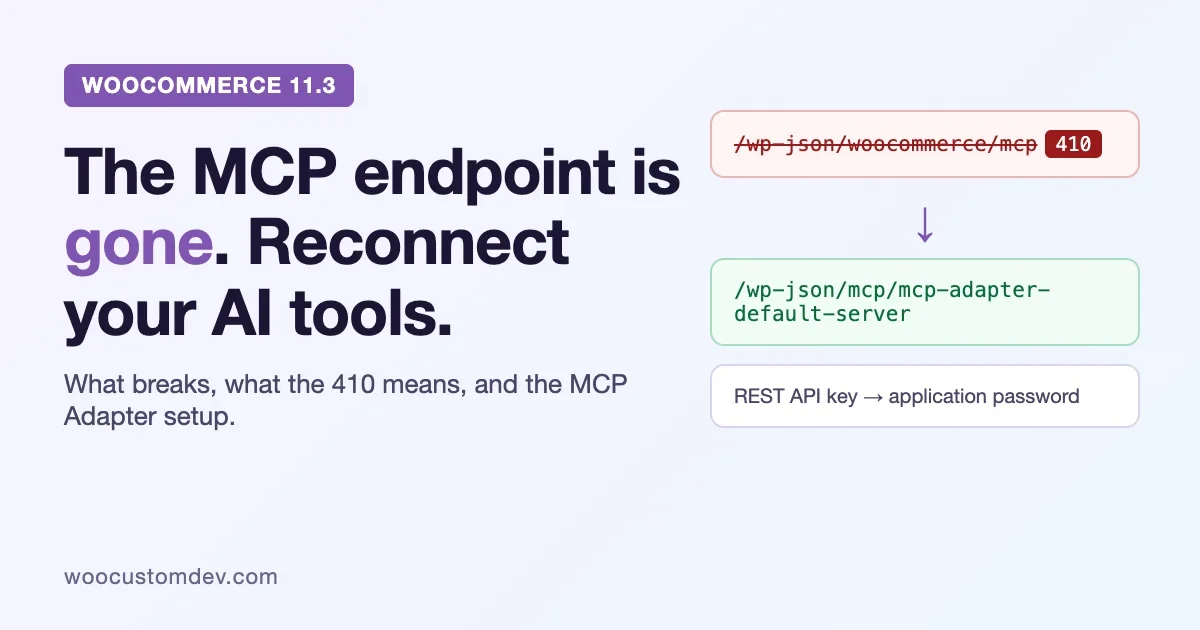
If you connected Claude, Cursor, Codex or any other AI tool to your store through the WooCommerce MCP endpoint, there is a date on your calendar you did not put there. WooCommerce 11.3 removes that endpoint. Requests to it will come back as HTTP 410, and the connection you set up with a WooCommerce REST API key will stop working.
The fix is not hard, and it takes about fifteen minutes per store. But the order matters. Do it before the update and you lose nothing. Do it after and you spend an afternoon wondering why your assistant says the server is unavailable.
This guide is for store owners, agencies and developers who already have an AI tool wired to a WooCommerce store. It covers how to tell if you are affected, what exactly is removed, the reconnection steps, what to test, and what extension authors need to change. Everything below comes from the WooCommerce developer blog, the WooCommerce MCP documentation and the MCP Adapter plugin page on WordPress.org. Where those sources say nothing, we say so.
The short version
- What changes: the
/wp-json/woocommerce/mcpendpoint and itsX-MCP-API-Keyauthentication are removed in WooCommerce 11.3. Requests return HTTP 410 with a JSON-RPC error that points to the MCP Adapter. - What replaces it: the WordPress MCP Adapter plugin, with the default server at
/wp-json/mcp/mcp-adapter-default-server, and a WordPress application password instead of a WooCommerce REST API key. - What to do first: install and activate the MCP Adapter, create an application password for a low-privilege user, repoint your client, then revoke the old REST API keys.
- When: WooCommerce 11.3 had not shipped when we wrote this. The stable release on WordPress.org was 11.2.1, updated on 9 October 2026. The developer post announcing the change is dated 21 October 2026, with an advisory URL dated 16 October. Treat the migration as something to finish before you let 11.3 reach production.
Check first: are you affected?
Most WooCommerce stores are not. The change only matters if something talks to your store over MCP. Work through these questions in order.
Symptom check
You are probably affected if any of these are true:
- Someone on your team (or your agency) enabled the MCP integration under WooCommerce > Settings > Advanced > Features.
- You have an MCP client configuration that contains a URL ending in
/wp-json/woocommerce/mcp. - A config file or environment variable holds an
X-MCP-API-Keyheader, or a WooCommerce REST API key (a consumer key and secret) created so an AI tool could read products or orders. - An extension of yours registered abilities and exposed them to the old endpoint with the
expose_in_deprecated_woocommerce_mcpmetadata or thewoocommerce_mcp_include_abilityfilter.
If none of that rings a bell, you can stop. Nothing in your store depends on the endpoint. You may still want the new setup later, and the rest of this guide will be there.
Find the old connection in three places
People forget where they put these. Look in all three.
- The store. Open WooCommerce > Settings > Advanced > REST API and read the key descriptions. Keys made for an AI tool usually carry a description that says so, and a recent “last access” date tells you which ones are live. Also check the Features tab for the MCP toggle.
- The client. In Claude Desktop, Claude Code, Cursor or VS Code, open the MCP server list and look for any server whose URL contains
woocommerce/mcp. Claude Desktop, Claude Code and Cursor keep servers under anmcpServersproperty; VS Code usesservers. - The code. Search your plugins and theme for the strings below. A hit means custom work is involved and the extension section later in this guide applies to you.
grep -rn "expose_in_deprecated_woocommerce_mcp\|woocommerce_mcp_include_ability\|woocommerce_mcp_allow_insecure_transport\|woocommerce_check_rest_ability_permissions_for_method" wp-content/plugins wp-content/themes wp-content/mu-pluginsRun that from the WordPress root on a staging copy. The four strings are the metadata key and the three filters the developer post lists as removed.
What exactly is removed
The WooCommerce developer post is specific, so we will be too. Here is the list of what 11.3 takes away.
The endpoint and its login
/wp-json/woocommerce/mcp goes away, along with X-MCP-API-Key header authentication. Any request to it now returns HTTP 410 (Gone) with a JSON-RPC error that explains how to connect through the MCP Adapter. We could not find the exact text of that error in the post, so do not write a monitoring rule that matches a specific message. Match on the status code.
The feature flag
The mcp_integration flag under WooCommerce > Settings > Advanced > Features is removed. Code that asks FeaturesUtil::feature_is_enabled( 'mcp_integration' ) will always get false. If you wrote a conditional around that check, it now takes the “off” branch on every store.
Nine abilities
The abilities that were derived from the REST API, and that only the old endpoint used, are removed:
woocommerce/products-list,woocommerce/products-get,woocommerce/products-create,woocommerce/products-update,woocommerce/products-deletewoocommerce/orders-list,woocommerce/orders-get,woocommerce/orders-create,woocommerce/orders-update
These were the legacy abilities WooCommerce deprecated in 10.9. If a prompt, an agent instruction or a saved workflow names one of them, it needs to change. The replacements are covered below.
Three filters and one piece of metadata
Callbacks hooked to these filters stop running:
woocommerce_mcp_include_abilitywoocommerce_mcp_allow_insecure_transportwoocommerce_check_rest_ability_permissions_for_method
The expose_in_deprecated_woocommerce_mcp metadata is no longer read either. A custom ability that relied on it to show up for AI tools will quietly disappear from the list. Nothing errors. It is just gone, which is the kind of failure that survives a week in production before anyone notices.
Bundled packages
WooCommerce stops bundling wordpress/mcp-adapter and wordpress/abilities-api. The second one is not a loss: the Abilities API has been part of WordPress core since 7.0, which is also WooCommerce’s minimum WordPress version. The first one is the reason for this whole guide. With the adapter no longer bundled, you have to install it as a plugin.
Four internal classes
MCPAdapterProvider, WooCommerceRestTransport, AbilitiesRestBridge and RestAbilityFactory still exist, but their methods do nothing except trigger a “called incorrectly” notice. Anything that calls them keeps loading, then silently does nothing. Also, WooCommerceRestTransport no longer extends the adapter’s HttpTransport, so passing it to create_server() fails outright.
What 11.3 adds on the other side
The removal comes with a change of default. Starting with 11.3, core product and order abilities are enabled by default, and you need the MCP Adapter plugin active for an MCP connection. The WooCommerce docs say there is no setting to switch the abilities on: WooCommerce registers them through the WordPress Abilities API, and the adapter is what makes them reachable over MCP.
Which abilities? The 11.3 post does not list the new names, so here is what the sources we could read actually say, and where each comes from.
- The WooCommerce 10.9 post introducing canonical abilities lists seven:
woocommerce/products-query,woocommerce/product-create,woocommerce/product-update,woocommerce/product-delete,woocommerce/orders-query,woocommerce/order-update-statusandwoocommerce/order-add-note. - The current MCP documentation describes products as query, create, update and delete, and orders as query, query notes, update status and add notes, and names
woocommerce/order-notes-queryas an example. So the order list has grown since 10.9.
We would not hard-code any of these names from a blog post, ours included. Ask your own store what it has. The next sections show how.
Notes on how the canonical abilities behave
From the 10.9 post, which is the most detailed source for behaviour:
- Each ability has strict input and output schemas. Unknown fields and unsupported values are rejected before anything runs.
orders-queryleaves line items out unless the request setsinclude_line_items: true. That keeps responses small and keeps product detail away from tools that do not need it.product-deletesends a product to the trash by default. Permanent deletion needsforce: true. If the trash is disabled andforceis not set, the ability returns an error instead of hard-deleting.order-update-statusrejects status changes that would change nothing.- Each ability has its own permission callback and uses WooCommerce’s existing permission model.
That last point is the real safety net. The AI tool acts as a WordPress user, so what it can do is bounded by what that user can do. This is why the user you create in step two matters more than any prompt you write.
The reconnection steps, in order
Do these on staging first, then on production before you update to 11.3. The sequence comes from the WooCommerce developer post, with the client configuration taken from the WooCommerce MCP documentation.
Step 1: Install and activate the MCP Adapter
MCP Adapter is on WordPress.org. When we checked, the latest release was 0.7.1, published 15 October 2026, and 0.7.0 (2 October 2026) was the first release on WordPress.org. It needs WordPress 6.9 or higher and PHP 7.4 or higher, and it was tested up to WordPress 7.1.3. From the admin, go to Plugins > Add New, search for “MCP Adapter” and activate it. From the command line:
wp plugin install mcp-adapter --activateIf your store had the old MCP feature enabled, WooCommerce 11.3 shows an admin notice after the update with an Install MCP Adapter or Activate MCP Adapter button, depending on the plugin’s state. Dismissing the notice, or activating the plugin from it, clears it for all admins. Do not rely on that notice. By the time anyone clicks it, your AI tools have already been failing.
Step 2: Make a user for the AI tool
Do not reuse your admin account. Create a dedicated WordPress user and give it only the capabilities the client needs. A tool that reads orders for reporting needs far less than one that edits products. The abilities check permissions on every call, so a narrow role is real protection and not just tidiness.
Then, on that user’s profile screen, create an Application Password. WordPress shows it once. Copy it somewhere safe immediately. Application passwords are revoked one at a time, which is useful when one laptop goes missing and the rest of your setup should not.
Two details from the docs worth repeating. Remote connections need HTTPS, and they need permalinks set to something other than Plain. The WooCommerce docs also warn against using the account’s real password or a WooCommerce REST API key here. Neither will work as an application password.
Step 3: Repoint the client
The new endpoint for the default server is:
https://yourstore.com/wp-json/mcp/mcp-adapter-default-serverThe docs give two ways to connect. Pick by where the site runs.
Remote store, over HTTP
Use the @automattic/mcp-wordpress-remote proxy. It turns your client’s local STDIO messages into HTTP requests to the adapter. This is the config block from the WooCommerce docs, with the placeholders you replace:
{
  "mcpServers": {
    "woocommerce_store": {
      "command": "npx",
      "args": [
        "-y",
        "@automattic/mcp-wordpress-remote@latest"
      ],
      "env": {
        "WP_API_URL": "https://yourstore.com/wp-json/mcp/mcp-adapter-default-server",
        "WP_API_USERNAME": "your-username",
        "WP_API_PASSWORD": "your-application-password"
      }
    }
  }
}
For VS Code, the top-level property is servers instead of mcpServers. Do not commit this file with a real application password in it. If it lives in a repository, move the password into the environment instead.
Claude Code users can add the same server in one command:
claude mcp add \
  --env WP_API_URL=https://yourstore.com/wp-json/mcp/mcp-adapter-default-server \
  --env WP_API_USERNAME=your-username \
  --env WP_API_PASSWORD='your-application-password' \
  woocommerce_store \
  -- npx -y @automattic/mcp-wordpress-remote@latest
Local site, over STDIO
On a local development copy, the client can call WP-CLI directly. No application password is needed, because the command names the user:
{
  "mcpServers": {
    "woocommerce_store": {
      "command": "wp",
      "args": [
        "--path=/path/to/your/wordpress/site",
        "mcp-adapter",
        "serve",
        "--server=mcp-adapter-default-server",
        "--user=admin"
      ]
    }
  }
}
This one needs the client to have access to the WordPress files and a working WP-CLI installation, so it suits a laptop and not a hosted store.
Step 4: Prove the new connection works
On a local site you can test the server without any AI client at all. The docs show how to ask it for its tool list:
echo '{"jsonrpc":"2.0","id":1,"method":"tools/list","params":{}}' | \
  wp --path=/path/to/your/wordpress/site \
  mcp-adapter serve \
  --server=mcp-adapter-default-server \
  --user=admin
Do not expect one tool per WooCommerce ability. The default server exposes three adapter tools: mcp-adapter-discover-abilities, mcp-adapter-get-ability-info and mcp-adapter-execute-ability. The client discovers the abilities, reads the schema of the one it wants, then executes it. To list what your store registers, call the discovery tool:
echo '{"jsonrpc":"2.0","id":1,"method":"tools/call","params":{"name":"mcp-adapter-discover-abilities","arguments":{}}}' | \
  wp --path=/path/to/your/wordpress/site \
  mcp-adapter serve \
  --server=mcp-adapter-default-server \
  --user=admin
On a WooCommerce 11.3 site the docs say the response should include abilities such as woocommerce/products-query and woocommerce/order-notes-query. That response is your ground truth for the ability list on your store. Save it. It is the checklist you will test against in a moment.
There is also a second way to see abilities that does not involve MCP. The canonical abilities declare that they are visible in REST, so the WordPress Abilities REST routes at /wp-json/wp-abilities/v1/abilities list them for an authenticated user. The 10.9 post describes those routes, and they are handy when you want to check what exists without touching a client.
Step 5: Revoke the old keys
Once the new connection works, delete the WooCommerce REST API keys that were created for the old endpoint. Go to WooCommerce > Settings > Advanced > REST API and remove them. This is the step people skip. A dead endpoint does not make a leftover key harmless. The same key may still work against the regular WooCommerce REST API, with whatever read or write permission you gave it, and it may be sitting in a config file on someone’s laptop. If an AI tool is the only thing that used it, remove it.
What to test before you update
Treat this like any change to a live store. We keep a short routine for it in the 10-minute checkout test after a WooCommerce update, and it applies here too: the update itself is not the risk, the things that quietly depend on the old behaviour are.
A before-and-after checklist
- Record what works today. On the old setup, write down the three or four requests your team really makes (“list orders from yesterday”, “find the product with this SKU”, “set this order to completed”) and the answer each one gives.
- Put the adapter on staging, repoint one client, and repeat those requests. Note any prompt that names a removed ability. Rewrite it to ask for the task in plain words, or to use the discovery tool, instead of naming an ability ID.
- Test a write on a throwaway product or order. Create, update and move to trash. Confirm that the narrow user can do exactly what you intend and not more.
- Test a denial. Ask the tool to do something the user should not be allowed to do, such as deleting a product when the role has no delete capability. You want to see a permission error. If it succeeds, your role is too wide.
- Check the logs. The docs point to WooCommerce > Status > Logs with the source
woocommerce-abilities. Open it after your tests. Registration problems and warnings land there. - Update WooCommerce on staging to 11.3 when it is available, repeat the same requests, and check that the old endpoint answers with 410 and the new one answers normally.
Check that the 410 does not break anything else
A 410 is a deliberate answer, but not every client treats it politely. A script that polls the old endpoint in a loop may log errors every few seconds, or retry in a way that fills a disk. After you update, look at your web server and application logs for requests to /wp-json/woocommerce/mcp. Anything still arriving there is a connection you did not know about. That is useful information, and it is the reason to read the logs for a few days.
Common failures after reconnecting
The WooCommerce docs have a short troubleshooting list. Here it is in the order we would check, with the cause behind each symptom.
“Server not available” or the client cannot connect
First, confirm the MCP Adapter plugin is active. Second, confirm the client uses the new endpoint and not the old one. A saved config from last month is the usual culprit. If the store is reachable but the endpoint returns an HTML page, check the permalink setting. The docs call for non-Plain permalinks on remote connections.
Authentication failures
The docs list four checks. WP_API_USERNAME must match the user who created the application password. The value in WP_API_PASSWORD must be an application password, not the account password and not a WooCommerce REST API key. The user needs the capabilities the task requires. And the connection must use HTTPS. If you paste the application password with its spaces, check that your client or shell did not split it; quoting the value, as the Claude Code command does, avoids that.
“Ability not found”
Run the discovery call again and compare the list with what the prompt asks for. If the missing ability is one of your own, check that your registration hooks run in the right order and that callbacks are accessible. If the missing ability is one of the nine removed ones, that is the expected result. Ask for the replacement.
A custom ability vanished
This is the one that catches agencies. Custom abilities no longer carry over automatically. The adapter exposes an ability only when meta.mcp.public is true, and falls back to the top-level meta.public if the first is not set. The fix is in the extension section below.
npx or SSL errors on a local site
Local environments with self-signed certificates and older Node versions cause most of these. The WooCommerce docs link to the troubleshooting guide in the mcp-wordpress-remote repository for exactly this case. For a local site, the STDIO option avoids both problems because it never touches HTTP.
If you build extensions or custom code
This section is for developers. If your work stops at configuring clients, you can skip to the privacy section.
Are you affected?
The developer post says you are if any of these apply: your extension relies on abilities appearing in the old endpoint through the woocommerce/ namespace, the expose_in_deprecated_woocommerce_mcp metadata or the woocommerce_mcp_include_ability filter; your code hooks any of the three removed filters; your code uses WP\MCP\* classes without checking they exist; or your code calls MCPAdapterProvider, WooCommerceRestTransport, AbilitiesRestBridge, RestAbilityFactory or any removed ability ID.
Register abilities the supported way
Register through the WordPress Abilities API and add mcp metadata with public set to true and type set to tool. This is the shape from the WooCommerce 10.9 post:
'meta' => array(
    'show_in_rest' => true,
    'mcp'          => array(
        'public' => true,
        'type'   => 'tool',
    ),
)
The docs also say to register a category on wp_abilities_api_categories_init and the ability itself on wp_abilities_api_init. Use your own prefix for the ability name, such as my-extension/sync-products. The woocommerce/ prefix is reserved for core. If a third-party callback registers a canonical core name first, the 10.9 post says WooCommerce removes that registration, logs a warning under woocommerce-abilities and registers its own definition.
Extensions can add their own definition classes through the woocommerce_ability_definition_classes filter, which takes a list of classes that extend Automattic\WooCommerce\Abilities\AbilityDefinition. That filter is not in the removed list.
Do not assume the adapter exists
Check at runtime before touching any WP\MCP\* class. The post’s own example tests for WP\MCP\Core\McpAdapter with class_exists:
if ( class_exists( 'WP\\MCP\\Core\\McpAdapter' ) ) {
    // Safe to use adapter classes here.
}
If your extension cannot work without MCP at all, declare the dependency in the plugin header instead, so WordPress refuses to activate it without the adapter:
Requires Plugins: mcp-adapterIf you bundled the adapter yourself
The 0.7.0 migration guide says bundling the adapter as a library is now deprecated. Plugins that still carry their own copy will run, but they log a deprecation notice, and if the standalone plugin is also active the standalone copy wins and an admin notice appears. The recommended path: remove the bundled dependency (composer remove wordpress/mcp-adapter if you use Composer), add Requires Plugins: mcp-adapter to the header, or check for WP\MCP\Core\McpAdapter if the adapter is optional.
Custom transports
Because WooCommerceRestTransport no longer extends HttpTransport, code that passes it to create_server() breaks. Use the adapter’s own HttpTransport with application passwords, or write your own transport. Note that the adapter’s 0.7.0 release notes also say custom transports must delegate to HttpRequestHandler or McpWireOrchestrator, and that JSON-RPC batch requests are rejected. If you wrote a transport, read that release note before you ship.
Adapter version changes that could affect you
MCP Adapter 0.7.0 is more than a repackaging. Its notes list breaking changes: it serves only the MCP revisions 2025-11-25 and 2026-07-28 (clients proposing older ones are served through 2025-11-25), the generated DTO classes and the validator classes were removed, and the mcp_adapter_validation_enabled filter is gone. For most store owners none of this matters. For anyone who built tooling on the adapter’s internals, it does. Pin the adapter version on staging and read the migration guide before moving it to production.
Privacy and permissions: the part people skip
The WooCommerce docs carry a plain warning. Order and customer abilities can expose personal data, including names, emails, addresses and payment details. Using least-privilege users and revoking unused application passwords is the documented mitigation, and we agree with it.
Think about where that data goes. When an AI tool reads orders, the order content lands in whatever service runs the model. Before you give a tool order access, check what that provider keeps and whether your privacy policy covers it. For many stores the better setup is a read-only reporting user that can see products and aggregate numbers, and a separate, rarely used user for changes.
If you are weighing how much AI access your store should have at all, our 30-minute check for AI shopping agents and store-side assistants covers what these tools can do on WooCommerce today and how to limit the risks. Nothing in this migration changes the advice there. It just moves the doorway.
A simple permission pattern that works
- Reader. A user whose role can view products and orders but change nothing. Give this to reporting and search assistants. Rotate its application password every quarter.
- Editor. A user that can edit products but cannot see customer data. Give this to tools that write descriptions or fix attributes.
- Operator. A user that can change order status. Keep it for a person-supervised workflow, never for an unattended agent.
Each gets its own application password, one per tool and one per machine. When a laptop is replaced or a contractor leaves, you revoke one password and nothing else breaks. That is the practical advantage of the application password model over a shared REST API key.
A rollout plan for agencies and multi-store owners
If you maintain more than a couple of stores, the work is mostly bookkeeping. This is the order we would use.
- Inventory. For every store, record whether the MCP feature flag is on, which REST keys exist for AI tools, and which clients use them. A spreadsheet is enough. Stores with the flag off and no AI keys are done.
- Hold the update on affected stores. Do not let auto-updates move an affected store to 11.3 until its connection is migrated. If you rely on auto-updates for WooCommerce, turn them off for these stores for now and say so in your maintenance notes.
- Migrate one store as the template. Create the adapter plugin, the three users and the client configs. Write down the exact steps in your own runbook.
- Repeat per store, then update. Migrate, test with the checklist above, and only then update WooCommerce.
- Watch the logs for a week. Look for requests to the old path and for entries from
woocommerce-abilities. - Tell the client. If an agency set up an AI integration for a customer, send a short note: what changed, what you did, what they need to do if they have their own tool connected.
It also helps to know the wider context. WooCommerce has said it will raise its PHP floor, and the update path for old servers is a separate decision; we wrote about it in WooCommerce is raising its PHP floor. If a store is already behind on PHP, fix that first. Stacking two changes on one release day makes it hard to know which one broke something.
If you would rather have it done for you: the complete path
You can do this migration yourself with the steps above. If you run several stores, have custom abilities to port, or would rather not touch a live checkout, here is what our own WooCommerce service pages say we do, read on 23 October 2026. We list only what those pages state, and they do not mention MCP by name, so treat the mapping below as our suggested use of the process and not as a listed package.
The process, applied to this change
Our WooCommerce development service starts with a brief and an estimate reviewed within a day, at no charge, giving scope, cost and date. The build happens on a staging clone of your store, review and revisions are part of the quote and not a variation, and shipping comes with a rollback path and monitoring through early traffic. The code is handed over in your repository, documented for another developer. The page says we build against documented hooks and APIs and flag template overrides for review at upgrade time, which is the right habit for a change that removes filters and a feature flag.
- Inventory. We list every MCP connection, REST key and custom ability across your stores, using the checks in this guide.
- Staging. We install the MCP Adapter, create least-privilege users and application passwords, repoint each client and run the read, write and denial tests.
- Port. Custom abilities are re-registered with
meta.mcp.publicset, and any code that used the removed filters is rewritten. - Ship and watch. We update each store with a rollback path, then watch the logs for requests to the old endpoint.
- Hand over. You receive the changes in your repository and a short runbook for the next store.
Pricing on that page is fixed after scoping, or hourly with a cap for open-ended work, and you approve the figure before work starts.
Keeping it stable afterwards
Our care plans run from $99 to $499 a month per site, with no annual lock-in. Every plan includes round-the-clock uptime monitoring, malware scanning, updates that reach production only after passing on staging, with regressions held for developer review, a written Friday status email and encrypted off-site backups every six hours kept for thirty days. The Professional plan at $179 a month adds a priority queue, an emergency support response time and a 30-day money-back guarantee, and the page is not consistent about which of those extras apply to Essentials, so ask. That staging-first update routine is what keeps a change like WooCommerce 11.3 from reaching a live store untested. Start from the contact page.
Frequently asked questions
Will my store break when I update to 11.3?
The store itself will not. Checkout, products and orders are unaffected. What breaks is any AI tool or script that was talking to /wp-json/woocommerce/mcp. Those requests get a 410.
Do I need the MCP Adapter if I never used MCP?
No. It is only needed for an MCP connection. If you do not connect an AI client over MCP, you can leave it off.
Can I keep using my WooCommerce REST API key?
Not for MCP. The new route authenticates as a WordPress user with an application password. REST API keys still work for the regular WooCommerce REST API, which is a separate thing and is not part of this removal. Delete the ones you created only for the old MCP endpoint.
Is there a way to stay on the old endpoint?
Not on 11.3. The endpoint, the feature flag and the filters are removed, so there is nothing to toggle back. If you must keep a client working while you migrate, stay on the current WooCommerce version until the new setup is tested. Do not treat that as a long-term plan.
When will 11.3 actually release?
The developer post does not give a release date, and WordPress.org still listed 11.2.1 as the stable version when we checked. Follow the WooCommerce release notes and plan to finish the migration before the update lands on your server.
Which abilities should my prompts use?
Whichever ones your store reports when you run the discovery call. Prompts that ask for a task and let the client find the right ability will survive the next rename better than prompts that quote an ID.
Is the developer documentation final?
It says it is a developer preview, so APIs and integration patterns may change. We checked it on 23 October 2026. If something here no longer matches the page, trust the page and tell us.
What we did not verify
We want to be plain about the limits of this guide. We read the sources; we did not run WooCommerce 11.3, because it had not been released. So we did not capture the exact text of the 410 response, the exact wording of the admin notice, or the final list of default abilities on a live 11.3 store. The 11.3 post itself notes the same gaps: it lists no new ability names, no 410 message text and no release date. When 11.3 is out and we have tested it on a staging store, we will update this page with what the real responses look like.
The takeaway
The change is small and the failure mode is quiet, which is a bad combination. Find out whether anything talks to your store over MCP. If it does, install the adapter, make a narrow user, move the client to the new endpoint, test a read, a write and a denial, then revoke the old key. Do it before the update, not after.
If you would rather have someone else do that across several stores, or you have custom abilities that need porting, our developer guide to WooCommerce hooks, architecture and REST API endpoints is a good place to see how we approach extension code, and you can contact us about a migration.
Sources
- WooCommerce 11.3 MCP Adapter updates, WooCommerce developer blog, 21 October 2026
- WooCommerce MCP integration documentation
- MCP Adapter on WordPress.org, versions 0.7.0 and 0.7.1
- MCP Adapter 0.7.0 migration guide
- WooCommerce 10.9 MCP and Abilities API post
- WooCommerce on WordPress.org, stable 11.2.1 when checked
Plugins we build and run
We maintain these ourselves, which is why we can support them on your site.
- BuddyNextThe self-hosted community engine for WordPress
- BuddyXFree community theme, Pro when you outgrow it
- ReignPremium community theme. Add pieces, build anything
- JetonomyCommunity forum and Q&A for WordPress
- EventonomyEvents and RSVPs for WordPress communities
- LearnomyCourses and learning communities on WordPress
- ListoraDirectories and listings your members can browse
- SnipShareCode sharing built for developer communities
- WB Ad ManagerAd placements that turn traffic into revenue
- WP Career BoardA job board your community actually uses
- WP Sell ServicesSell services with offers, orders, and payouts
- MediaVersePhotos, video, and media albums for members
- WB GamificationPoints, badges, and rewards that keep members active
- Product RoadmapPublic roadmaps with voting your users trust