WooCommerce 11.3 for Developers: Parent-Child Cart Items and What Changes for Bundle and Add-On Code
WooCommerce 11.3 lets an extension declare a cart item as the child of another. What the new filter does, who should adopt it, and which other 11.3 changes can touch bundle and add-on code.

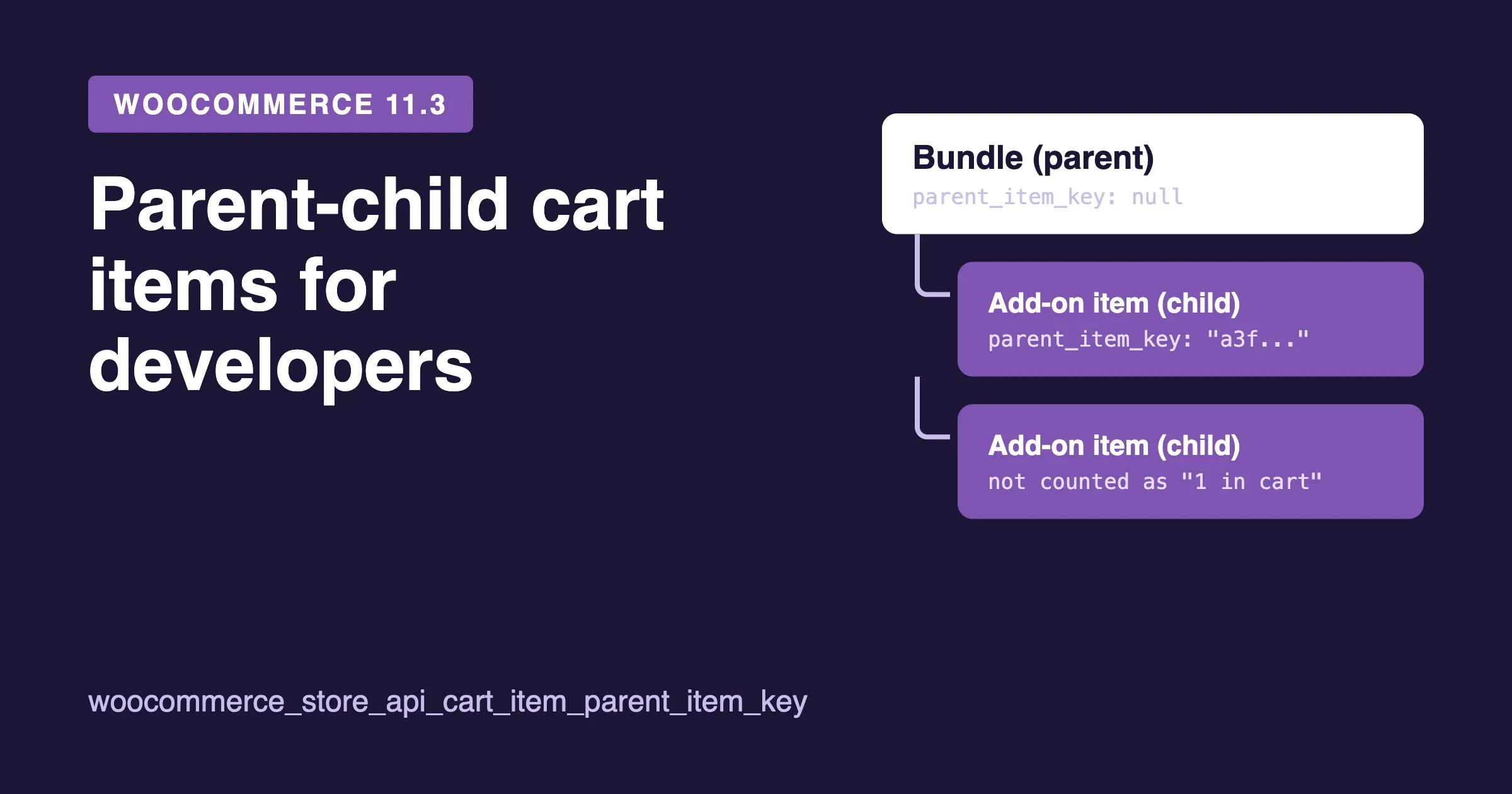
WooCommerce 11.3 adds one small API that matters a lot if your store runs bundles, composite products or any add-on that puts extra items in the cart. An extension can now declare that one cart item is the child of another. WooCommerce uses that to fix a wrong “N in cart” count on the Product Button block, and it may use it for more later. Nothing breaks if you ignore it, but you should decide on purpose.
This post is for developers and store owners who rely on bundle or add-on code. It explains the new filter, who should adopt it, and what else in 11.3 can touch custom code. Every fact here comes from two posts on the official WooCommerce developer blog, linked in the sources section. We did not install 11.3 or test any of this, and we say so where it matters.
What is the short answer?
WooCommerce 11.3 adds a filter named woocommerce_store_api_cart_item_parent_item_key and a read-only Store API field named parent_item_key. If your extension adds cart items on behalf of another item, you hook the filter and return the parent’s cart item key for those child items. WooCommerce then leaves those children out of the “N in cart” count on the Product Button block.
WooCommerce never marks an item as a child by itself. Only the extension that knows the relationship can say so. If you do nothing, your items keep counting the way they count today.
When does WooCommerce 11.3 ship?
The developer post from 26 October 2026 announced 11.3.0-beta.1 and said the final release is scheduled for the week of 9 November 2026. That is what the source says, and we have not confirmed the final release date or version status beyond it. Check the release channel of your own store before you plan an update, and test on a staging copy first.
If you want to try the beta, the post says to install the WooCommerce Beta Tester plugin, switch to the Beta channel and update to 11.3.0-beta.1. Do that on staging, never on a live store.
What problem does the parent-child filter solve?
The Product Button block shows an “N in cart” label after a shopper adds a product. Before 11.3, that count included a product that was in the cart only because it came along with a bundle. The post gives the plain example: a product that is present only as part of a bundle showed “1 in cart”, even though the shopper never added it on its own.
That looks like a small thing, but it confuses shoppers. Picture a bundle of three items. The shopper adds the bundle once. They then visit the page for one of the three items and see “1 in cart” on its button. They think they already own it separately, or they wonder why the cart shows a bundle and a single item when they only chose one thing.
From 11.3, the count leaves out cart items that an extension declares as children of another cart item. The post also notes a second change: when a product appears on several cart lines, the count now adds them up. Before, the button showed only the quantity of the first line.
Which extensions are affected?
The post says the change matters for extensions that add cart items on behalf of another item. It lists these kinds of products:
- Bundles
- Composite products
- Mix and match products
- Force sells
- Chained products
- “Frequently bought together” add-ons
It also says free gift and upsell plugins may reasonably go either way. A free gift that the shopper did not choose could be treated as a child of the product that triggered it. An upsell the shopper picked on purpose could be treated as a normal item. That is a product decision, not a technical one, and the post leaves it to the extension author.
If you are a store owner and not the author of the extension, the question to ask your developer or plugin vendor is simple: does any plugin on our store add a second cart item when a shopper adds the first one? If yes, that plugin is the one that can adopt this filter.
How do you test whether your store is affected?
The post gives a simple test. Add the parent product to the cart, then look at a product that the parent adds on its own. If that product’s button shows “1 in cart”, you have the issue. On 11.3 you can then fix it by declaring the parent-child link, if your extension author supports it.
Run the test for each kind of parent you sell. A bundle plugin and a “frequently bought together” plugin may behave differently, because each one stores its data its own way.
How do you declare a parent-child relationship?
The post describes three steps. We describe them in our own words here.
Step 1: Store the parent’s cart item key in the child’s cart item data
When you add the parent to the cart, WC()->cart->add_to_cart() returns a cart item key. Keep that value. The post is clear that this is the cart item key, not a product ID. When you add the child item, put that key into the child’s cart item data so you can read it again later.
Step 2: Hook the filter with two arguments
The filter woocommerce_store_api_cart_item_parent_item_key receives two arguments: the parent item key that is currently set, and the cart item. For your own child items, return the parent key you stored. For every other item, return the incoming value unchanged.
That last point protects other plugins. If another extension already declared a parent for an item, your filter must not wipe it out. Passing the value through is the safe default.
Here is a shape for the callback. It is an illustration of the steps above, not code from the post, and we have not run it. The cart item data key name my_parent_key is made up for this example.
add_filter(
	'woocommerce_store_api_cart_item_parent_item_key',
	function ( $parent_item_key, $cart_item ) {
		if ( ! empty( $cart_item['my_parent_key'] ) ) {
			return $cart_item['my_parent_key'];
		}
		return $parent_item_key;
	},
	10,
	2
);
Step 3: Leave cleanup to WooCommerce
You do not need to clear the stored key when the parent leaves the cart. WooCommerce returns a parent key only while that parent is in the cart. If the parent is removed, the child’s parent_item_key becomes null, and the child counts as a standalone item again.
The post adds two edge cases. If your filter returns a key that matches no cart item, WooCommerce returns null. It also returns null if the key is the item’s own key. So a wrong key fails quietly instead of breaking the cart.
What does the new Store API field look like?
Cart items in the Store API get a new read-only field called parent_item_key. It is a string or null. The default is null. Because it is read-only, clients such as a headless storefront or a mobile app can read it but cannot set it.
If you build a custom front end on the Store API, this field gives you the relationship without extra work. You can group child items under their parent in your own cart view. The post says the core Cart and Mini-Cart blocks could do the same in the future, showing children indented under the parent. It does not say they do this in 11.3. Today only the Product Button count uses the field.
Why declare it if the count does not bother you?
The post gives a reason to act early. Today only the Product Button count uses parent_item_key. Later, other blocks may use it to show structure in the cart. If your extension declares its children now, it is ready when that happens.
The post also says that not adopting the filter breaks nothing. Your items keep counting as they do now. So this is not an emergency. It is a small piece of work that makes your product behave better in block themes and headless setups.
What other 11.3 changes can touch bundle and add-on code?
The “what’s coming for developers” post lists eleven developer advisories. Not all of them touch bundles, but several touch custom code that many stores carry. We go through them in plain words. Each one comes from the same post, and each links to a pull request there.
Products API: on_sale with include and exclude
The post says the on_sale, include and exclude parameters now work together in a more correct way. This affects the v2 and v3 products endpoints, the product variation endpoints, and the Store API products endpoint at /wc/store/v1/products.
- With
on_sale=trueandinclude, you now get only products that are both included and on sale. - With
on_sale=trueandexclude, the exclusion now applies. Before, it was ignored. - With
on_sale=falseandexclude, you get non-sale products minus the excluded ones. - Using each parameter alone is unchanged.
If a bundle builder or a sale widget on your store calls these endpoints with more than one of these parameters, retest it. The result set can shrink compared to what you got before.
REST refund validation
Calls to POST /wp-json/wc/v3/orders/{order_id}/refunds now check any line item amounts you send. Each line must belong to the same order. A line’s refund total plus refund tax cannot go above what is left to refund on that line. Line amounts cannot exceed the top-level amount. Signs must match the type of line, though negative refunds are allowed for negative lines such as discount fees.
Invalid requests now return HTTP 400 or 422 with an error code that starts with woocommerce_rest_. The post names woocommerce_rest_invalid_refund_amount, which returns 400, as one example.
This matters for bundles in one way. If your integration refunds the parent and child lines of a bundle by sending line items, your amounts must add up per line. An accounting or ERP sync that used to send loose numbers may now get an error back. The post says integrations should treat these errors as failures and should not assume a refund was created. That is worth checking in any sync that writes refunds.
Product Collection and Product Filters
When filtering is on and the collection does not inherit the template query, Product Collection now uses the Product Filters engine for URL filters. If your extension changed the generated meta_query or tax_query through query_loop_block_query_vars, the post says to change arguments such as max_price instead. Custom conditions and rating filters are unchanged.
There is also a new hook, woocommerce_product_filter_params. It lets you rename URL filter parameters, for example to localize them. In 11.3 only taxonomy changes are supported. The post’s example uses Spanish names, and it says you must register the hook before the parameter map is first read.
Single Product block context
The Single Product block now uses WordPress block context. The post says this fixes two open issues, numbered 45374 and 45342. It also removes a protected method named extract_single_product_inner_block_names() and two properties, $product_id and $single_product_inner_blocks_names. If you have a custom PHP class that extends this block and uses any of them, you must update it.
Shop page template
With a block theme active, reading _wp_page_template for the Shop page through get_post_meta() now returns archive-product, even if a different template is saved. The database value does not change. The override applies on the front end, in the admin and on REST requests. If you need another value, the post points to the get_post_metadata filter.
VAT exemption and calculated shipping
The values is_vat_exempt and calculated_shipping now persist when a logged-in customer saves their account. The post says code that sets the exemption must set it both ways based on current details. It gives examples on two hooks: woocommerce_store_api_cart_update_customer_from_request for the Checkout block, and woocommerce_checkout_update_order_review for classic checkout. B2B stores with tax-exempt customers should read that section in full.
Payment method in Analytics Orders
11.3 adds a payment_method column to the wc_order_stats table and an index named idx_payment_method_date_paid_status. Refunds take the gateway of the order they refund. A backfill runs through Action Scheduler using the wc_update_1130_backfill_order_stats_payment_method() update, in batches of 500 orders.
The reports/orders items gain a payment_method field. Both reports/orders and reports/orders/stats accept payment_method_is and payment_method_is_not.
The warning for developers: custom SQL that joins wc_orders through the woocommerce_analytics_clauses_* filters can fail with an “ambiguous column” error. Qualify the column with the table name or alias. The post also says the index needs about 47 MB per one million orders, and that on MySQL 5.7 adding the column rebuilds the table. A store with a large order table should plan the update for a quiet hour.
Legacy Reports menu
Stores first installed on 11.3.0 or later no longer show WooCommerce > Reports in the menu. The page still works at admin.php?page=wc-reports. Existing stores are not affected. WooCommerce decides this from the woocommerce_initial_installed_version option.
The menu item is hidden with the hide-if-js class and stays in the global menu arrays. A new filter, woocommerce_show_legacy_reports_menu, takes a boolean to force the item on or off. If your extension adds legacy reports, register your callbacks (woocommerce_admin_reports, wc_reports_tabs, wc_admin_reports_path) on plugins_loaded or init, before admin_menu. Otherwise the menu stays hidden on new stores. To test on an existing store, set the option to an older version.
Customer search on order edit screens
The woocommerce_json_search_found_customers filter now keys the selected registered customer by user ID instead of 0. Guest orders still pass an array keyed by an empty string. Callbacks that read $found_customers[0] are affected. The post says to use current(), reset() or a loop instead.
Variation price hashing
The faster hashing method from WooCommerce 10.5 is now on by default for new stores. Existing stores are not described as changed in the post.
What else is new for store owners in 11.3?
The post lists several changes that are not code advisories. They are useful to know because they change what you see in the editor and the admin.
- More styling controls. The Product, Featured Product, Featured Category and Product Categories List blocks gain color, spacing and border options.
- Featured Category in Terms Query. You can use the Featured Category block inside a Terms Query block.
- Result count and sorting. The Product Result Count and Catalog Sorting blocks are easier to customize.
- Gallery swipe. The Product Gallery uses native scrolling and scroll snap on mobile, so images follow the finger.
- On-Sale Badge. It can show text, an amount or a percentage. Amount and percentage accept a prefix and a suffix. Variable products show “Up to” the maximum discount. On a single product with Add to Cart and Options, the badge follows the chosen variation and hides if that variation is not on sale.
- Refund and returns policy page. You can pick a policy page under Settings, Advanced, Page setup. The page is labeled in the Pages list and exposed through structured data.
- Purple theme. The post says Purple is available in the WordPress.org, WooCommerce Marketplace and WordPress.com theme directories, and its development moved into the WooCommerce monorepo.
Our own take on the Purple theme and when to pick a block theme or a custom build is in Purple, a Block Theme or a Custom WooCommerce Build?.
What happens to the MCP endpoint?
The same post says 11.3 removes the deprecated /wp-json/woocommerce/mcp endpoint and the REST API key connection path. It no longer bundles the MCP Adapter or the Abilities API packages. Core product and order abilities are on by default, and clients connect through the WordPress MCP Adapter plugin using an application password. An experimental extensible abilities API exists but is off by default and still changing.
We wrote a full walk-through of that change earlier: WooCommerce 11.3 Removes Its MCP Endpoint: What Breaks and How to Reconnect Your AI Tools. If any tool on your store talks to WooCommerce through MCP, read it before you update.
A safe way to test 11.3 on a store with bundles
You do not need a long plan. Use staging and a short list. This is our checklist, not one from the source posts.
- Copy the live store to staging, with the same plugins and the same theme.
- Update WooCommerce on staging only. Use the beta only if you have a reason to test early.
- Add each kind of bundle or add-on parent to the cart. Check the button label on the products it adds.
- Check the cart and the mini-cart. Remove the parent and confirm the children go away or behave as your product expects.
- Run a full checkout with each payment method you offer. Our 10-minute checkout test after a WooCommerce update covers that.
- If you refund by API, send one test refund with line items and read the error messages.
- If you use custom reports or analytics SQL, open the reports and watch the debug log for database errors.
Also check your PHP version before any update. We covered what the coming PHP requirement means for your hosting plan in WooCommerce Is Raising Its PHP Floor. The two developer posts used for this article do not cover PHP versions, so we make no claim about them here.
What we could not confirm
We want to be plain about the limits of this post.
- We did not install WooCommerce 11.3, beta or final, and we did not run the filter code. The snippet above is an illustration of the steps in the developer post.
- We did not read the full Store API documentation example that the post links to. Use it for the complete parent and child example.
- We did not check the final 11.3 release notes. The sources are pre-release posts, and details can change before the final release.
- We did not test any third-party bundle or add-on plugin. We cannot tell you which of them will adopt the filter or when.
Where this leaves a store with custom bundle code
The parent-child filter is a quiet change with a clear rule: the extension that creates the relationship declares it. For a plugin author the work is small. Store the key, add one filter, return the stored key for your own children and pass everything else through.
For a store owner the first job is to find out which plugin adds those extra cart items, then ask whether it supports 11.3. The second job is to test the other advisories against any custom code on the site, mainly refunds by API, analytics SQL, legacy reports and custom blocks.
How can we help?
If your store runs custom bundles, add-ons or integrations and you want someone to check them against WooCommerce 11.3 before you update, our team does that kind of work. We read the code, test on staging and write down what needs to change. See our WooCommerce customization service, or talk to us through the contact page. If you need a developer to own the work, our hire a WooCommerce developer page explains how we work.
Sources
- Declaring parent-child cart item relationships in WooCommerce 11.3, WooCommerce Developer Blog, 27 October 2026.
- WooCommerce 11.3: What’s coming for developers, WooCommerce Developer Blog, 26 October 2026.
Plugins we build and run
We maintain these ourselves, which is why we can support them on your site.
- BuddyNextThe self-hosted community engine for WordPress
- BuddyXFree community theme, Pro when you outgrow it
- ReignPremium community theme. Add pieces, build anything
- JetonomyCommunity forum and Q&A for WordPress
- EventonomyEvents and RSVPs for WordPress communities
- LearnomyCourses and learning communities on WordPress
- ListoraDirectories and listings your members can browse
- SnipShareCode sharing built for developer communities
- WB Ad ManagerAd placements that turn traffic into revenue
- WP Career BoardA job board your community actually uses
- WP Sell ServicesSell services with offers, orders, and payouts
- MediaVersePhotos, video, and media albums for members
- WB GamificationPoints, badges, and rewards that keep members active
- Product RoadmapPublic roadmaps with voting your users trust