The 10-Minute Checkout Test After a WooCommerce Update
A 10-minute WooCommerce checkout test to run after every update, what 11.2.0 broke and for whom, and how to slow card testing through the Store API.

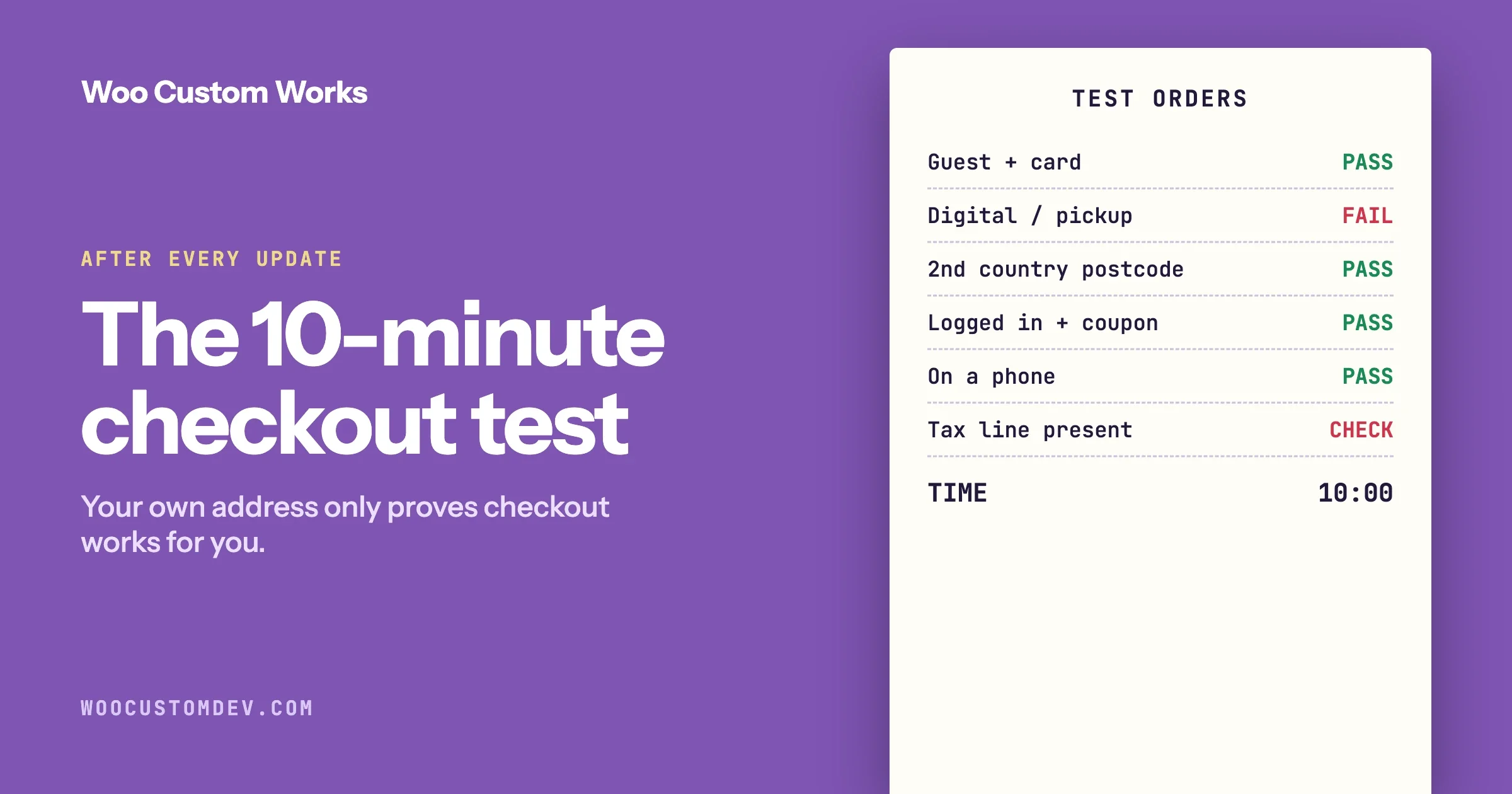
After every WooCommerce update, place three test orders before you do anything else: one as a guest with a card, one for the kind of product or delivery your store handles differently (digital goods, local pickup, a second country), and one as a logged-in customer with a coupon. Check that the address fields, shipping options, tax, total, payment and emails are all correct. It takes about ten minutes, and it catches the failures that cost real orders, because a broken checkout does not send you an error. It just stops taking money.
This guide gives you the test as a checklist, shows what the most recent WooCommerce release got wrong and for which stores, and then covers the half of checkout most owners never look at: the route automated card-testing attacks use, and the setting that slows them down. Version details and settings come from WooCommerce’s release notes and developer documentation, linked where they are used.
In this guide
- Why a ten-minute test is worth doing: what 11.2.0 broke
- Two minutes of preparation
- The ten-minute test, order by order
- What to check on every test order
- Is your store one of the ones at risk?
- What to do when a test fails
- The checkout nobody tests: card testing through the Store API
- A sensible update routine
- Questions people ask
Why bother? What the last release broke
WooCommerce 11.2.1 was released on 9 October 2026 to fix two checkout problems introduced in 11.2.0. The release notes describe them:
- Classic checkout on stores that remove address fields. On 11.2.0, stores that remove address fields using the
woocommerce_billing_fieldsorwoocommerce_default_address_fieldsfilters “could see checkout blocked with ‘Please enter an address to continue.’, tax not charged, or shipping options disappear.” - Postcode validation on the checkout block. 11.2.0 rejected Argentine postcodes written without the province letter (for example
1213), along with formats for El Salvador, Saint Vincent and the Grenadines, and the British Virgin Islands.
Look at who was affected. The first problem hit stores that had simplified their checkout: shops selling digital products that do not need a street address, and stores offering local pickup. Those owners did the right thing for their customers and were the ones whose checkout stopped. The second hit stores selling to specific countries. A store owner in the United States testing with their own address would have seen nothing wrong in either case.
The lesson is not that WooCommerce is unreliable. Two regressions were found and fixed within days, and the notes are clear about what happened. The lesson is that a test with your own address and your own card only proves that checkout works for you. The test below is built around the ways your store differs from a default install.
Two minutes of preparation
Do this once and keep the notes. They make every later test faster.
- Know which checkout you have. Open your Checkout page in the editor. One shortcode means the classic checkout. A Checkout block means the block checkout. The two are different code, and a release can affect one and not the other, as 11.2.0 showed.
- Write down what your store does differently. Removed or added checkout fields. Local pickup. Digital or virtual products. Countries you ship to. Subscriptions. Tax-exempt customers. Each item on this list becomes one test order.
- Have a way to pay without spending money. Your payment provider’s test mode on a staging copy, or on the live store a 100% coupon restricted to your own email address plus one real low-value order that you refund.
- Note the versions shown under WooCommerce > Status before you update: WooCommerce, WordPress, PHP and your payment plugin. If something breaks you need to know what changed.
The right place for this test is a staging copy, before the update reaches your live store. If you have no staging copy, run it on the live store straight after updating, at your quietest hour.
The ten-minute test
Order | Who and what | What it catches | Time |
|---|---|---|---|
1 | Guest, not logged in, a private browser window, one physical product, your main country, card payment | The path most customers take. Address fields, shipping options, tax and payment. | 3 min |
2 | The thing your store does differently: a digital product, local pickup, or an address in a second country you ship to with that country’s postcode format | Exactly the kind of regression 11.2.0 introduced | 3 min |
3 | Logged-in customer with a saved address, a coupon applied, your second payment method | Saved data, discounts, and the payment method you test least | 3 min |
4 | Repeat order 1 on a phone | Layout problems that hide the pay button | 1 min |
If your notes from the preparation step list more than one difference, rotate them. Test local pickup after one update and a foreign address after the next. Any difference tied to custom code should be tested every time.
What should you check on every test order?
Do not stop at “the order went through”. Most of the 11.2.0 symptoms would have allowed an order to complete with the wrong total.
Check | What a failure looks like |
|---|---|
Only the fields you expect are shown | A field you removed is back, or a message asks for an address you do not collect |
Shipping options appear after the address is entered | No shipping methods, or only one where there should be several |
Tax is on the order | A tax line that is missing or zero for a taxable customer |
The total matches your own arithmetic | Coupon not applied, shipping charged twice, rounding off by a cent |
The postcode is accepted | A valid postcode rejected as invalid |
Payment completes and you land on the confirmation page | A spinner that never ends, or a return to the cart |
The order appears in the dashboard with the right status | Stuck at Pending payment, or missing |
The payment shows in your provider’s own dashboard | An order marked paid with no matching payment |
Customer and admin emails arrive | No email, or one with missing details |
Stock went down by the quantity ordered | Stock unchanged |
The two people skip are the provider’s dashboard and the tax line. An order can look complete in WooCommerce while the payment was never captured, and an order with no tax looks fine until your accountant finds it.
Is your store one of the ones at risk?
The classic checkout problem in 11.2.0 only affected stores whose code removes address fields through two specific filters. You can find out in a minute whether yours does.
# Run from the WordPress root. Lists code that changes checkout address fields.
grep -rnE "woocommerce_(billing_fields|shipping_fields|default_address_fields|checkout_fields)" \
  wp-content/themes wp-content/plugins wp-content/mu-plugins \
  --include='*.php' | grep -v '/woocommerce/' | head -30
Every line in the output is a place where your theme, a plugin or a snippet reshapes the checkout form. That is the code most exposed to a change in how WooCommerce handles addresses. If the list is empty, you are closer to a default checkout and carry less of this particular risk. If it names a “checkout field editor” plugin or your theme’s functions.php, add a test order for each field you removed, and keep that test in your routine.
No command line? Look under Plugins for anything that edits checkout fields, and ask whoever built the store whether custom code removes address fields.
For the block checkout, the equivalent question is which countries you sell to. Keep one real, valid address and postcode for each country in a note, and use a different one for order 2 each time.
What do you do when a test fails?
On staging: do not update the live store. Write down the exact steps that fail, then find out whether it is already known.
- Read the release notes for the version you tested, and the notes for any newer point release. A fix may already be out, as it was two days after 11.2.0.
- Search the WooCommerce issue tracker for the error text.
- Switch off your own customisations one at a time on staging and retest, to see whether the problem is in WooCommerce or in how your code interacts with it.
- If it is a new problem, report it with the steps, your versions and whether you use the classic or block checkout. A report with clear steps gets fixed faster.
On the live store: go back to the version that worked, then investigate.
# Changes the site. Take a database backup first.
wp db export before-rollback.sql
wp plugin install woocommerce --version=11.1.2 --force   # use the version you noted before updating
wp plugin get woocommerce --field=version
Rolling back is safe when the update did not change the database. The release notes state this for each version. The 11.2.1 notes say “Database update: No”, for example. If a release did run a database update, restore your pre-update backup instead of only swapping the plugin files, and get help if you are unsure. After any rollback, run the three test orders again.
The checkout nobody tests: card testing through the Store API
Everything above tests the checkout page a customer sees. There is a second way to place an order on a WooCommerce store, and automated attacks use it.
What is it?
WooCommerce includes the Store API, a set of web addresses that the block cart and checkout use to talk to your store. The one that places an order is POST /wp-json/wc/store/v1/checkout. It exists on WooCommerce stores whether or not you use the block checkout.
Card testing is when someone with a list of stolen card numbers makes many small purchases to find out which cards still work. Your store is the testing tool. You are left with hundreds of failed orders, fees or penalties from your payment provider, and sometimes a suspended account.
WooCommerce’s developers wrote about this directly: “Recently we have seen card attacks specifically targeting the Store API alone, even without the use of the Checkout block.” That last part is the reason owners miss it. A store running the classic checkout page can still receive orders through this route. Store owners describing these attacks on forums often report the same sequence: a flood of failed payments, a payment method switched off in the dashboard, and the attempts continuing, because the requests were never coming through the page they were looking at.
Symptom: how do you know it is happening?
- Many failed or pending orders in a short time, often for your cheapest product.
- Customer names and emails that look generated, with addresses that do not match.
- Emails from your payment provider about a rise in declined transactions.
- Orders arriving at a steady rhythm, including at hours when you have no real customers.
Check: where are they coming in?
Look at your server’s access log for the two order-placing addresses and compare the counts with your real order numbers.
LOG=/var/log/nginx/access.log*    # adjust for your host; many hosts offer a download in the control panel

# Store API checkout requests, grouped by status code
zgrep -h 'POST /wp-json/wc/store/v1/checkout' $LOG | awk '{print $9}' | sort | uniq -c

# Classic checkout requests, for comparison
zgrep -h 'wc-ajax=checkout' $LOG | awk '{print $9}' | sort | uniq -c

# Who is sending the Store API requests
zgrep -h 'POST /wp-json/wc/store/v1/checkout' $LOG | awk '{print $1}' | sort | uniq -c | sort -rn | head -20
If you take twenty orders a day and the log shows two thousand checkout requests, you have your answer, and the first command tells you which door they used. If you cannot get logs, ask your host for the count of POST requests to that address over the last week.
Fix 1: turn on checkout rate limiting
WooCommerce has rate limiting for the Store API built in, and it is switched off by default. Since WooCommerce 9.6 you can enable it for the order-placing step from the settings screen. Per the documentation:
- Go to WooCommerce > Settings > Advanced > Features.
- Enable Rate limiting Checkout block and Store API.
- Save.
When enabled this way, the limit applies to placing an order through the checkout block and the POST /checkout address, at a maximum of 3 requests per 60 seconds. Limits are tracked by user ID for logged-in customers and by IP address for guests.
If your store is behind Cloudflare, a load balancer or any proxy, read this before enabling it. Without proxy support, WooCommerce may see every visitor as coming from the proxy’s address, and the limit will block real customers. Proxy support is off by default and is turned on with a filter. This example is taken from the documented options and should be tested on staging before you rely on it:
<?php
// In a small custom plugin. Enables Store API rate limiting with proxy support.
// Adjust limit and seconds for your store, then test with real checkouts.
add_filter( 'woocommerce_store_api_rate_limit_options', function () {
	return array(
		'enabled'       => true,
		'proxy_support' => true,  // read the visitor IP from standard forwarding headers
		'limit'         => 25,    // requests allowed per time frame (the documented default)
		'seconds'       => 10,    // the time frame
	);
} );
Note that this filter covers Store API POST requests in general with its own limit, which is a different scope from the settings-screen option. Whichever you use, run the full ten-minute test afterwards, including a few orders in quick succession from the same connection, to confirm real customers are not blocked.
WooCommerce is honest about the limit of this fix: rate limiting lets you “slow the attacks immediately, however, not prevent them fully.” Attackers who spread requests across many addresses stay under any per-address limit. So it is the first step, not the only one.
Fix 2: a captcha that protects this route
Many stores already have a captcha on the checkout page and are attacked anyway. WooCommerce’s developers found the reason when they audited the common plugins: several “were not protecting the Checkout Block/Store API”, so the check could be bypassed. They list the versions in which this was patched:
Plugin | Protected from version |
|---|---|
Google reCaptcha by Koala Apps (WooCommerce Marketplace) | 1.4.1 |
reCaptcha by I13 Solutions (WooCommerce Marketplace) | 2.57 |
reCaptcha by RelyWP (WordPress.org) | 1.4.0 |
Cloudflare Turnstile by RelyWP (WordPress.org) | 1.28.0 |
Check: if you use one of these, confirm your version is at or above the one listed. If you use a different captcha or fraud plugin, ask its developer one question in writing: does it validate orders placed through the Store API checkout endpoint, or only the checkout page form? A plugin that only adds a widget to the page protects the page, not the store.
Fix 3: use your payment provider’s fraud tools
Your provider sees every attempt and has tools you do not: rules that decline payments where the postcode or security code does not match, limits on attempts per card, and risk scoring. Turn on the checks it offers. If you are under attack now, contact the provider. They deal with card testing constantly and can often block the pattern on their side faster than you can on yours.
Fix 4: limit the address at your firewall
If you use a firewall or CDN in front of your site, add a rate limit rule for POST requests to /wp-json/wc/store/v1/checkout and to /?wc-ajax=checkout. A real customer places an order once or twice. A rule at the edge stops excess requests before they reach your server, which also protects your store’s speed during an attack. Our guide to fraud prevention and chargeback protection covers the wider set of controls.
Do not do this
- Do not switch off a payment method and assume it is over. Confirm in the logs that the requests stopped.
- Do not block whole countries as a first move. Card testers rotate through addresses worldwide, and you will block customers before you block them.
- Do not disable the Store API by blocking
/wp-json/. The block cart and checkout, and many extensions, depend on it.
Add one line to your test
After each update, glance at the count of failed and pending orders for the past week under WooCommerce > Orders. A sudden rise that does not match your traffic is the earliest sign you will get.
A sensible update routine
- Read the release notes first. They say whether a release is a security update and whether it changes the database. A security update goes out promptly. A feature release can wait a few days.
- Let a new major or minor version settle. 11.2.1 followed 11.2.0 within days. Waiting a short while for the first point release means other stores find the regressions for you. Do not apply this to security releases.
- Update on staging and run the ten-minute test.
- Back up, then update live at a quiet hour.
- Run the test again on the live store. Staging and live differ in small ways, including the real payment provider connection.
- Check failed and pending orders the next morning.
If WooCommerce updates itself automatically on your store, you skip steps 1 to 3 without choosing to. Decide deliberately whether you want that. For how to set a policy across several sites, see Update the Same Day or Wait?
Checkout problems are one of several ways a store loses money without an error message. We listed five more, each with a quick check and a fix, in 5 Silent Money Leaks in a WooCommerce Store. If your checkout is slow or times out, start with the hidden work behind a slow checkout.
Questions people ask
How do I test WooCommerce checkout after an update?
Place three test orders: one as a guest with a card, one covering whatever your store does differently such as a digital product, local pickup or a foreign address, and one as a logged-in customer with a coupon and a second payment method. On each, check the fields shown, shipping options, tax, total, payment, the order in your dashboard, the payment in your provider’s dashboard, and the emails.
What did WooCommerce 11.2.1 fix?
Two checkout regressions from 11.2.0. Classic checkout on stores that remove address fields could be blocked, charge no tax or lose shipping options. The checkout block rejected valid postcodes for Argentina, El Salvador, Saint Vincent and the Grenadines, and the British Virgin Islands. It was released on 9 October 2026 and required no database update.
Should I update WooCommerce as soon as a new version is released?
Apply security releases promptly. For a feature release, waiting a few days for the first point release and testing on a staging copy first is reasonable, because regressions in a new version are usually found and fixed quickly.
What is a card testing attack?
Someone uses your checkout to try stolen card numbers with small purchases, to learn which cards work. Signs are a burst of failed or pending orders, generated-looking customer details, and warnings from your payment provider about declines.
Why do card testing attacks continue after I add a captcha or disable a gateway?
Because the requests may be going to the Store API checkout address and not to your checkout page. WooCommerce’s developers have said attacks target the Store API even on stores that do not use the checkout block, and that some captcha plugins did not protect that route until they were patched.
How do I turn on rate limiting for WooCommerce checkout?
Go to WooCommerce, Settings, Advanced, Features and enable “Rate limiting Checkout block and Store API”. It limits order placing to 3 requests per 60 seconds. If your site is behind a proxy such as Cloudflare, enable proxy support through the documented filter and test real orders before relying on it.
Can I roll back a WooCommerce update?
Yes, by reinstalling the previous version, provided the update did not change the database. The release notes say whether it did. If it did, restore the backup you took before updating. Always retest checkout after a rollback.
If you would like this test set up as a routine on your store, or your checkout carries custom code that makes updates risky, our WooCommerce development services page explains how we work. Tell us what your checkout does differently and we will tell you what to test.
Plugins we build and run
We maintain these ourselves, which is why we can support them on your site.
- BuddyNextThe self-hosted community engine for WordPress
- BuddyXFree community theme, Pro when you outgrow it
- ReignPremium community theme. Add pieces, build anything
- JetonomyCommunity forum and Q&A for WordPress
- EventonomyEvents and RSVPs for WordPress communities
- LearnomyCourses and learning communities on WordPress
- ListoraDirectories and listings your members can browse
- SnipShareCode sharing built for developer communities
- WB Ad ManagerAd placements that turn traffic into revenue
- WP Career BoardA job board your community actually uses
- WP Sell ServicesSell services with offers, orders, and payouts
- MediaVersePhotos, video, and media albums for members
- WB GamificationPoints, badges, and rewards that keep members active
- Product RoadmapPublic roadmaps with voting your users trust