WooCommerce Payment Fees at Peak: How to Read Your Black Friday Statement
Black Friday is 27 November 2026. Learn what each line on a card processing statement means, how to model your fees before the weekend, and what to ask your processor.

Black Friday this year is on 27 November 2026, and Cyber Monday follows on 30 November. For most WooCommerce stores, payment processing is the biggest cost of that weekend that nobody looks at closely. You check traffic, stock and ad spend. The fee line on the processor statement arrives weeks later, by which time it is too late to change anything.
This guide is for store owners and agencies who want to read that statement before it arrives. We will take it line by line, show how to estimate your fees from your own numbers, list what to ask your processor in the next two weeks, and walk through a scenario from WooCommerce’s own blog post on the subject, with the parts that are marketing marked as such. We stay neutral on gateways. We do not tell you which one to use, because the right one depends on your country, your order values and your risk.
The figures below come from the vendors’ own pages, read on 23 October 2026. Where we could not read a vendor’s page for your country, the number is marked (confirm), and you should read the page before you rely on it.
The short answer
- There are usually three kinds of cost on a card sale: what the card networks and banks charge to move the money, what your processor adds on top, and, on some platforms, a surcharge for using a processor the platform does not own.
- WooCommerce itself says it adds no platform surcharge. That is WooCommerce’s own claim. Your gateway still charges its fees, and some gateways add charges for international cards, currency conversion and disputes.
- Refunds do not give the fees back. WooPayments’ fee page says transaction fees are not refunded when you refund a customer. PayPal’s fee page says the same for the fees you paid to receive the payment (confirm for your country).
- Do the sums now. Take last year’s peak-day orders, apply your gateway’s published rates, and you will know what to expect within a rough margin before 27 November.
Why peak days change the math
A processor’s rate does not change on Black Friday, but your mix does. Peak days bring more orders, more first-time buyers, more international cards, more discount-driven low-value baskets, more card testing by fraudsters and, a few weeks later, more disputes. Each of those moves the effective rate you pay.
- More orders means more fixed fees. Most card rates are a percentage plus a fixed amount per transaction. The fixed part hurts most on small baskets. A $0.30 fixed fee is 0.3 percent of a $100 order and 1.5 percent of a $20 order.
- More new customers means more cross-border cards. Gateways often add a percentage for cards issued outside your country.
- More sales in other currencies means conversion fees. If you sell in more than one currency, a conversion charge can apply on top.
- More chargebacks, later. Disputes land weeks after the sale, and each one carries a fee even if you win some of them.
So the rate you were quoted when you signed up is a starting point, not a forecast. The statement tells you what really happened.
Anatomy of a card processing statement
Statements differ by processor, but the same items keep showing up. This is the vocabulary, in the order we would read it.
Gross volume and transaction count
The total value of card sales and the number of transactions. Divide one by the other to get your average order value. Everything else is a ratio of these two numbers.
Interchange
The fee that the card-issuing bank charges, set by the card networks. Merchants rarely see it as its own line unless the processor uses an interchange-plus pricing model. WooCommerce’s article names it as one of the costs of moving money, together with network assessments and processor markup.
Network assessments
The card networks’ own fees on each transaction.
Processor markup
What the processor adds for its service. On a flat-rate plan like “2.9 percent plus 30 cents,” the three items above are bundled into one number and you only see the total.
Platform or gateway surcharge
A percentage some platforms add when you use a payment provider they do not own. The WooCommerce post’s example is a 0.6 percent surcharge on one Shopify plan for using a third-party gateway. We did not verify Shopify’s current surcharge, and we are not stating it as fact. Read Shopify’s pricing page for your country and plan (confirm). The point for you: ask any platform whether it charges extra for the gateway you plan to use.
International card fee
An extra percentage on cards issued outside your country. WooPayments’ US fee page lists +1.50 percent on cards, and PayPal’s US page lists an extra 1.50 percent on international commercial transactions (confirm for your country).
Currency conversion fee
An extra percentage when a payment needs converting. WooPayments’ US page lists +1.00 percent.
Dispute fee
A flat fee per dispute. WooPayments’ US page lists $15.00 and says it is refunded if you challenge and win. PayPal’s US page lists $15 for a standard dispute and $20 per chargeback, with different amounts for high-volume disputes (confirm).
Payout fees and holds
Some processors charge for faster payouts. WooPayments’ page lists a 1.5 percent fee on instant payouts. Others hold funds for a time on new accounts or high-volume days. Ask about it before Black Friday, not on it.
Refund lines
Refunds reduce your volume, but the fee on the original sale usually stays. You will see the refund and still see the fee you paid. A store with a high refund rate pays fees on money it did not keep.
What the gateways publish
These are the figures we could read. The right column says where each one comes from.
Gateway | Published card rate (US) | Extras | Source |
|---|---|---|---|
WooPayments | 2.90% + $0.30 for cards | +1.50% international, +1.00% currency conversion, $15.00 dispute fee | WooCommerce fees page |
PayPal checkout | 3.49% + $0.49 for checkout, 2.99% + $0.49 for standard card payments | +1.50% international, $15 standard dispute, $20 chargeback (confirm) | PayPal US business fees page |
Stripe | Not verified (confirm) | Varies by country | Read stripe.com/pricing for your country |
Square | Not verified (confirm) | Varies by country | Read Square’s pricing page for your country |
The Stripe pricing page we could open from here was a different country’s version, so we are not quoting a US rate. If you use Stripe or Square, read the page for the country of your account and fill in the row yourself. The extras matter as much as the headline rate.
One more WooPayments line worth knowing: subscriptions that use Stripe Billing add +1.00 percent to the whole order, according to the page. If you sell subscriptions, include it.
A worked example you can copy
Here is the exercise we suggest. We use WooPayments’ US rates because we could read them. Replace them with your own gateway’s.
The assumptions
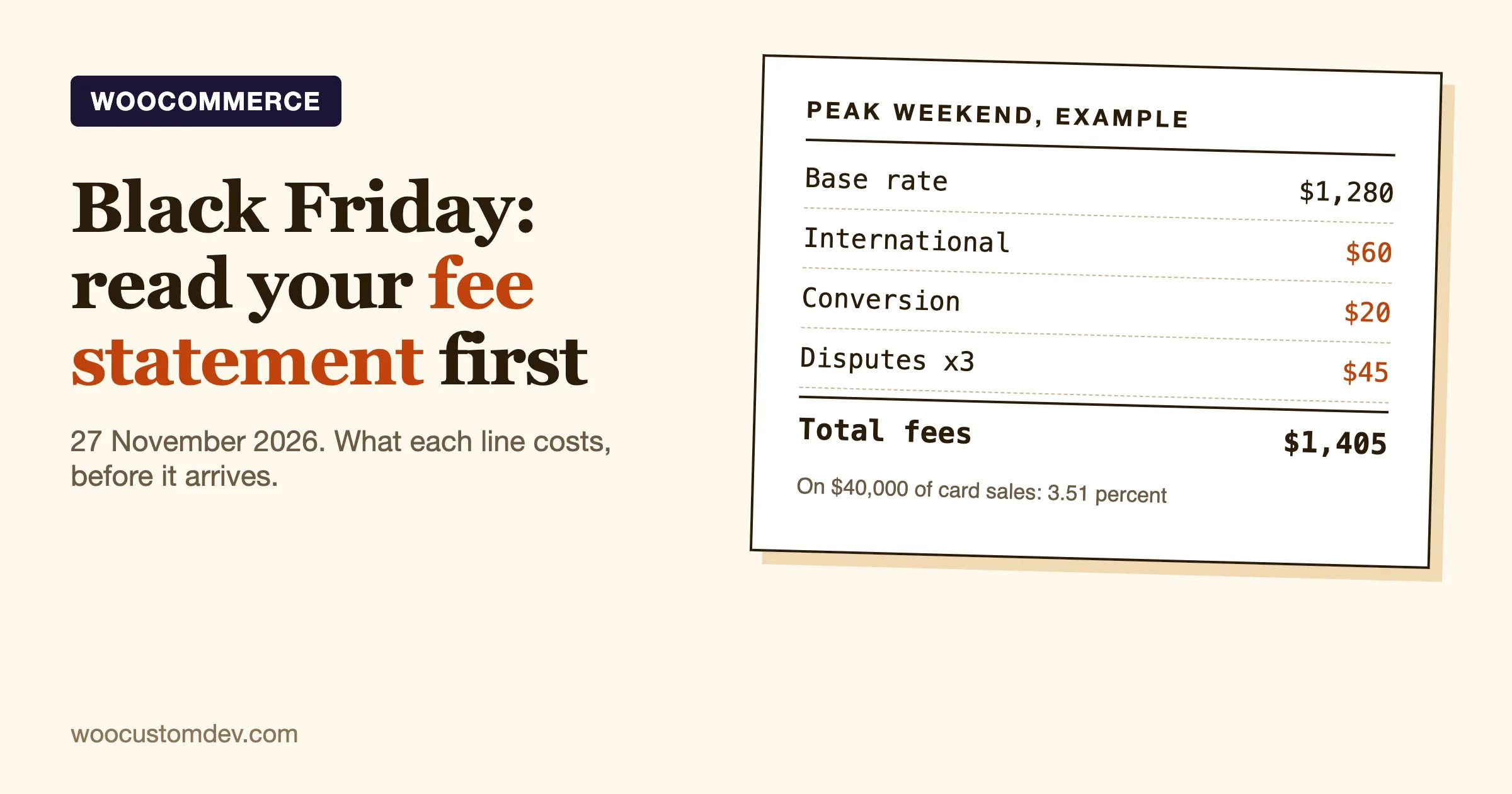
- 400 orders on Black Friday weekend, average order value $100, so $40,000 in card sales.
- 10 percent of orders, 40 orders or $4,000, are from international cards.
- $2,000 of sales need currency conversion.
- 12 refunds of $100 each.
- 3 disputes, none won.
The sums
Line | Calculation | Amount |
|---|---|---|
Base rate | 2.9% of $40,000 plus 400 x $0.30 | $1,280.00 |
International cards | 1.5% of $4,000 | $60.00 |
Currency conversion | 1.0% of $2,000 | $20.00 |
Disputes | 3 x $15 | $45.00 |
Total | $1,405.00 |
That is 3.51 percent of $40,000, against a headline rate of 2.9 percent plus 30 cents, which works out to 3.2 percent on a $100 order. The gap is the extras.
Now the refunds. Twelve refunds of $100 means $1,200 refunded. The fee on those original sales was 2.9 percent of $1,200 plus 12 x $0.30, which is $34.80 plus $3.60, so $38.40. That money is already inside the $1,280, and WooPayments’ page says transaction fees are not refunded when you refund a customer. Your cost of those twelve refunds is $38.40 on top of the $1,200 you returned.
What to do with the result
Compare your estimate with last year’s statement for the same weekend. If last year’s effective rate was higher than this model gives, find out which line grew. If you have no statement from last year, use any recent busy week as the baseline.
A simple spreadsheet is enough. Put the lines above in rows, put your assumptions in a column, and change one thing at a time. Which line moves the total most? For stores with small baskets it is nearly always the fixed fee per transaction. For stores that sell abroad it is the international and conversion lines.
The scenario from WooCommerce’s own post, and how to read it
WooCommerce published a post on 28 September 2026 titled “Black Friday is also your payment processor’s best day of the year.” It is vendor-authored, and it argues for WooCommerce. We read it in full, and it is useful if you read it for its structure and not its conclusion.
What the post models
It imagines a merchant, Brand X, on Shopify’s Advanced plan, with $2 million in sales over a five-day Cyber Week at a $120 average order value, about 16,667 orders. It compares three cases:
- A: the platform’s own payments at 2.5 percent plus $0.30. That is $50,000 plus $5,000, or $55,000.
- B: a negotiated rate through a third-party gateway at 2.1 percent plus $0.25. The processor cost is $46,167. The post adds a 0.6 percent platform surcharge, $12,000, for a total of $58,167. That is $3,167 more than case A, even though the negotiated rate is lower.
- C: WooCommerce at the same negotiated rate. $46,167, with no surcharge, which the post says is $8,833 less than case A.
We re-did the arithmetic and it holds: 2.5 percent of $2 million is $50,000, plus 16,667 x $0.30 is $5,000. The second case is 2.1 percent, which is $42,000, plus 16,667 x $0.25, which is $4,167, so $46,167. The 0.6 percent surcharge on $2 million is $12,000.
What to take from it, and what to be careful about
- The structure is the lesson. A good negotiated rate can be cancelled out by a surcharge for using a processor the platform does not own. Ask whether your platform charges one.
- The figures are the post’s. The Shopify rates, the Advanced plan surcharge and the competitor table are WooCommerce’s reading of other vendors’ pricing, and we did not verify them. Read each vendor’s own pricing page for your country before you decide anything (confirm).
- The scenarios leave things out. The post says they exclude platform subscription fees and hosting. A self-hosted WooCommerce store has hosting, security, extension and maintenance costs that the comparison does not count. The post itself estimates about $175 a month for self-hosting, excluding some of those items.
- The $8,833 saving compares against case A, not case B. It is a fair headline only if you would otherwise use the platform’s own payments.
- “No platform surcharge” is the post’s claim about WooCommerce. It matches what we know of how core WooCommerce works, but your gateway or extensions may still charge their own fees, so read their pages too.
The advice we would take from the post is its simplest: review the two big lines on your Cyber Week statement, processing costs and any gateway fee, and confirm that the rate you negotiated is really the rate you are paying.
If you are weighing platforms more broadly, we wrote a separate, even-handed guide: WooCommerce vs Shopify vs Custom Build: A Store Owner’s Decision Guide.
What to ask your processor before 27 November
You have a few weeks. Send these questions to your processor or gateway, in writing, so you have the answers on file. If you manage stores for clients, send the same list for each one.
- What is my exact rate, and is it flat or interchange-plus? Ask them to put it in an email.
- What are the extras? International cards, currency conversion, subscriptions, instant payouts, and any monthly or per-reader fee.
- What does a dispute cost, and is it refunded if I win? Also ask how long you have to respond.
- Do you keep the fee when I refund? Get a yes or no, and whether it differs for partial refunds.
- Are there limits on daily volume, order size or payouts? A sudden limit on the busiest day is worse than a slightly higher rate.
- Will you hold any funds, or delay payouts, when volume spikes? Policies vary, and you want to know ahead of time.
- Is there a surcharge from my platform or an extension for using you? This is the question the WooCommerce post’s scenario turns on.
- Who do I call on the day? Get a contact that is not a general inbox.
A pre-weekend checklist for the store itself
Fees are one part. The same two weeks are the time to check that payments work at all under load.
1. Test the payment path after every update
Run a full test order with a real gateway in test mode, and then one live order of your own, refunded. Our 10-minute checkout test after a WooCommerce update gives you a script. Freeze plugin updates a few days before the weekend so that what you tested is what runs.
2. Check for card testing
Fraudsters test stolen card numbers on busy stores, because the noise hides them. Card testing creates failed payments and sometimes fees, and it can lead to disputes. Rate limits and challenge pages at checkout are the usual defence, and our guide to fraud prevention and chargeback protection covers them.
3. Review the gateway options you offer
More methods can mean fewer abandoned checkouts, and each one has its own fee. List what you offer, and what each costs you per $100 order. If one method is far more expensive and is rarely used, decide whether it earns its place on the busiest weekend.
4. Prepare your dispute evidence
For every order, keep the receipt, the delivery or tracking record, and any messages with the customer. Our guide to payment gateway plugins covers what to check before you install one, and webhooks and tokenisation are worth a read before the weekend.
5. Decide your discounting rule
Deep discounts shrink the order value, which makes the fixed fee bigger as a share of each sale. A 40 percent discount on a $30 item turns a $0.30 fixed fee from 1.0 percent of the sale to about 1.7 percent. Check that your offers still leave a margin after fees, not only after the cost of goods.
On the day: what to watch
- Failed payment rate. A jump during the day can mean a gateway problem, card testing, or a checkout bug. Check it every hour or two.
- Order status counts. Orders stuck on pending or on hold after payment can mean a webhook problem.
- Refund requests. Handle them, but remember each one keeps its fee.
- Gateway status pages. Bookmark them. When the processor has an outage, you want to know in minutes.
After the weekend: reconcile within a week
Do not wait for the monthly statement. Most gateways let you export transactions by date. Within a week of Cyber Monday:
- Export the weekend’s transactions from the gateway.
- Compare the total with your WooCommerce orders for the same period. They should match, apart from timing differences at the edges of the date range.
- Compute your effective rate: total fees divided by gross volume.
- Break it down by the lines above: base, international, conversion, disputes, other.
- Compare with the estimate you made before the weekend, and note where it was wrong.
- Check back in four to six weeks for disputes that arrive late.
That one note, what you expected against what you paid, is worth more than any rate comparison, because it is built on your own store’s mix.
Frequently asked questions
Does WooCommerce charge a fee on payments?
WooCommerce’s own post says it adds no platform surcharge. Your payment gateway charges its fees, and individual extensions may charge theirs, so read the pricing of each one you use.
Which gateway is cheapest for Black Friday?
It depends on your country, your average order value, your international share and your refund rate. A gateway with a lower percentage and a higher fixed fee can cost more on small baskets. Model your own mix instead of comparing headline rates.
Do I get the fees back when I refund?
WooPayments’ fee page says transaction fees are not refunded when you refund a customer. PayPal’s US page says the fees you paid to receive the payment are not returned (confirm for your country). Check your own gateway.
Can I negotiate my rate?
Some processors negotiate with high-volume merchants and some do not, and we do not have data on yours. Asking costs nothing. Have last year’s volume and your refund and dispute rates ready, because they are what a processor weighs.
Should I add a surcharge for card payments?
Card surcharging rules differ by country and by card network, and are restricted in many places. We are not going to advise on it. Check the rules where you sell and your processor’s terms before you try.
When is Black Friday in 2026?
Friday 27 November 2026, the fourth Friday of November. Cyber Monday is 30 November.
If you would rather have it done for you: the complete path
Everything above you can do yourself with a spreadsheet and a staging site. If you would rather hand the checking and the changes to a team, here is what our own WooCommerce service pages say we do, read on 23 October 2026. We list only what those pages state.
Checkout and payments work
Our WooCommerce development service lists checkout and payments as a scope area: custom fields, conditional logic, split payments, fee rules and reconciliation at volume, which the page calls the part we test hardest. Reconciliation is the step in this guide that follows the weekend, when you compare gateway exports with your orders. The same page describes the process: a brief and estimate reviewed within a day, at no charge, with scope, cost and date; a build on a staging clone of your store; review and revisions that are part of the quote and not a variation; shipping with a rollback path and monitoring through early traffic; and a handover with the code in your repository, documented for another developer. Pricing is fixed after scoping, or hourly with a cap for open-ended work, and you approve the figure before work starts.
Keeping the store stable around the peak
Our care plans run from $99 to $499 a month per site, with no annual lock-in. Every plan includes round-the-clock uptime monitoring, malware scanning, updates that reach production only after they pass on staging, a written status email every Friday, and encrypted off-site backups every six hours kept for thirty days. The Professional plan, at $179 a month and described as the one for a site that earns money, adds a priority queue, an emergency support response time and a 30-day money-back guarantee. The page is not consistent about which of those extras apply to the Essentials plan, so ask before you choose. Our maintenance service page says a production-down ticket reaches a senior engineer within one business hour during coverage, and within four hours overnight.
What we would suggest for the next two weeks
- Send us your gateway, your last peak statement and your list of plugins that touch checkout. A scoped estimate comes back within a day.
- We check the payment path on a staging clone, including refunds and failed payments, and report what we find.
- You decide which changes to ship before the freeze, and which to leave until after the weekend.
- After Cyber Monday, we help you reconcile the gateway export with your orders and write down what was different from the estimate.
That list is our suggested way to use the process above, not a fixed package. Black Friday is a hard date, so ask early. To start, use the contact page.
The takeaway
Before 27 November, do three things. Ask your processor for your exact rates, extras and holds, in writing. Build the spreadsheet from the example above with your own numbers. And freeze and test your checkout. After the weekend, reconcile within a week and write down what surprised you. A store that knows its effective rate can price its offers properly, and a store that does not finds out from a statement.
If you want a developer to review your checkout, gateways and fraud settings before the weekend, start with our payment gateway checklist and contact us with your store’s details.
Sources, read on 23 October 2026
- Black Friday is also your payment processor’s best day of the year, WooCommerce, 28 September 2026 (vendor-authored)
- WooPayments fees and debits
- PayPal business fees (US)
Plugins we build and run
We maintain these ourselves, which is why we can support them on your site.
- BuddyNextThe self-hosted community engine for WordPress
- BuddyXFree community theme, Pro when you outgrow it
- ReignPremium community theme. Add pieces, build anything
- JetonomyCommunity forum and Q&A for WordPress
- EventonomyEvents and RSVPs for WordPress communities
- LearnomyCourses and learning communities on WordPress
- ListoraDirectories and listings your members can browse
- SnipShareCode sharing built for developer communities
- WB Ad ManagerAd placements that turn traffic into revenue
- WP Career BoardA job board your community actually uses
- WP Sell ServicesSell services with offers, orders, and payouts
- MediaVersePhotos, video, and media albums for members
- WB GamificationPoints, badges, and rewards that keep members active
- Product RoadmapPublic roadmaps with voting your users trust