Google for WooCommerce Stuck Loading or Products Not Syncing: How to Fix the Feed (and When to Replace It)
Google for WooCommerce spinning, not syncing, skipping variable products or duplicating Merchant Center accounts? Check versions, logs and background jobs in this order, with what we confirmed on version 3.9.6, and when replacing it is worth it.

Google for WooCommerce (the plugin once called Google Listings & Ads) has had a rough autumn. Since version 3.9.6 arrived on 12 October 2026, the plugin’s support forum has filled with the same few reports: the settings panel spins forever, products stop syncing to Merchant Center, variable products never appear, and Merchant Center sub-accounts get duplicated. Many store owners respond by uninstalling it and trying another feed plugin. Sometimes that is the right call, but usually it is not the first one.
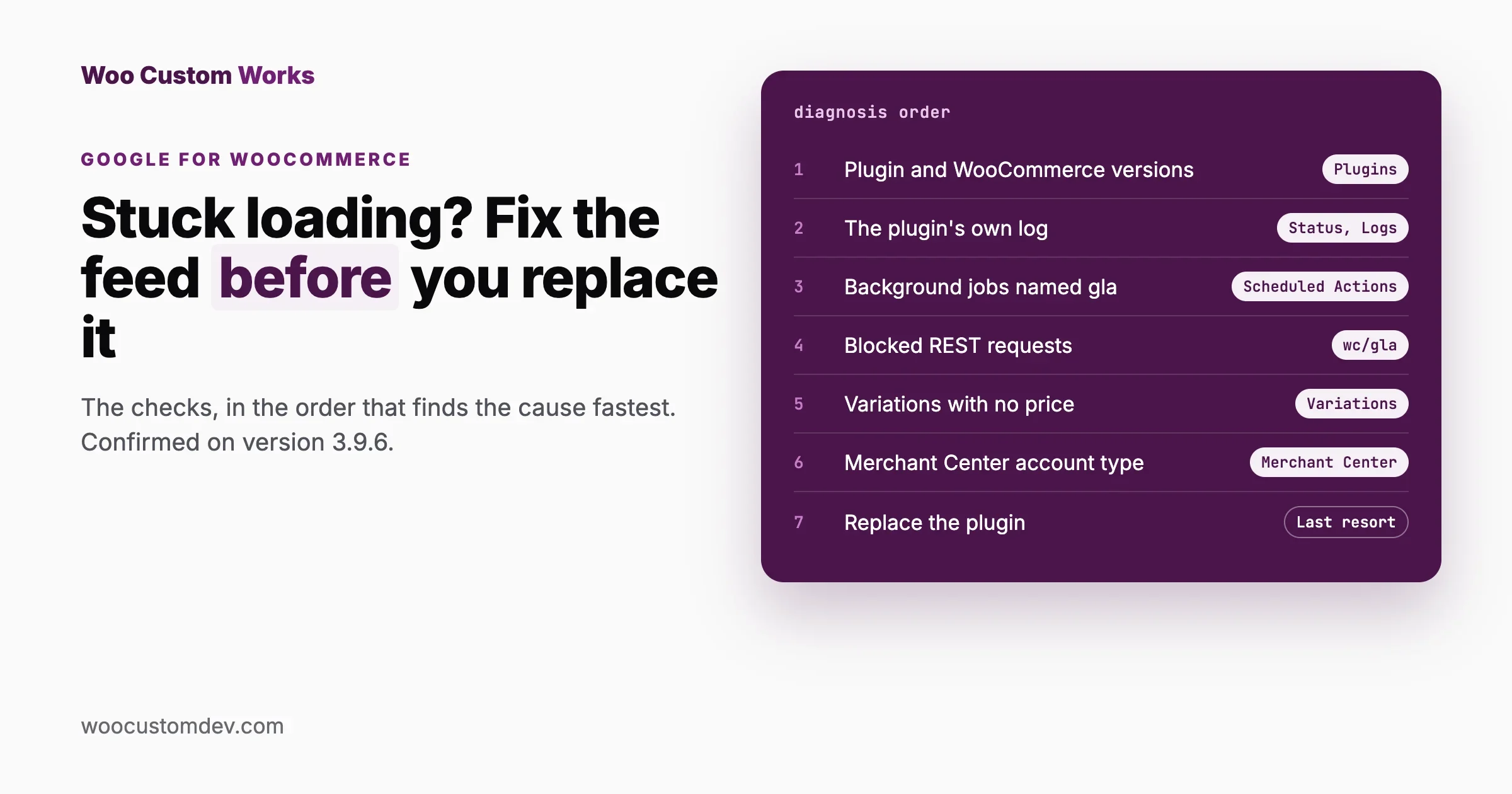
This guide works through each symptom in the order that finds the cause fastest: what to check, what it means, and how to fix it. Replacing the plugin comes last, with a clear test for when it is worth it. We installed version 3.9.6 on a clean WooCommerce 11.2.1 store and read its code to confirm the checks below; where a step needs a connected Google account, we say so and point to the plugin’s own documentation and public issue tracker.
The short answer
- Check versions first. Google shut down its old Content API for Shopping on 18 August 2026, and WooCommerce’s documentation says the plugin must be on version 3.8.1 or later to use Google’s new Merchant API. Version 3.9.6 also requires WooCommerce 11.0 or newer.
- Read the plugin’s own log under WooCommerce, Status, Logs, source
google-for-woocommerce. Logging is on by default. - Check its background jobs under WooCommerce, Status, Scheduled Actions, searching for
gla. Failed or stuck jobs explain most “nothing syncs” cases. - Variable products: a variation without a price, or a disabled variation, is skipped on purpose. We confirmed this with the plugin’s own check.
- Spinning settings panel: usually a blocked or failing request from the browser to your site’s REST API, which shows in the browser’s developer tools.
- Replace the plugin only if the problem is one of its open, unfixed bugs and you cannot wait, or if you need product types and attributes it does not support.
Quick reference: symptom to first check
Symptom | First check | Most common cause |
|---|---|---|
Settings or dashboard spins forever | Browser developer tools, Network tab, filter | A blocked or failing REST request |
Continue button stays disabled after connecting | Same as above, plus the plugin log | A status request that failed or returned an error |
Nothing syncs at all | Plugin version, then Scheduled Actions | An old version on the retired Content API, or background jobs not running |
Some products never sync | The product’s type, status, visibility and channel setting | Unsupported product type or a product that is not ready |
Variations missing | Each variation’s price and enabled setting | Variations without a price or disabled |
401 errors in the log | The Google connection | An expired or revoked connection |
Extra Merchant Center accounts | Which account holds your claimed website | Setup retried, or a multi-client account |
Why so many stores are seeing problems now
Three things changed at once:
Date | Change | Effect on stores |
|---|---|---|
18 August 2026 | Google sunset the Content API for Shopping. Its documentation says requests return progressive errors from 1 September. | Stores on plugin versions before 3.8.1 lose syncing. |
29 September 2026 | Version 3.9.5: “Fixed security issues.” | A reason to update quickly, which brought many stores onto the newest code at once. |
12 October 2026 | Version 3.9.6: new image-size notices, a channel visibility toggle, settings fixes, and a minimum WooCommerce version of 11.0. | Stores on older WooCommerce versions cannot run it; the forum reports above started the same week. |
On WordPress.org, the plugin had more than 800,000 active installs and a rating of 54 out of 100 from 268 ratings when we checked on 18 October 2026. The recent support threads include “Google for WooCommerce 3.9.6 stuck loading and sync fails”, “settings panel spins indefinitely after update to 3.9.6”, “Variable product not being synched” and “Duplicate Merchant Center sub-accounts created by plugin”.
Step 1: collect the facts (10 minutes)
- Versions. Plugins page: the Google for WooCommerce version. WooCommerce, Status: your WooCommerce, WordPress and PHP versions. Note them; every fix below depends on them.
- The plugin’s log. WooCommerce, Status, Logs. Choose the source
google-for-woocommerceand read the newest entries. WooCommerce’s documentation says that if products sync through the new Merchant API, you will see entries mentioningMerchantApiClient. - Background jobs. WooCommerce, Status, Scheduled Actions. Search for
gla. The plugin’s jobs includeupdate_products,update_all_products,update_merchant_product_statuses,update_shipping_settingsanddelete_products. Look at the Failed and Pending tabs. - Merchant Center. In Google Merchant Center, open the product list and the diagnostics or issues view, and note the main error messages and how many products they affect.
Now match what you found to a symptom below.
Symptom 1: the settings panel spins forever
What it looks like: Marketing, Google for WooCommerce opens, but the settings or dashboard never finish loading, or a “Continue” button stays disabled although every account shows as connected.
Why it happens: the plugin’s screens are built in the browser. They load their data by calling your own site’s REST API, under the address /wp-json/wc/gla/. If one of those calls fails or never returns, the screen waits forever.
Check
- Open the panel, then the browser’s developer tools (right-click, Inspect), and choose the Network tab. Reload. Filter by
gla. - Look for requests shown in red or with status 401, 403, 404 or 500. Click one and read the response.
- Check the Console tab for red errors at the same moment.
What each result means
You see | Likely cause | Fix |
|---|---|---|
403 on | A security plugin, firewall or host rule blocking REST requests | Allow |
401 errors | The connection to Google has expired or been revoked | Reconnect the Google account through the plugin’s setup and settings screens; a recent support thread is titled “Products not syncing and 401 errors” |
500 errors | A PHP error on the server | Read WooCommerce, Status, Logs (the |
Requests never finish | A slow call to Google, or a server timeout | Retry at a quiet time; ask your host whether outgoing requests are being slowed or blocked |
A red JavaScript error in Console, no failed requests | A script conflict, or a bug in the panel | Test with other admin plugins disabled on a staging copy; if it persists, report it with the error text |
Also check
- WooCommerce version. 3.9.6 requires WooCommerce 11.0 or newer. If WooCommerce is older, update it on a staging copy first, or roll the plugin back to the version that worked until you can.
- Store country. An open issue on the plugin’s GitHub tracker (number 3660) reports that the Get Started screen crashes when the store’s base country is not in the plugin’s supported list. Another (3734) reports that seven EU and EEA countries are missing from that list, which blocks shipping sync.
- Caching of REST responses. If a cache or CDN stores
/wp-json/responses, the panel can load stale or broken data. Admin REST requests should never be cached.
Symptom 2: no products are syncing
What it looks like: Merchant Center shows no products, or the count stops changing after you edit products.
Check, in this order
- Plugin version. If it is older than 3.8.1, it is still trying the Content API that Google switched off. Update it.
- Scheduled Actions. Search for
gla. Many Pending jobs that never run mean your site’s background processing is not running; many Failed jobs mean the jobs run but Google rejects them. Open a failed job to read the error. - The log. In the
google-for-woocommercelog, look for errors and forMerchantApiCliententries, which show the new API is being used. - Merchant Center account type. WooCommerce’s documentation states that the plugin “does not support multi-client Merchant Center accounts”. If your account is a multi-client (agency) account, that is the cause.
If background jobs are stuck
WooCommerce runs these jobs through Action Scheduler, which relies on WordPress’s scheduled tasks. If your site has little traffic, or WP-Cron is switched off without a real server cron job in its place, jobs wait until someone visits. Ask your host to run WP-Cron from a server schedule every minute or five. An open issue on the plugin’s tracker (3729) reports its queue becoming stuck or very slow during product sync on some stores; if your Pending list keeps growing while other jobs run, you may be hitting that.
The “data source” message in Merchant Center
After the move to the new API, Merchant Center may still label your data source as Content API. WooCommerce’s documentation describes this as a display issue, not a failure. There is also an open report (issue 3875) of the plugin attaching a file-type data source instead of an API-type one, causing permanent sync failure. If Merchant Center shows a file data source that the plugin created and products never arrive, add your details to that issue rather than deleting data sources by hand, which can make reconnecting harder.
Symptom 3: some products sync, others never do
This is usually not a bug. The plugin only sends products that pass its readiness check. We read that check in version 3.9.6 and tested it on our store:
Rule | What we found |
|---|---|
Product type | By default only simple products, variable products and their variations are sent. Grouped and external products, and types added by other extensions such as bundles or subscriptions, are not, unless a developer adds them through the plugin’s filter. |
Published | The product (or for a variation, its parent) must be Published. |
Visible | The product must be visible in your catalogue. |
Channel visibility | Each product has a Google channel setting; products set not to sync are skipped. |
Variations | On a test T-shirt with sizes S, M and L: S with a price synced; M with no price was skipped; L, disabled, was skipped. |
Fix for variable products: open the product, Variations, and make sure every variation you want on Google is enabled and has a price. Variations without a price are hidden from shoppers in your store too, so they will not sync, by design.
Products that do reach Merchant Center can still be disapproved by Google for missing data (identifiers such as GTIN, images, shipping or tax settings). Version 3.9.6 added a notice for synced products whose main image is smaller than 500 by 500 pixels. Those disapprovals are listed in Merchant Center with Google’s reason for each one.
Symptom 4: duplicate Merchant Center sub-accounts, or onboarding loops
What it looks like: during setup, the plugin creates a new Merchant Center account instead of using yours, or setup returns to the start with “There was an error getting your status”. Both appear in recent support threads.
What to do:
- Stop retrying setup; each attempt can create another account.
- In Merchant Center, note which account holds your verified and claimed website and your existing products.
- Check whether that account is a multi-client account, which the plugin does not support.
- Post the details in the plugin’s support forum or contact WooCommerce support if you bought through WooCommerce.com, naming the account you want to keep. Removing accounts in Google is slow to undo, so get advice before you delete anything.
If an update broke it: rolling back safely
When a store worked before an update and broke straight after it, going back one version is a fair short-term fix while the bug is reported. Do it carefully:
- Never go below 3.9.5. Its changelog entry is “Fixed security issues”. Rolling back further reopens them.
- Check WooCommerce’s version too. If 3.9.6 refused to run because WooCommerce is older than 11.0, the better fix is updating WooCommerce on staging, not rolling the plugin back.
- Get the previous version from WordPress.org. On the plugin’s page there, the Advanced View lists previous versions for download. Avoid copies from other sites.
- Test on staging first, run a sync, and check Merchant Center before doing it on the live store.
- Turn off automatic updates for this plugin until the fix you need appears in the changelog, then update again on staging.
- Report what you saw in the support forum, with your versions and the log lines. Bugs with clear reports get fixed sooner.
What a healthy sync looks like
After any fix, check these before you call it done:
Where | Healthy |
|---|---|
WooCommerce, Status, Scheduled Actions, search | Jobs move from Pending to Complete within minutes; no new Failed entries |
WooCommerce, Status, Logs, source | Entries mentioning |
Marketing, Google for WooCommerce | The dashboard and settings load fully, no endless spinner |
Merchant Center product list | Your product count rises to match the products that should sync, and an edited price appears after the next sync |
Merchant Center diagnostics | Remaining issues are about product data (images, identifiers), not connection or data source errors |
Make one small test edit, such as a sale price on one product, and watch it travel through these checks. It is the quickest proof that the whole chain works again.
When should you replace the plugin?
Replacing a feed plugin is a project: products may get new IDs in Merchant Center unless you carry them over, which can reset their performance history, and conversion tracking has to be set up again. Do it when one of these is true:
Reason | Replace? |
|---|---|
A known, open bug blocks you, it has no workaround, and you cannot wait for a fix | Yes, or run a temporary feed alongside it |
You need product types it does not send (bundles, subscriptions, grouped products) or custom attributes it cannot map | Yes |
You need several feeds (other marketplaces, regional catalogues) from one tool | Often yes |
Variations missing because they have no price | No; fix the products |
The plugin is out of date or WooCommerce is too old | No; update on staging first |
Requests blocked by a security plugin or cache | No; any other plugin would hit the same block |
If you do switch, our comparison of WooCommerce Google product feed plugins covers the options. Before uninstalling, export a list of your synced products and their Merchant Center IDs, and plan the switch so both feeds do not send the same products at once; the plugin’s own start screen warns that if you already use another extension for your Google feed, you should deactivate or uninstall it first to prevent duplicate product feeds.
Prevent it next time
- Update on a staging copy first. Feed plugins touch your whole catalogue. Test the update, run a sync, and check Merchant Center before updating the live store.
- Keep WooCommerce current. Feed plugins raise their minimum WooCommerce version regularly; 3.9.6 required 11.0.
- Glance at Scheduled Actions weekly. A growing list of failed
glajobs is the earliest warning. - Give every variation a price before publishing it.
- Read the changelog before updating, for minimum versions and anything about the Merchant API.
If your catalogue also drives stock or prices from other systems, our guide to syncing WooCommerce stock from Google Sheets covers the same principle of a visible sync log. And for preparing your product data for AI shopping assistants as well as Google, see our AI shopping agents store check.
Frequently asked questions
Why is Google for WooCommerce stuck loading?
The panel loads its data from your site’s REST API under /wp-json/wc/gla/. If a security plugin, firewall, cache or PHP error stops one of those requests, the screen keeps spinning. Open the browser’s developer tools, Network tab, and look for failed gla requests.
Why are my variable products not syncing to Google?
Variations without a price and disabled variations are skipped by design. We confirmed this with the plugin’s own readiness check in version 3.9.6. Give each variation a price and enable it.
Do I need to update Google for WooCommerce?
Yes, at least to 3.8.1. Google sunset the Content API for Shopping on 18 August 2026, and WooCommerce’s documentation says 3.8.1 or later is needed for the new Merchant API. Version 3.9.6 needs WooCommerce 11.0 or newer.
Merchant Center still says Content API. Is my sync broken?
Not necessarily. WooCommerce’s documentation describes this label as a display issue. Check the plugin’s log for MerchantApiClient entries to confirm the new API is used.
Where are the plugin’s logs?
WooCommerce, Status, Logs, source google-for-woocommerce. Logging is enabled by default in the plugin’s code.
Can I run two Google feed plugins at the same time?
Not for the same products. The plugin’s start screen itself warns that another feed extension should be deactivated or uninstalled first to prevent duplicate product feeds. If you are testing a replacement, send it a separate set of products, or a separate Merchant Center account, until you switch.
Will fixing the sync bring my products back immediately?
No. Background jobs send products in batches, and Google then reviews them before they can show. Expect a delay of hours rather than minutes for a full catalogue, and check the Merchant Center product list and diagnostics the next day.
Does it support bundles or subscriptions?
Not by default. The plugin sends simple and variable products and variations; other types need a developer to add them through its filter, and the result should be tested in Merchant Center.
How we checked this
On 18 October 2026 we installed Google for WooCommerce 3.9.6 on a local store running WordPress 7.1.3 and WooCommerce 11.2.1. We confirmed the start screen loads and shows the duplicate-feed warning, the job names in Scheduled Actions, the REST address the panel uses, the log source and that logging is on by default, and we ran the plugin’s product readiness check on a variable product with a priced, an unpriced and a disabled variation. We did not connect a Google account, so the connected-account symptoms come from the plugin’s changelog, WooCommerce’s documentation, Google’s Content API notice, the plugin’s open GitHub issues and its WordPress.org support forum, all read the same day.
Need help with a feed or an integration? We build and repair WooCommerce product feeds and integrations on a staging copy of your store, with a sync log that shows each product’s status. See WooCommerce development, and send us what you collected in Step 1.
Plugins we build and run
We maintain these ourselves, which is why we can support them on your site.
- BuddyNextThe self-hosted community engine for WordPress
- BuddyXFree community theme, Pro when you outgrow it
- ReignPremium community theme. Add pieces, build anything
- JetonomyCommunity forum and Q&A for WordPress
- EventonomyEvents and RSVPs for WordPress communities
- LearnomyCourses and learning communities on WordPress
- ListoraDirectories and listings your members can browse
- SnipShareCode sharing built for developer communities
- WB Ad ManagerAd placements that turn traffic into revenue
- WP Career BoardA job board your community actually uses
- WP Sell ServicesSell services with offers, orders, and payouts
- MediaVersePhotos, video, and media albums for members
- WB GamificationPoints, badges, and rewards that keep members active
- Product RoadmapPublic roadmaps with voting your users trust