Before You Ask a WooCommerce Developer for a Quote: The Requirements Your Store Project Needs
What to hand a WooCommerce developer before asking for a quote: the problem and acceptance tests, the system status report, catalogue, orders, payments, integrations, customisations, staging, ownership and dates. Includes a brief you can copy.

Ask three WooCommerce developers to quote “a custom checkout” and you can get three prices that differ by a factor of five. Usually none of them is dishonest. Each one filled the gaps in the brief with a different guess: one assumed a single payment method and no integrations, another assumed your ERP has to see every order, a third assumed the store still runs on an old checkout. A good brief removes the guessing, so the quotes you get back describe the same job.
This guide lists what to hand a developer before you ask for a quote on a WooCommerce project: what each item is, why it changes the price, and where to find it in your store in a few minutes. At the end there is a brief template you can copy, and a short list of what a good quote should give you back.
The short answer
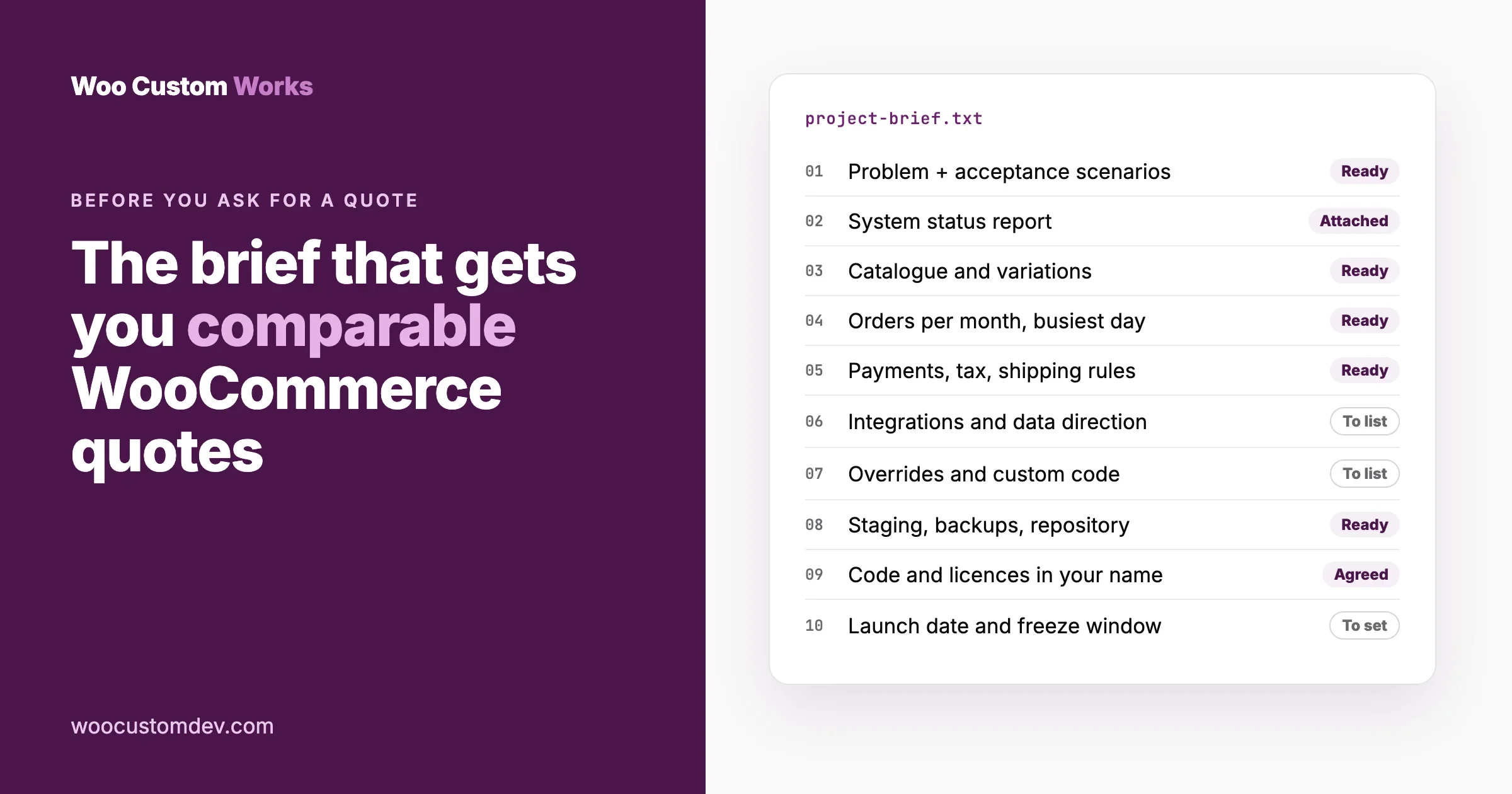
Before you ask for a quote, gather these, in roughly this order of impact on the price:
- The problem and how you will know it is solved. What the store must do that it does not do today, and the test you will run to accept the work.
- A system status report from WooCommerce, Status, which answers most technical questions in one file.
- Your catalogue shape: how many products, which types (simple, variable, subscription, bundles) and roughly how many variations.
- Order volume and peaks: orders per month and your busiest day.
- Payments, tax and shipping rules that the change touches.
- Integrations: which other systems must see or send store data, in which direction.
- Existing customisations: template overrides, custom code and the plugins doing the heavy lifting.
- Access and environments: whether you have a staging site, backups and a code repository.
- Ownership and handover: who owns the code and licences when the job ends.
- Dates and constraints: sales, launches and freeze periods.
You do not need all ten to start a conversation. A clear problem statement plus the system report is enough for a first estimate; the rest turns an estimate into a fixed price.
Why does a vague brief produce wildly different quotes?
Developers price risk. When a brief leaves a question open, each developer prices the answer they think is likely, plus a margin for the answers they cannot rule out. The open questions that move WooCommerce prices the most are:
Open question | Cheap guess | Expensive guess |
|---|---|---|
Which checkout does the store use? | The block checkout, extended with supported APIs | The older shortcode checkout with template overrides that must be kept working |
Where are orders stored? | High-performance order storage, the current default | Legacy post storage, or both kept in sync, which changes how custom order queries are written |
How many products and variations? | A few hundred simple products | Tens of thousands of variations, where every bulk change needs batching |
Does anything else read the orders? | No | An ERP, a CRM and a fulfilment service, each with its own failure modes |
Is there a staging site? | Yes, current and safe to break | No, so the developer must build one and plan a careful deployment |
Who tests and signs off? | You, against written scenarios | Nobody defined, so “done” will be argued about |
Answer these in the brief and the spread between quotes narrows to differences in approach and rate, which is the comparison you actually want.
1. The problem, and how you will accept the work
Describe the outcome, not the solution. “Wholesale customers should see their own prices and be able to pay by invoice” is a better brief than “install a B2B plugin and customise it”, because it lets the developer suggest the simplest route, which may be a setting you already have.
Then write the acceptance test: three to five real scenarios you will try before you pay the final invoice. For example:
- A logged-out visitor sees retail prices.
- A wholesale customer logs in, sees wholesale prices on the shop and in the cart, and can choose “Pay by invoice” at checkout.
- A wholesale order arrives in the accounting system with the customer’s account number.
These scenarios become the developer’s test plan and your sign-off list. They are the single most useful paragraph in any brief.
2. The system status report
Where: in your WordPress admin, go to WooCommerce, Status. Click Get system report, then copy it.
What it tells a developer: in WooCommerce 11.2 the report has sections for the WordPress environment, the server environment (PHP version, memory), the database, post type counts, security, active and must-use plugins, settings, logging, the WooCommerce pages, the theme, template overrides, admin and the Action Scheduler queue. That one paste answers questions that otherwise take an email thread.
Why it changes the price: an outdated PHP version, dozens of active plugins or a long list of template overrides each add work. Better to price that in up front than to discover it halfway.
Privacy note: the report contains technical details about your server, not customer data. Send it to developers you are seriously considering, not to every name on a freelance board.
Two settings to state explicitly
The report covers them, but say them in plain words too, because they change how code is written:
- Order storage. WooCommerce, Settings, Advanced, Features, under “Order data storage”: High-performance order storage, WordPress posts storage (legacy), or compatibility mode with both kept in sync. If you are still on legacy storage, see how to migrate to HPOS safely.
- Cart and checkout type. Edit your Checkout page. If you see a Checkout block, you are on the block checkout; if you see the
[woocommerce_checkout]shortcode, you are on the older one. Customising each works differently, so this matters for any checkout, payment or field change. Our guide to moving from the classic checkout to checkout blocks explains the difference.
3. Your catalogue
What to give | Where to find it | Why it matters |
|---|---|---|
Number of products | Products, All products (the count at the top) | Bulk changes and imports scale with it |
Product types in use | Products list, filter by product type | Variable, grouped, subscription and bundle products each need their own handling |
Rough number of variations | The system report’s post type counts, or estimate from your largest products | Large variation counts slow admin screens, feeds and imports |
Custom product data | Any extra fields on the product edit screen and which plugin adds them | Feeds, filters and integrations must carry them |
4. Orders and traffic
Give orders per month, your busiest day (Black Friday, a launch, a weekly drop) and whether you sell to businesses, consumers or both. Order volume decides whether a change can run on every order as it happens or must be queued, and your busiest day decides when the work must be finished and frozen. WooCommerce, Reports or Analytics shows the numbers; a rough figure is fine.
5. Payments, tax and shipping
List only what the project touches, but be exact about it:
- Payments: every gateway in use (WooCommerce, Settings, Payments), currencies, and any special flows such as deposits, invoices or saved cards.
- Tax: where you charge tax, whether prices include it, and any exemptions such as business customers with tax numbers.
- Shipping: zones, methods and any rules that depend on weight, value, product or customer.
Checkout projects in particular go wrong at the edges: a coupon combined with a tax exemption, a free-shipping threshold with a mixed cart. Naming your edge cases is how you get them tested.
6. Integrations
For every outside system the work involves, answer four questions:
Question | Example answer |
|---|---|
Which system, and which plan or version? | Accounting software, standard plan |
Which data, in which direction? | Orders and customers from the store to accounting; stock from the warehouse to the store |
How often and how many? | Every order as it happens; about 40 a day, 400 on our busiest day |
Who controls access? | Our finance manager can create an API key |
Integrations are where quotes most often go wrong, because the hard part is not sending data, it is what happens when the other system says no. Ask how failed records will be shown to you and retried; a good answer includes a visible log with a reason for each failure.
7. Existing customisations
Every store carries its history. Tell the developer about:
- Template overrides. The system report’s template section lists theme files that replace WooCommerce templates, and flags outdated ones. Each override is code that may need updating.
- Custom code. A child theme’s functions file, a code snippets plugin, or a site-specific plugin. Say where it lives and who wrote it.
- The heavy-lifting plugins. Subscriptions, memberships, bookings, product add-ons, B2B pricing: anything the new work must cooperate with.
- Known problems. Errors you already see, slow screens, things “nobody touches”. Hiding them only moves the cost later.
8. Access, staging and backups
State what exists today:
- Staging: a copy of the store where work can be tested safely. Many hosts create one in a click. If you have none, say so; the developer should plan to set one up before touching anything.
- Backups: how often, where, and whether anyone has ever restored one.
- Code repository: whether your theme and custom code are in version control (for example a Git repository you own).
- Access: who can create accounts. Create a separate account for each developer with the role they need, and remove it when the work ends. Never send passwords by email or chat; use your host’s user tools or a password manager’s sharing feature.
9. Ownership and handover
Decide this before work starts, not when the invoice arrives:
- The code is delivered to your repository or as files you keep, with a short written explanation of what it does and how to change it.
- Paid plugins and services are licensed in your name and paid from your account.
- Any API keys and outside accounts belong to your business, not the developer’s.
- You get a note of anything that needs checking after WooCommerce updates, such as template overrides. Our checkout test after a WooCommerce update is a good routine to hand over with it.
A developer who is reluctant to agree to these is telling you something about the next two years of your store.
10. Dates and constraints
Give the dates that cannot move: a sale, a product launch, a season. Then add a freeze window, for example “no deployments in the two weeks before Black Friday”. A realistic date with a buffer is cheaper than a rushed one, because rushed work skips testing, and checkout bugs cost money by the hour.
Extra details by project type
The ten items above apply to every project. Most WooCommerce work also falls into one of a few types, and each type has two or three questions that decide the price on its own.
Checkout and payment changes
- Which checkout you run (block or shortcode), and which payment gateways must keep working.
- Every rule the new behaviour depends on: customer role, cart total, product, country, coupon.
- What should happen when a payment fails halfway, and who needs to be told.
Integrations with an ERP, CRM, accounting or fulfilment service
- The outside system’s documentation link and whether it has a test account (a “sandbox”).
- Which system is the source of truth for each piece of data: stock, prices, customers, order status.
- What should happen to orders placed while the other system is down.
B2B and wholesale
- How customers become wholesale customers: they apply, you approve, or you import them.
- How prices are set: a percentage off, a separate price per product, or quantity tiers.
- Tax exemptions, minimum orders and payment terms such as invoices with 30 days to pay.
Performance problems
- Which pages are slow (shop, product, cart, checkout, or admin screens) and when it started.
- Whether the slowness follows traffic, a plugin update, or the store growing past a size.
- Your hosting plan and whether a page cache or object cache is in place, from the system report and your host’s panel.
Taking over a project someone else started
- Everything the previous developer delivered: code, notes, and the list of what is unfinished.
- Whether you have access to every account they used: hosting, repository, plugin licences, outside services.
- Expect an audit first, priced on its own, before anyone quotes the remaining work. Nobody can price unknown code honestly without reading it.
Should you share your budget?
Yes, as a range or a ceiling. It is not a negotiating mistake; it tells the developer which version of the solution to propose. “We have up to X for this” can turn a custom build into a configured plugin plus a small extension, or tell you early that the full version needs a second phase. Without it, you get one solution at one price, and no idea what the cheaper or better options were.
What a good quote gives you back
Once your brief is solid, the quote is where you judge the developer. A good one includes:
Part of the quote | What to look for |
|---|---|
Scope in plain words | What will be built, matching your acceptance scenarios |
Assumptions | What they assumed where your brief was silent, so you can correct it now |
Exclusions | What is not included: content entry, design, third-party fees, ongoing support |
How it will be built | Using supported hooks and APIs where possible; any template overrides named up front |
Where it will be tested | On staging, with your scenarios, before production |
How it ships | A deployment plan with a way back if something breaks |
Handover | Code in your repository and a short explanation |
Price and payment terms | Fixed, or hourly with a cap you approve, and when each payment is due |
Red flags
- A price with no questions asked, for anything beyond a small change.
- Work planned directly on the live store.
- “We will edit the WooCommerce plugin files.” Changes to core plugin files are lost on the next update.
- No mention of testing or a way back.
- Code, licences or accounts that stay in the developer’s name.
A brief you can copy
Project: [one line, e.g. "Wholesale pricing and invoice payment"]

1. Problem and outcome
   What the store must do that it does not do today:
   How we will accept the work (3-5 scenarios):
   -
   -
   -

2. Store snapshot
   System status report: attached
   Order storage: HPOS / legacy / compatibility mode
   Checkout: block / shortcode

3. Catalogue
   Products: [number]   Types: [simple, variable...]
   Variations (rough): [number]   Custom product data: [fields, plugin]

4. Orders
   Orders per month: [number]   Busiest day: [number, date]
   Customers: consumers / businesses / both

5. Payments, tax, shipping (only what this project touches)
   Gateways:            Currencies:
   Tax rules:           Shipping rules:
   Edge cases we care about:

6. Integrations
   System / data and direction / volume / who controls access

7. Existing customisations
   Template overrides: [from the report]
   Custom code lives in:
   Key plugins this must work with:
   Known problems:

8. Access
   Staging: yes / no     Backups: [how often, tested?]
   Code repository: yes / no

9. Ownership
   Code, licences and API keys stay with us; handover notes required.

10. Dates
   Must be live by:     Freeze window:

Budget range or ceiling:
Main contact and decision maker:
If you sell services or bookings
Service stores have one more layer: what the customer must tell you after they pay, and how the work is delivered. If that is part of your project, write down the questions you ask every client today; our sister site’s guide to client intake form questions is a good starting list.
Frequently asked questions
How detailed does a WooCommerce brief need to be?
Detailed enough that two developers would picture the same finished store. A clear outcome, acceptance scenarios and the system status report get you a reliable estimate; adding catalogue, order volume, integrations and dates gets you a fixed price.
Is it safe to send the system status report?
It contains technical details about your server and plugins, not customer data. Share it with developers you are seriously considering.
Should I give a developer admin access before they quote?
Usually not. The system report, screenshots and a short call answer most questions. If an audit is needed first, give a separate account on a staging copy, and remove it afterwards.
Why do quotes for the same WooCommerce job vary so much?
Each developer fills the gaps in the brief with a different guess, and prices the risk of being wrong. Answer the open questions (checkout type, order storage, catalogue size, integrations, staging, sign-off) and the quotes converge.
What should I ask a developer before hiring?
Where they will test, how they will deploy and roll back, whether they use supported hooks rather than editing plugin files, and whether code, licences and accounts end up in your name. The answers matter more than the hourly rate.
Do I need a staging site?
For anything beyond a small change, yes. Work on a copy of the store protects your orders while changes are built and tested. Many hosts include one; if yours does not, ask the developer to include setting one up.
What happens after you send a brief to us
So you know what you are starting, this is how a project runs with our team:
- Brief and estimate. You send the problem. We review it within a working day and come back with questions, then scope, cost and a date. Scoping is free.
- Staging build. The work happens on a copy of your store. You see it before anything touches production.
- Review and revise. You test it against your scenarios. Changes at this stage are part of the quote.
- Ship and watch. We deploy with a way back, then watch the first days of real orders.
- Handover. The code goes into your repository, with notes another developer can follow.
Send us the brief
If you have a WooCommerce project in mind, send what you have through our WooCommerce development page, even if it is only the problem and the system report. A senior engineer reads every request and replies within one working day with the questions that matter, then scope and an estimate. You can also read how hiring a WooCommerce developer with us works, or start with WooCommerce customization if the change is small.
Plugins we build and run
We maintain these ourselves, which is why we can support them on your site.
- BuddyNextThe self-hosted community engine for WordPress
- BuddyXFree community theme, Pro when you outgrow it
- ReignPremium community theme. Add pieces, build anything
- JetonomyCommunity forum and Q&A for WordPress
- EventonomyEvents and RSVPs for WordPress communities
- LearnomyCourses and learning communities on WordPress
- ListoraDirectories and listings your members can browse
- SnipShareCode sharing built for developer communities
- WB Ad ManagerAd placements that turn traffic into revenue
- WP Career BoardA job board your community actually uses
- WP Sell ServicesSell services with offers, orders, and payouts
- MediaVersePhotos, video, and media albums for members
- WB GamificationPoints, badges, and rewards that keep members active
- Product RoadmapPublic roadmaps with voting your users trust