Best LMS with Built-in Payments (Stripe & PayPal) in 2026
Which LMS plugins process Stripe and PayPal payments natively, and which need WooCommerce or a paid add-on bolted on. Learnomy, LearnDash, Tutor LMS, LifterLMS, and MemberPress combos compared.

Most “best LMS plugin” roundups compare course builders, quiz types, and certificate templates, then leave the payment question for a footnote. That’s backwards if the whole point of the site is to sell courses. The plugin that wins your course builder comparison can still leave you stuck gluing a payment plugin, a subscription plugin, and a cart on top of it before a single student can check out.
This guide flips the order. Every entry below is judged first on where the checkout actually lives: built into the plugin itself, bolted on through WooCommerce, or locked behind a separate paid add-on before a student can pay you anything. Learnomy leads the list because its checkout runs through Stripe and PayPal directly, with no platform cut and no required bridge plugin. The rest, LearnDash, Tutor LMS, LifterLMS, and the MemberPress-plus-LMS pattern, each handle the payment question differently, and the difference matters more than any quiz feature once real money is involved.
If you already run a WooCommerce store, there’s a second question worth answering honestly: does your course business actually need WooCommerce, or would a native checkout save you a maintenance layer you don’t need? We cover that directly in a dedicated section below, since it’s the question most course sellers on this site are actually trying to answer.
Key takeaways
- Learnomy sells directly through Stripe and PayPal as a complete learning platform, with a WooCommerce adapter available for stores that already run one, not a requirement to run one.
- LearnDash doesn’t include a checkout of its own. Selling a course means mapping it to a WooCommerce product or adding a separate payment add-on first.
- Tutor LMS’s free core has no checkout at all. A monetization add-on, or a connection to WooCommerce, is what actually takes the payment.
- LifterLMS ships with its own official Stripe and PayPal gateway add-ons, so a course can sell without WooCommerce in the stack.
- MemberPress-plus-LMS setups split the job: MemberPress owns the checkout and paywall, while a separate LMS plugin handles lessons, quizzes, and progress tracking.
- “Has a WooCommerce integration” and “sells courses out of the box” are not the same claim. Confirm which one you’re actually buying before you commit a course catalog to a plugin.
In this guide
- What “built-in payments” actually means for an LMS
- 1. Learnomy: direct Stripe and PayPal checkout, no bolted-on plugin
- 2. LearnDash: needs WooCommerce or a payment add-on
- 3. Tutor LMS: a monetization add-on does the selling
- 4. LifterLMS: native payment options without WooCommerce
- 5. MemberPress plus an LMS: the membership plugin owns checkout
- Native checkout vs. requires an add-on: the comparison table
- When you actually need a WooCommerce adapter
- Buying criteria: how to choose an LMS with payments built in
- Common mistakes when picking a payment-ready LMS
- FAQ
What “built-in payments” actually means for an LMS
“Built-in payments” gets used loosely enough in LMS marketing that it’s worth defining before comparing anything. For this guide, a plugin only counts as having built-in payments if a course creator can connect Stripe or PayPal and accept a real payment without installing a second commerce plugin and without buying a separate paid extension just to reach checkout. Everything short of that is a bolt-on, whether the bolt-on is free, paid, or a plugin from the same company.
That distinction splits the market into three groups. The first group sells directly: the checkout, the coupon logic, and the receipt emails live inside the LMS itself. The second group needs WooCommerce as the actual store, with the LMS plugin doing nothing more than gating course content behind a WooCommerce product purchase. The third group needs a specific paid add-on from the LMS vendor before Stripe or PayPal will even show up as an option, regardless of whether WooCommerce is installed.
None of the three patterns is automatically wrong. A course seller who already runs a busy WooCommerce store with existing coupons, tax rules, and shipping-adjacent plugins might prefer a course plugin that plugs into that store rather than running a second checkout beside it. A course seller starting from zero usually wants the opposite: one plugin, one checkout, nothing to reconcile between two systems. The plugins below are sorted by which pattern they actually use, not by which pattern their marketing implies.
1. Learnomy: direct Stripe and PayPal checkout, no bolted-on plugin
Learnomy is a complete learning platform for WordPress, not a course plugin waiting on a payment bridge. Courses, quizzes, certificates, and checkout run inside the same platform, which is exactly the gap this guide is built around: a school that can accept a payment on day one, without a second plugin standing between a “Buy” button and a working Stripe or PayPal charge.
On the course side, instructors build unlimited courses from video, audio, PDF, and reading lessons through a drag-and-drop builder, with six quiz types, partial credit, question banks, anti-cheat tab-switch tracking, and an essay-grading inbox for the assessments a computer can’t grade alone. Certificates are cryptographically signed, carry a QR code that resolves to a public verify page, and can be shared straight to LinkedIn, so “I finished the course” comes with proof a student can actually use.
The business layer is where the payment story lives. Checkout runs directly through Stripe and PayPal, and there are no platform fees on what a student pays: the revenue is the school’s, not shared with a marketplace on every sale. A WooCommerce adapter is available for stores that already sell physical or digital products and want course checkout to sit inside that same cart rather than running two disconnected systems, but it’s an option for an existing store, not a requirement to get started.
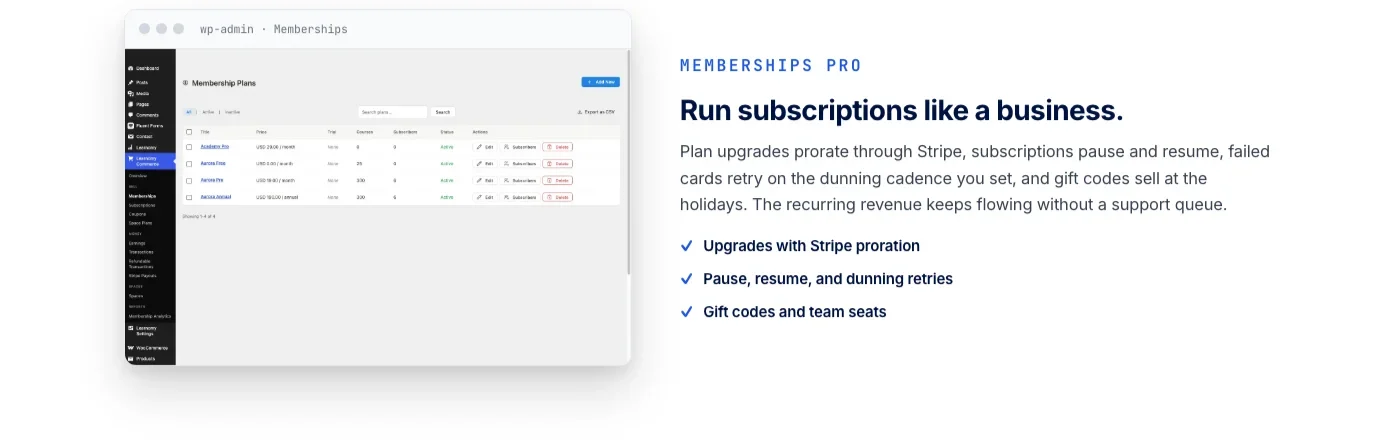
Memberships come with trial periods and an automatic pricing page, so a subscription-based school doesn’t need a separate plugin to handle recurring access. Coupons, reviews, announcements, and email templates round out the parts of running a course business that usually get scattered across three or four add-ons in a plugin-stack approach.
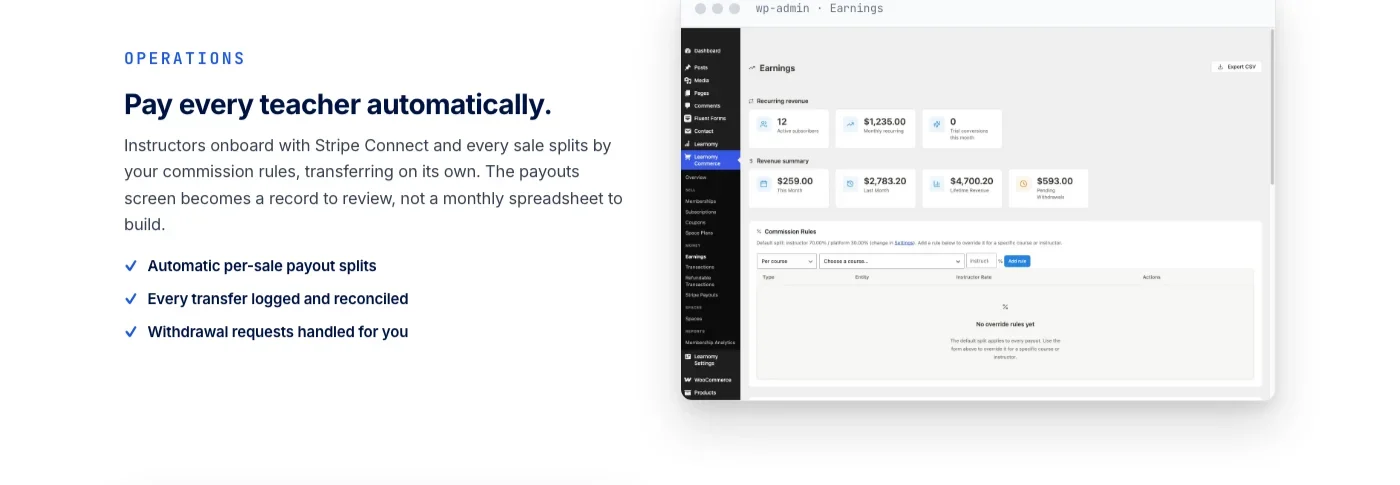
Instructor revenue sharing supports Udemy-style splits, with instructor applications and dashboards for schools that plan to scale past a single teacher. As a school adds instructors, the bookkeeping that would otherwise mean a manual spreadsheet, who sold what, who’s owed what, gets handled inside the platform instead.
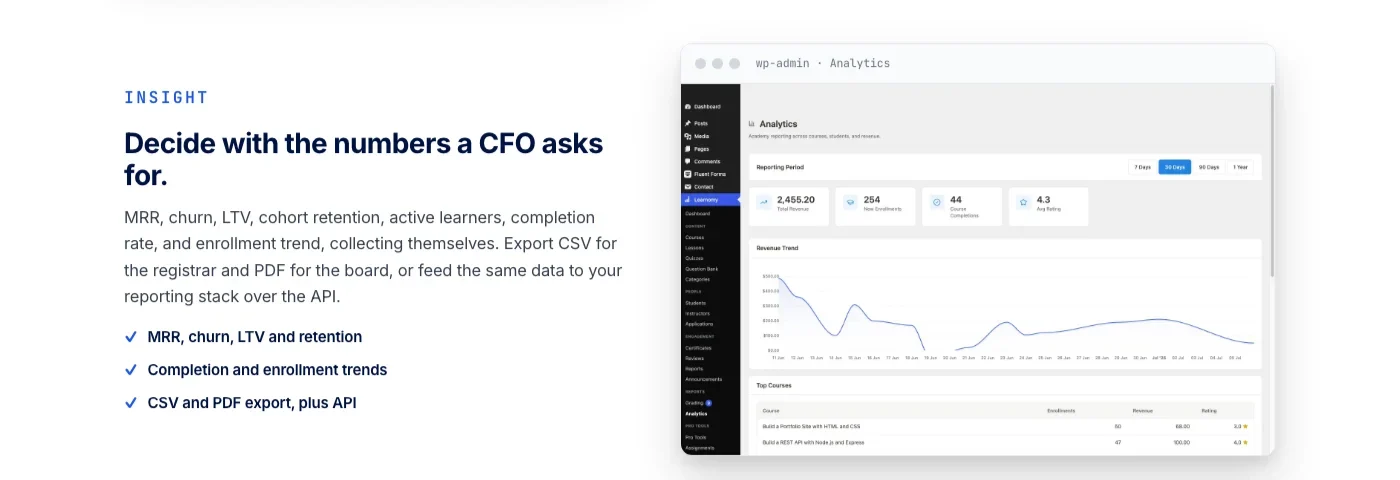
A school running for a few months needs answers a spreadsheet can’t give fast enough: which course is actually driving revenue, how enrollment is trending, where completion is dropping off. That reporting lives in the same platform as the checkout that generated the numbers in the first place, rather than requiring a separate analytics plugin pointed at a different data source.
The platform doesn’t stop at the transaction. A learning community can grow around a school, course discussion boards and Q&A sit alongside the lessons, gamified learning adds points, badges, and streaks for learners working through a curriculum, and a job board helps graduates turn a certificate into a lead on their next role. Course videos can be protected from casual downloading, and the whole thing runs under a design layer built for a school’s own branding: colors, typography, dark mode, and layouts that belong to the school rather than a borrowed template.
Switching in is built in too. A migration wizard imports directly from LearnDash, Tutor LMS, and LifterLMS, which matters if any of the plugins covered below turn out to be a stepping stone rather than a destination for a growing course business.
Best for: a course business that wants checkout, memberships, and instructor payouts working together from the first sale, instead of assembling them from separate plugins with separate renewal dates.
2. LearnDash: needs WooCommerce or a payment add-on
LearnDash is one of the most established course plugins on WordPress, and its course builder, quiz engine, and certificate tools are genuinely mature. Payments are a different story: LearnDash’s core plugin is built around course delivery, not commerce, so selling a course means routing the transaction through something else first.
The most common path is mapping each course to a WooCommerce product. That gets a school the entire WooCommerce toolkit, coupons, tax handling, order management, subscriptions through a separate extension, but it also means running the full weight of an eCommerce plugin for what might be a single-course catalog. The alternative is one of LearnDash’s own payment add-ons, which connects Stripe or PayPal directly without WooCommerce sitting in the middle, at the cost of a separate purchase and a narrower feature set than a full store plugin provides.
Either way, a school evaluating LearnDash needs to budget for that second piece before pricing out the course side. A course builder that looks complete in a demo can still leave a checkout gap the moment a real student tries to pay, and that gap is exactly where LearnDash sits until WooCommerce or a payment add-on is added on top.
Best for: a team that already runs, or is willing to run, a full WooCommerce store and wants LearnDash’s course tools layered on top of that existing commerce stack.
3. Tutor LMS: a monetization add-on does the selling
Tutor LMS’s free core is a genuinely capable course and quiz engine: drag-and-drop lesson building, several question types with automatic grading, and student and instructor dashboards that work out of the box. None of that free core includes a way to charge a student, though. Selling anything through Tutor LMS means connecting it to WooCommerce, Easy Digital Downloads, or a membership plugin like Paid Membership Pro, or turning on Tutor LMS’s own monetization add-on, which handles Stripe and PayPal charges and subscription plans once it’s active.
That structure puts Tutor LMS in a similar spot to LearnDash: the course-building half is strong on its own, and the payment half is a separate decision made after the fact. The monetization add-on route keeps a course seller inside one ecosystem instead of adding a full store plugin, which is worth checking if WooCommerce feels like more infrastructure than a single-course business needs. Either path adds a step between installing the plugin and taking a first payment, which is worth budgeting for during evaluation rather than discovering after building out a full course catalog.
Best for: a course creator who wants Tutor LMS’s course and quiz builder and is comfortable adding either WooCommerce or the monetization add-on as a deliberate second step.
4. LifterLMS: native payment options without WooCommerce
LifterLMS takes a different approach from LearnDash and Tutor LMS: commerce was part of the plan from the start rather than an afterthought handled by a third-party plugin. Official, purpose-built payment gateway add-ons connect Stripe and PayPal (and Authorize.net) directly to LifterLMS’s own checkout, memberships, and coupon system, without requiring WooCommerce to sit underneath it.
That native path matters for exactly the kind of course seller who doesn’t want a full store plugin running alongside their LMS. Memberships, one-time course purchases, and recurring subscriptions can all run through LifterLMS’s own system, keeping the checkout and the course delivery in one place rather than splitting the transaction from the content it’s paying for. A WooCommerce integration exists too, for stores that already run one and want the option, but it’s an addition rather than a requirement, which is the same pattern Learnomy uses on a broader platform.
Where LifterLMS’s free-tier gateway options fall short of a full commerce platform is in the depth of billing management, proration on plan changes, dunning on failed cards, and instructor revenue splits for multi-teacher schools tend to need paid add-ons or a different platform entirely. For a single-instructor school selling courses and memberships without complicated billing rules, though, LifterLMS’s native gateways cover the ground most course sellers actually need.
Best for: a single-instructor course or membership site that wants direct Stripe or PayPal checkout without adding WooCommerce as a dependency.
5. MemberPress plus an LMS: the membership plugin owns checkout
A fifth pattern shows up often enough in real course-business setups to earn its own entry: MemberPress paired with a separate LMS plugin, usually LearnDash, Tutor LMS, or LifterLMS running underneath it. In this setup, MemberPress does the selling, its own native Stripe, PayPal, and Authorize.net checkout handles the transaction, the paywall, and the recurring billing, while the LMS plugin handles lessons, quizzes, and progress tracking once a student is inside.
The appeal is real: MemberPress’s checkout and membership rules are mature on their own, and pairing it with an LMS plugin means neither side has to be the weakest link in the stack. The cost is the same integration-seam problem this whole guide is built around. Two plugins from two vendors means two update cycles, two support channels, and a membership rule engine that has to stay correctly wired to a course-gating system it wasn’t originally built to talk to. When that wiring breaks, silently or after an update, a paying student can lose access to a course they already bought, and diagnosing which of the two plugins caused it takes real troubleshooting time.
For a school that specifically wants MemberPress’s checkout and membership logic and is willing to maintain the seam between it and a course plugin, this combination works. For a school that would rather not own that seam at all, a platform where the checkout and the course delivery are built by the same team removes the question entirely.
Best for: a site that’s already standardized on MemberPress for its membership and paywall logic and wants a specific LMS plugin’s course tools layered underneath it.
Native checkout vs. requires an add-on: the comparison table
Laid side by side, the pattern each plugin uses becomes easier to compare than reading five separate sections back to back:
Plugin | Payment path | Native checkout or bolted on | WooCommerce required? |
|---|---|---|---|
Learnomy | Direct Stripe and PayPal, no platform fees on sales | Native, built into the platform itself | No, an adapter is optional for stores that already run one |
LifterLMS | Official Stripe, PayPal, and Authorize.net gateway add-ons from the LifterLMS team | Native, ships without WooCommerce | No, WooCommerce integration is optional |
LearnDash | WooCommerce product mapping, or a separate LearnDash payment add-on | Bolted on; checkout isn’t part of the core plugin | Effectively yes for most stores, or a dedicated add-on instead |
Tutor LMS | WooCommerce, Easy Digital Downloads, Paid Membership Pro, or Tutor’s own monetization add-on | Bolted on for the free core; native once the monetization add-on is active | Not required, but one of the more common paths |
MemberPress + LMS combo | MemberPress’s native Stripe, PayPal, and Authorize.net checkout | Native on the membership side; the LMS plugin handles delivery only | No, but two vendor-maintained plugins have to stay in sync |
The pattern worth noticing: only Learnomy and LifterLMS sell without needing either WooCommerce or a second paid add-on activated first. Everything else in this list treats commerce as a layer added after the course tools are already in place, which is a reasonable trade-off if a school specifically wants WooCommerce’s ecosystem, and an unnecessary detour if it doesn’t.
When you actually need a WooCommerce adapter
This is the question most course sellers researching this topic on a WooCommerce-focused site are actually trying to answer: given that WooCommerce already runs the rest of a store, does the course side need it too, or does a native checkout cover the job without adding another layer?
A WooCommerce adapter earns its keep when a store already has real infrastructure built around it: existing coupon campaigns, tax rules configured for multiple regions, a subscriptions extension already running recurring billing, or a checkout customization plugin that shapes the buying flow for every product on the site. In that situation, routing course sales through WooCommerce means a new course product inherits all of that configuration automatically instead of duplicating tax and coupon logic in a second, separate checkout system. Learnomy’s WooCommerce adapter exists specifically for this case: a store that already sells physical or digital products and wants course checkout to sit inside that same cart rather than running two disconnected systems side by side.
Native checkout is the better fit when the course is the product, not an addition to an existing catalog. A coach launching their first cohort, a consultant packaging a training course, or a school selling only courses and memberships doesn’t gain much from WooCommerce’s product-variation logic, shipping settings, or inventory management, none of which apply to a downloadable lesson. Running a second full commerce plugin for features that will never get used adds maintenance and a wider security surface without adding anything a student actually experiences at checkout.
A useful test before deciding: list what WooCommerce is doing on the site today that a course sale would actually need, shared coupon codes, a tax jurisdiction setup, an existing subscriptions extension, a specific checkout flow customers already trust. If that list is short or empty, native checkout is very likely the simpler, more maintainable choice. If the list is long, an adapter that plugs course sales into the store you already run beats standing up a parallel one.
Buying criteria: how to choose an LMS with payments built in
Course-builder features are the easy part of this comparison. The payment side is where a wrong choice actually costs money and support time, so it’s worth checking these before committing a course catalog to a plugin:
- Where does checkout actually live? Confirm whether Stripe or PayPal connects directly inside the LMS, or whether a purchase has to pass through WooCommerce or a separate paid add-on first. Marketing pages rarely spell this out clearly; a trial install usually does.
- What’s the real cost of “no platform fees”? A plugin that skips a per-sale cut still has a license cost, and a WooCommerce-dependent setup has WooCommerce’s own extension costs layered on top. Compare the full stack, not just the headline plugin price.
- Do coupons and trials work without another plugin? Discount codes and free-trial periods are common enough in course selling that they shouldn’t require a third extension to switch on.
- How does instructor revenue get split, if there’s more than one teacher? A single-instructor school can ignore this; a multi-instructor school can’t. Check whether revenue splits and payouts are handled inside the platform or need a manual process outside it.
- What’s the migration path if this isn’t the last plugin? Confirm what a destination platform can actually import before assuming a course catalog will move cleanly later. Learnomy’s migration wizard, for example, covers LearnDash, Tutor LMS, and LifterLMS specifically, not every course plugin on the market.
- Does an existing WooCommerce store change the calculation? If tax rules, coupons, and subscriptions already run through WooCommerce, an adapter that plugs into that setup can beat a fully native checkout. If there’s no existing store, that advantage disappears.
Common mistakes when picking a payment-ready LMS
The same handful of mistakes shows up across course-selling forums and support tickets, usually discovered right when a course business is trying to take its first payment:
- Choosing a plugin for its quiz builder, then discovering the checkout gap at launch. Course tools get evaluated first because they’re visible in a demo; payment gaps only show up once a real transaction is attempted.
- Assuming “WooCommerce integration” means checkout comes free. Some plugins connect to WooCommerce in their free tier; others require a paid add-on just to unlock that connection. Read the fine print rather than the feature-list headline.
- Comparing a self-hosted plugin’s zero-fee checkout to a hosted platform’s rent-plus-cut model without accounting for setup time. A native checkout genuinely saves money over time, but only if it’s actually configured correctly on day one; a rushed setup with untested coupons or a broken webhook costs more in refunds than it saves in fees.
- Not testing coupons, trials, and failed-payment handling before launch. These are the parts of checkout that only get exercised once real customers start buying, which is the worst time to discover they don’t work.
- Skipping the migration question until it’s urgent. A course business that outgrows its current plugin needs to know in advance what a destination platform can actually import, not after the decision to switch has already been made under pressure.
- Confusing “sells a membership” with “sells an individual course.” Some combinations handle recurring access well and one-time course purchases poorly, or the reverse. Match the plugin’s strength to the actual pricing model the school plans to run.
FAQ
Does LearnDash have built-in payment processing?
Not in the core plugin. Selling a LearnDash course means mapping it to a WooCommerce product or adding a separate LearnDash payment add-on that connects Stripe or PayPal directly. Either way, payment is a decision made after installing the plugin, not something that works out of the box.
Can I sell courses with Tutor LMS without WooCommerce?
Yes, through Tutor LMS’s own monetization add-on, which handles Stripe and PayPal charges and subscription plans once it’s active. The free core alone has no way to take a payment, so either the monetization add-on or a connection to WooCommerce, Easy Digital Downloads, or a membership plugin is required first.
Does LifterLMS require WooCommerce to sell courses?
No. LifterLMS ships with official Stripe, PayPal, and Authorize.net gateway add-ons that connect directly to its own checkout, memberships, and coupon system. WooCommerce integration exists as an option for stores that already run one, but it isn’t required to accept a payment.
What does “no platform fees” actually mean when comparing LMS checkout options?
It means the plugin or platform doesn’t take a cut of what a student pays, on top of whatever license or subscription the school already pays for the software itself. Learnomy’s checkout runs this way: what a student pays goes to the school, not split with a marketplace on every transaction. It’s a separate question from whether Stripe or PayPal charge their own standard processing fee, which every option on this list is still subject to.
Do I need WooCommerce if I use Learnomy?
No. Learnomy’s checkout connects directly to Stripe and PayPal without WooCommerce in the stack. A WooCommerce adapter is available for stores that already sell other products and want course checkout to sit inside that same cart, but it’s an option for an existing store, not a requirement to start selling courses.
Can I migrate from LearnDash or Tutor LMS to a platform with native checkout?
Learnomy’s migration wizard imports directly from LearnDash, Tutor LMS, and LifterLMS specifically. If a course catalog currently lives on one of those three plugins, that’s a supported move rather than a manual rebuild.
Is MemberPress an LMS on its own?
MemberPress is a membership and paywall plugin first, with its own native Stripe, PayPal, and Authorize.net checkout. In the combination covered in this guide, MemberPress handles the transaction and access rules while a separate LMS plugin, usually LearnDash, Tutor LMS, or LifterLMS, handles the actual lessons, quizzes, and progress tracking.
Which option makes the most sense for a solo course creator versus a multi-instructor school?
A solo creator selling a handful of courses can get by with LifterLMS’s native gateways or a straightforward WooCommerce-plus-LearnDash setup, since instructor revenue splitting doesn’t come into play. A school planning to onboard multiple paid instructors needs revenue-sharing and payout tracking handled without a manual spreadsheet, which is where a platform like Learnomy, built with instructor applications, dashboards, and per-sale commission splits from the start, saves real operational work as the school grows past one teacher.
For the wider landscape of free-tier course plugins beyond the payment question, our honest guide to free WordPress LMS plugins covers what each plugin’s free tier actually includes. And if a WooCommerce store is already part of the plan, the deeper walkthrough on building a WooCommerce online course platform covers course-as-product setup, drip content, and group enrollment in detail.
Want checkout that doesn’t need a second plugin?
Learnomy sells courses and memberships directly through Stripe and PayPal, with no platform fees on sales, instructor revenue splits built in, and a migration wizard for LearnDash, Tutor LMS, and LifterLMS sites ready to move.
Plugins we build and run
We maintain these ourselves, which is why we can support them on your site.
- BuddyNextThe self-hosted community engine for WordPress
- BuddyXFree community theme, Pro when you outgrow it
- ReignPremium community theme. Add pieces, build anything
- JetonomyCommunity forum and Q&A for WordPress
- EventonomyEvents and RSVPs for WordPress communities
- LearnomyCourses and learning communities on WordPress
- ListoraDirectories and listings your members can browse
- SnipShareCode sharing built for developer communities
- WB Ad ManagerAd placements that turn traffic into revenue
- WP Career BoardA job board your community actually uses
- WP Sell ServicesSell services with offers, orders, and payouts
- MediaVersePhotos, video, and media albums for members
- WB GamificationPoints, badges, and rewards that keep members active
- Product RoadmapPublic roadmaps with voting your users trust