WooCommerce LMS Integration: Complete Course Platform Guide
Build a WooCommerce online course platform by integrating LearnDash or LifterLMS, configuring courses as products, setting up drip content, enabling student progress tracking, and handling group enrollments for corporate buyers.

Every time I quote a client for a WooCommerce LMS integration, the conversation starts the same way: they have looked at Teachable or Thinkific, decided those platforms do not give them enough control over the purchase flow and pricing, and now want to run their courses through WooCommerce instead.
That is the right instinct. WooCommerce gives you full control over coupons, upsells, subscription billing, and the checkout experience. The LMS plugin then handles the course content, student progress, and certificates. This guide covers how to connect those two pieces in a way that actually holds up when you have hundreds of students and need to sell to corporate buyers with group licenses.
Updated September 2026.
A note on scope: this guide focuses on LearnDash and LifterLMS specifically, since they cover the large majority of client requests we get for WooCommerce-based course platforms, with a comparison to a complete-platform alternative near the end for teams starting from zero.
In This Guide
- Why Build Course Sales on WooCommerce Instead of a Hosted Platform
- Choosing Your LMS: LearnDash vs. LifterLMS
- Course as a Product: The Integration Model
- Drip Content Configuration
- Quiz and Certificate Setup
- Student Progress Tracking & Instructor Dashboards
- Group Enrollments for Corporate Buyers
- Course Upsells and Bundles
- Handling Refunds, Chargebacks, and Access After the Refund Window
- Performance at Scale
- Checkout Experience for Course Sales
- Testing Your Enrollment Flow Before Launch
- Learnomy: A Complete Learning Platform, Not a Two-Plugin Stack
- SEO and Discoverability for Your Course Catalog
- Accessibility Considerations for Course Content
- Integration with the Rest of WooCommerce
- Frequently Asked Questions
- Putting It Together
Key Takeaways
- LearnDash fits stores that already run WooCommerce and want to bolt courses on; LifterLMS fits course businesses that need memberships and certificates without a second add-on.
- The parts that actually break at scale are rarely the course builder, they are subscription grace periods, partial refunds on bundles, serialized progress data, and corporate group licensing.
- Test the full enrollment flow with real payment gateway test modes before launch. Manually marking an order “completed” in wp-admin skips the hooks a real purchase triggers and hides broken automation.
- If you are starting from zero rather than extending an existing WooCommerce build, a complete platform like Learnomy skips most of this integration work entirely, see the comparison below.
Why Build Course Sales on WooCommerce Instead of a Hosted Platform
Before wiring a course plugin into WooCommerce, it is worth being clear about what you are trading for what. Hosted platforms like Teachable, Thinkific, and Kajabi hand you a checkout, a student dashboard, and a certificate system on day one. In exchange, they charge a monthly subscription and take a cut of every sale, and your student records live in their database rather than yours.
Building on WooCommerce plus an LMS plugin flips that trade. You get coupons, subscriptions, upsells, and a checkout you fully control, and every student record sits in your own WordPress database. What you give up is the “it just works” simplicity of a hosted platform, the integration between the store and the course engine is now something you have to build and maintain yourself.
This guide is written for the second group: teams that have decided the control is worth the integration work, and now need that integration to hold up past the first fifty students, not just on a demo site with three test enrollments.
Choosing Your LMS: LearnDash vs. LifterLMS
These are the two LMS plugins I have used in production. Both have mature WooCommerce integrations and active development teams. The choice usually comes down to specific feature requirements, which the table below lines up directly.
Aspect | LearnDash | LifterLMS |
|---|---|---|
WooCommerce integration | Official add-on connects product purchases to course access | Built-in checkout, plus an optional WooCommerce integration |
Add-on ecosystem | Larger, more third-party add-ons available | Smaller ecosystem, but core plugin covers more out of the box |
Memberships & certificates | Require separate add-ons (Groups, certificate add-on) | Included in the core plugin |
Corporate group licensing | Groups add-on, functional but needs configuration | Not a core focus; usually needs custom development |
Best fit | Existing WooCommerce store adding courses | Course business is the primary product |
For most client projects I recommend LearnDash when the client already has a WooCommerce store and wants to add courses. I recommend LifterLMS when the course business is the primary product and the client does not need deep WooCommerce integration for their existing catalog.
Course as a Product: The Integration Model
LearnDash WooCommerce Integration
The official LearnDash WooCommerce integration works by hooking into the WooCommerce order completion flow. You create a WooCommerce product for each course (or a bundle product covering multiple courses), then in the LearnDash course settings you link that product to the course. When an order completes, the integration automatically enrolls the customer in the linked course.
The integration also handles refunds: if the WooCommerce order is refunded, the course access is removed. This is the behavior you want for most setups.
One edge case is partial refunds on bundle orders. If a customer bought a three-course bundle and requests a refund for one course, the integration removes all course access. You need custom logic to handle partial refund scenarios if that is a business requirement.
Product Variations for Course Tiers
A common course product structure is to sell tiers: Basic (course access only), Premium (course plus community), VIP (course plus community plus 1-on-1 coaching call). Implement this with WooCommerce product variations.
Each variation maps to a different set of LearnDash courses or groups. The variation meta stores the LearnDash course IDs or group IDs to enroll on purchase. The order completion hook reads the variation meta and makes the enrollment calls accordingly.
Subscription-Based Course Access
For ongoing access models (pay monthly, access all courses), combine WooCommerce Subscriptions with LearnDash groups. Whether recurring access is the right call in the first place, rather than selling courses one at a time, is worth settling before you build the integration; our comparison of one-time course sales versus a recurring membership model walks through the tradeoffs. The moving pieces break down into a short sequence:
- Create a LearnDash group that contains all your courses.
- Add a WooCommerce Subscriptions product that grants group membership on purchase.
- Hook into
woocommerce_subscription_status_activeto add the student to the group. - Hook into
woocommerce_subscription_status_cancelledto remove them. - On
woocommerce_subscription_status_on-hold(a failed payment), schedule a WP-Cron job for 72 hours later rather than revoking access immediately. - If the subscription reactivates within that grace window, cancel the scheduled job so access is never incorrectly revoked.
Most clients prefer that 3-day grace period before suspending access, since a single failed card charge should not instantly lock a paying student out of a course they are actively working through.
Drip Content Configuration
LearnDash Drip Settings
LearnDash has built-in drip content at the lesson level. You can set each lesson to become available a fixed number of days after the student enrollment date. This is the most common drip pattern for self-paced courses: enroll on day 1, week 1 content unlocks immediately, week 2 content unlocks after 7 days, and so on.
The drip settings also support scheduled dates (a lesson becomes available on a specific calendar date regardless of enrollment date), which is useful for cohort-based courses where everyone starts the same week. For a cohort model, set the drip type to Lesson Available On with a fixed date for each lesson.
Custom Drip Logic
The built-in drip settings cover most cases, but I have built custom drip logic for clients who need milestone-based unlocking rather than time-based. The most common request is: Lesson 3 unlocks only after the student completes the quiz at the end of Lesson 2.
For milestone-based drip, hook into the learndash_lesson_completed action, check whether the completed lesson was a prerequisite for another lesson, and update the drip availability date on the next lesson to the current date.
Quiz and Certificate Setup
LearnDash Quiz Engine
LearnDash has a solid quiz builder with multiple question types: multiple choice, true/false, free-form text, essay, fill-in-the-blank, sorting, and matching. Quizzes can be set to require a passing score before the student proceeds, or they can be informational (no pass/fail). Setting a pass percentage and enabling the Lock Quiz option blocks course progression until the student passes.
For certification courses where the quiz result matters legally or professionally, store quiz attempts and scores in a custom table rather than relying solely on LearnDash user meta storage. User meta scales poorly when you have thousands of students with multiple quiz attempts each. A custom table with student_id, quiz_id, attempt_date, score, and pass/fail allows indexed queries for reporting.
Timed quizzes are a common requirement for compliance training. LearnDash supports time limits on quizzes, but the timer runs client-side in JavaScript. For high-stakes quizzes where gaming the timer is a concern, record the quiz start time server-side when the student loads the quiz page and validate on submission that the elapsed time falls within the allowed window.
Certificate Generation
LearnDash generates PDF certificates on course completion. You define a certificate template (HTML/CSS), and LearnDash fills in the student name, course name, and completion date. The default system uses dompdf for the PDF generation.
For certificates that need custom design beyond what the LearnDash template system supports, replace the PDF generation with a custom implementation.
Student Progress Tracking & Instructor Dashboards
LearnDash Progress Data
LearnDash stores student progress in WordPress user meta. The main meta keys are: _sfwd-course_progress (tracks which lessons and topics are completed for each course) and _sfwd-quizzes (stores quiz attempt data). These meta keys hold serialized arrays, which makes direct database querying difficult at scale.
For reporting dashboards that need to show completion rates across all students, do not query user meta directly for each student. Instead, build a denormalized reporting table that stores summary progress records: student_id, course_id, lessons_completed, lessons_total, last_activity, completion_date. Update this table via a hook on learndash_lesson_completed and learndash_course_completed.
Instructor Dashboards
If your platform has multiple instructors (each managing their own courses), you need an instructor-facing dashboard. I build a custom WP admin page for instructors using the denormalized progress table. It shows enrollment counts, average progress, completion rates, and quiz scores per course, which is also where you can catch students falling behind before they quietly stop logging in. Our guide on spotting which students are progressing and which ones have stalled covers the reporting patterns worth building into that view.
Add an export function so instructors can pull a CSV of student progress for their own records or to share with an employer who needs completion reports.
Group Enrollments for Corporate Buyers
The Group Model
Corporate buyers typically want to buy course access for their team and then manage enrollment themselves rather than having each employee purchase individually. In LearnDash, this maps to the Groups feature: you create a LearnDash group, add courses to the group, and add employees as group members.
The group leader (the HR manager or training coordinator) can add and remove members from the group through a front-end group management interface.
The WooCommerce product for a group license is a simple or variable product where the variation defines the seat count: 10-seat license, 25-seat license, 50-seat license. On purchase, create the LearnDash group automatically with the seat limit set to the purchased count. Store the group ID in the order meta so the group leader can be identified and directed to the group management page.
Custom Group Management Front End
LearnDash’s default group management interface is basic. Corporate clients expect something cleaner: a dashboard where they can see all their seats, who is using each seat, and add or remove people by email address.
I build this as a custom WooCommerce My Account endpoint, the same pattern used for license management dashboards in plugin shops. If you are also selling software alongside your courses, our guide on WooCommerce license key generation covers the same My Account endpoint pattern for seat-based access management.
Course Upsells and Bundles
WooCommerce handles course upselling the same way it handles product upselling: linked products shown on the course product page. For course platforms, the more effective patterns are:
- Post-purchase upsell: After completing course A, show an offer to purchase course B at a discount. Trigger this from the
learndash_course_completedhook: store the completion event, then display a WooCommerce-powered offer on the student dashboard. - Bundle discounts: A WooCommerce grouped product or a custom bundle that offers 3 courses at the price of 2. The bundle product links to all three course products for enrollment purposes.
- Subscription upsell: Students who have purchased individual courses and are close to spending the equivalent of an annual subscription should see a prompt to switch to the subscription.
Track upsell performance the same way you would track any other conversion path in WooCommerce Analytics: which offer triggered the sale, at what point in the course, and at what discount depth. Without this tracking, it is easy to keep running an upsell that feels intuitively right but is not actually converting, since course upsells do not show up separately from any other WooCommerce order unless you tag them at checkout.
Handling Refunds, Chargebacks, and Access After the Refund Window
Most course platforms offer a 30-day refund window. The challenge is that a determined student can complete the course in the first week and then request a refund on day 25. To mitigate this, track course completion percentage and set a policy: refunds are not available after the student has completed more than 30% of the course content. Enforce this in the WooCommerce refund flow by checking the student LearnDash progress when a refund is requested through My Account.
Chargebacks need a separate policy from refunds, since a chargeback bypasses your refund rules entirely and goes through the payment processor instead of your WooCommerce refund flow. Set up a webhook or scheduled check that revokes course access automatically when a chargeback is recorded against an order, rather than relying on someone noticing the payment gateway notification email.
Left unhandled, a chargeback leaves the student with course access and the store with lost revenue and a processor dispute fee on top of it. Document the chargeback policy in your terms of service too, since a clear written policy is what your payment processor will ask for if you need to contest a dispute later.
Performance at Scale
Course platforms have a specific traffic pattern: low traffic most of the time, spikes when a new course launches or when an email campaign goes out. The lesson page is the most visited page and needs to load fast. Three things that help:
- Object caching. LearnDash makes multiple user meta queries per lesson page load to check access permissions. With object caching (Redis or Memcached), these queries hit cache after the first request. Without caching, a lesson page load can trigger 15-20 database queries just for the access checks.
- Separate the marketing site from the LMS. The public course catalog and sales pages can be aggressively cached. The lesson pages cannot be cached (they are personalized per student). Run the public pages through a CDN or page cache and exclude the lesson URL pattern from caching.
- LearnDash transient caching. LearnDash has a built-in transient cache for course and lesson data. Enable it in LearnDash > Settings > Advanced. This reduces the number of database queries for course structure lookups.
Media delivery is worth a separate look too. Serving course videos directly from your WordPress media library works fine for a handful of students, but it puts real load on your server once dozens of students are streaming lessons at the same time, especially around a cohort start date when everyone logs in the same week.
A video hosting service or CDN built for video, rather than a generic file CDN, handles adaptive bitrate and concurrent streams in a way self-hosted video on shared hosting usually cannot.
Checkout Experience for Course Sales
The checkout experience for courses differs from physical products in a few important ways. Students often want to review the course curriculum before buying, so the product page needs a detailed lesson list with locked lesson indicators for content they cannot access before enrolling. Preview lessons (free samples) are a standard expectation.
The checkout should not ask for a shipping address. Add a filter to remove shipping fields from the WooCommerce checkout for course-only orders. Check the cart contents: if all products have a custom digital-only flag (set via product meta), remove the shipping fields with woocommerce_checkout_fields. Students buying a mix of physical merchandise and courses still need shipping, so the filter should be conditional, not global.
Testing Your Enrollment Flow Before Launch
The enrollment flow is the one piece of a course platform you cannot afford to find broken after a launch email has already gone out. A short manual test pass before opening sales catches most of the failure modes that otherwise turn into refund requests and support tickets in week one.
- Full-price purchase to enrollment. Buy a course with a live test card (Stripe and PayPal both support test mode), confirm the order completes, and confirm the course actually appears in the student account without a manual step.
- Coupon-based purchase. Apply a launch discount coupon and confirm the discounted order still triggers enrollment. Coupon logic occasionally interferes with order-completion hooks if a plugin checks the order total rather than the line items.
- Bundle and variation purchases. If you are selling tiered products (Basic, Premium, VIP), buy each tier once and confirm the correct course or group gets assigned for that specific variation, not just the base product.
- Refund and access removal. Refund a test order and confirm course access is actually removed, not just flagged in the order notes. This is the check most teams skip, and it is the one that matters most for refund-window abuse.
- Subscription cancellation and reactivation. If you are running subscription-based access, cancel a test subscription and confirm the grace period behaves as configured, then reactivate within the grace window and confirm access was not incorrectly revoked early.
- Group license seat management. For corporate group licenses, add and remove a seat as the group leader and confirm the employee access changes immediately, not after a cache clear or a cron run.
Run this checklist in a staging environment with real payment gateway test modes, not by manually toggling an order status to “completed” in wp-admin. Manually completing an order in the admin skips the webhooks and hooks that real payment gateways trigger, which means a manual test can pass while the actual checkout flow silently fails for real customers.
Learnomy: A Complete Learning Platform, Not a Two-Plugin Stack
Everything covered above, connecting a WooCommerce product to a course, configuring drip content, tracking progress at scale, is work you take on because LearnDash and LifterLMS are built as course engines first and leave selling, memberships, and payouts to WooCommerce or their own add-ons.
Learnomy starts from a different position: it is a complete learning platform for WordPress, the online school you own, with the selling layer built into the same product instead of assembled from a second plugin.
For a WooCommerce-focused audience, the part worth knowing is that Learnomy does not force a choice between using WooCommerce and skipping it. Its checkout runs directly through Stripe and PayPal with no platform fees on what students pay, and it ships a WooCommerce adapter for stores that already have a WooCommerce catalog and want courses sitting in the same cart instead of running a parallel checkout. That adapter is the piece that matters most if you already have the kind of WooCommerce build this guide is aimed at: coupons, subscriptions, and product variations that took real development time to get right.
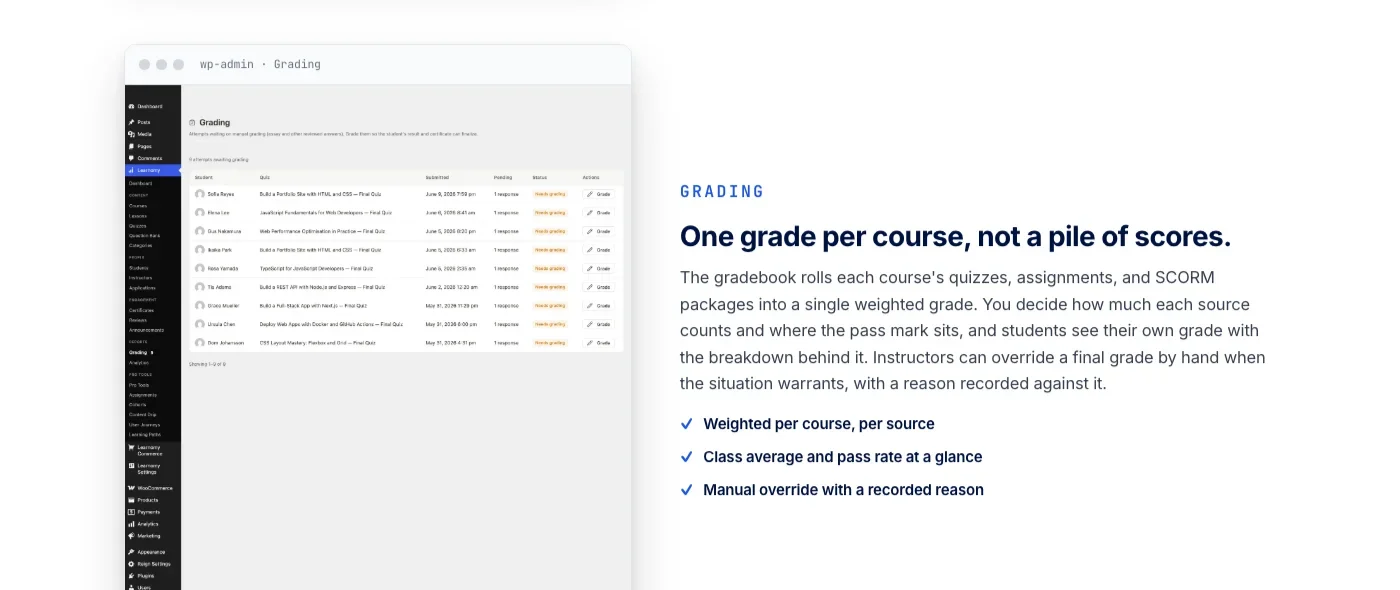
On the teaching side, Learnomy covers the same ground as LearnDash and LifterLMS: course creation across video, audio, PDF, and reading lessons; six quiz types with partial credit, question banks, an essay-grading inbox, and anti-cheat tab-switch tracking on timed quizzes; and cryptographically signed certificates with a QR-verifiable public verify page and a visual certificate designer, useful for the same compliance and credentialing scenarios covered earlier in this guide.
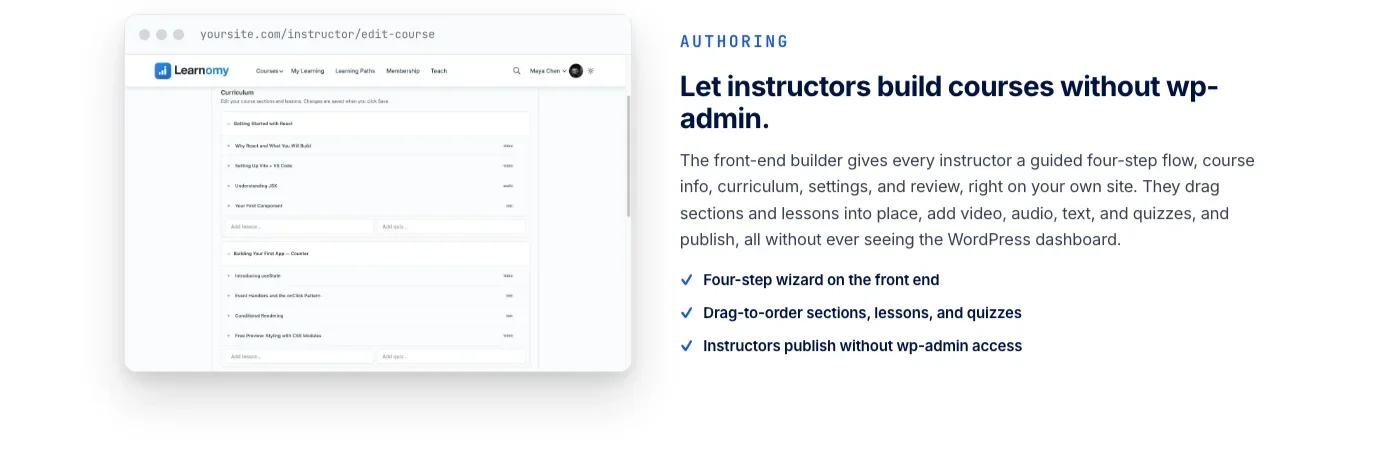
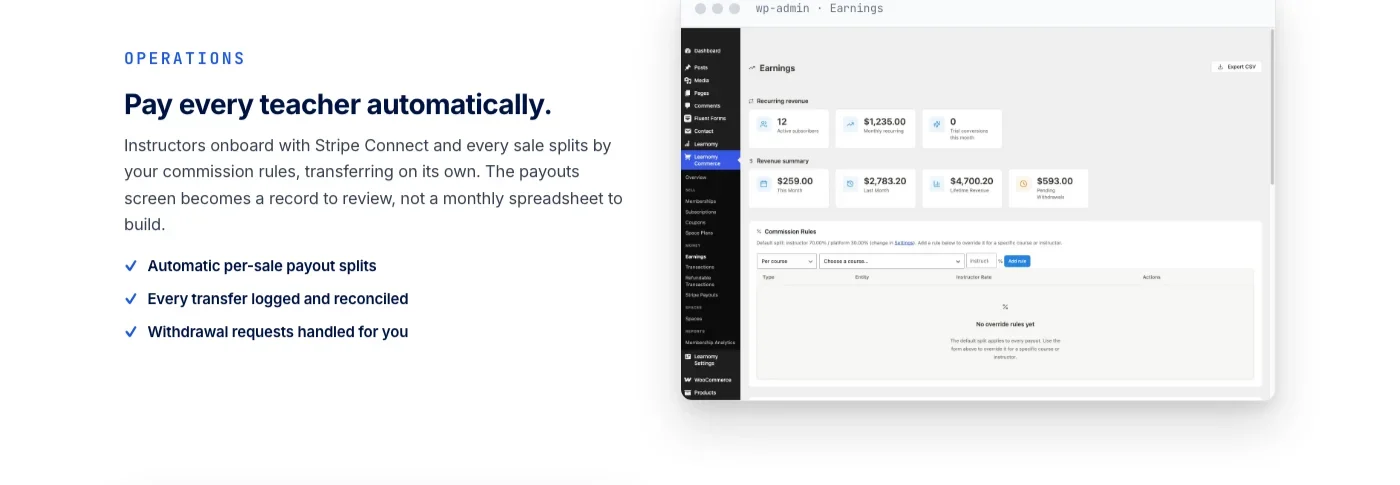
Memberships come with trials and an automatic pricing page, and schools with more than one teacher get Udemy-style instructor revenue sharing with instructor applications and dashboards, the built-in equivalent of the custom instructor dashboard described above under student progress tracking.
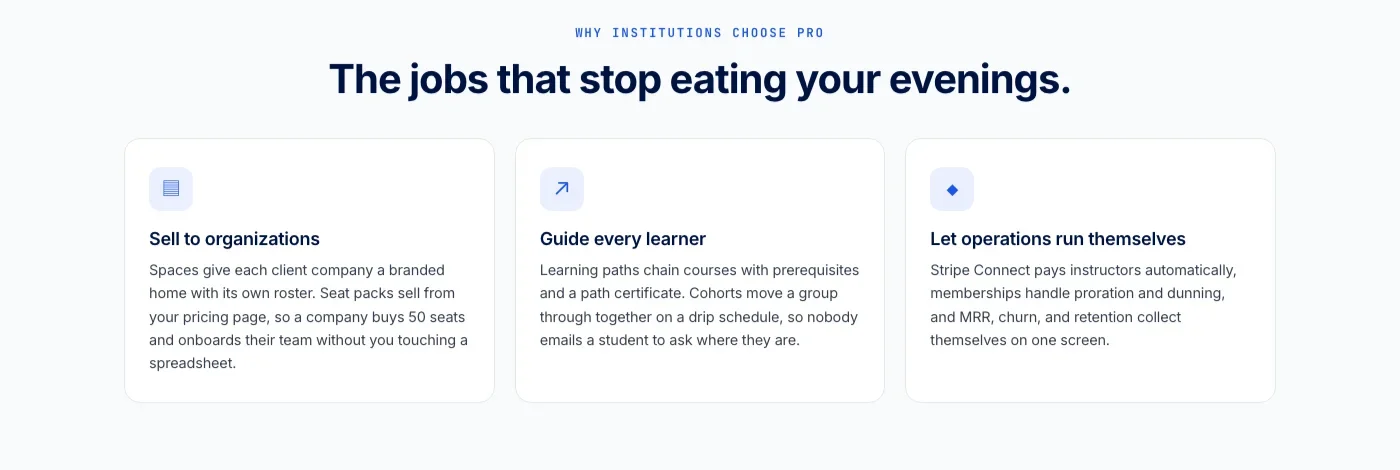
The platform grows past courses on its own terms too: a learning community around your school, course discussion boards and Q&A, gamified learning with points and badges, a job board for graduates, protection for your course videos, and full branding and design control, all from the same team rather than a separate plugin for each. If you are migrating off LearnDash or LifterLMS specifically, Learnomy ships a migration wizard built for exactly those two platforms, plus Tutor LMS, rather than a generic importer that leaves the reconciliation work to you.
When this is the better starting point: a new course business without an existing WooCommerce store built out, or a LearnDash/LifterLMS site where the WooCommerce integration, memberships, and certificates were all custom-built separately and are due for consolidation.
When the stack in this guide still makes more sense: a store with WooCommerce customizations, subscription logic, and product catalog architecture already deeply built out, where adding an adapter to an existing investment beats replacing it.
SEO and Discoverability for Your Course Catalog
Course pages compete for search visibility the same way any product page does, with one advantage: structured data built specifically for courses. Adding Course schema markup (the schema.org Course type) to each course product page gives Google enough information to show rich results, including price, rating, and provider, directly in search listings.
LearnDash and LifterLMS do not add this markup automatically. You need a schema plugin that supports the Course type, or custom JSON-LD output added to the course template.
Sitemaps need the same attention. If your course products are WooCommerce products, they are usually already covered by your WooCommerce or SEO plugin’s product sitemap. If courses are a custom post type outside WooCommerce, confirm they are included in your sitemap configuration specifically, since some SEO plugins exclude custom post types from the sitemap by default until you register them.
Search within the course catalog itself matters once you have more than a handful of titles. WordPress’s default search only indexes post titles and excerpts well, which misses a student searching for a specific topic covered inside a lesson rather than in the course title. A full-text search solution that indexes lesson content, not just course titles, meaningfully improves the odds a visitor finds the right course instead of leaving to search on Google instead.
Accessibility Considerations for Course Content
Course content has an accessibility profile that a typical marketing page does not: video lessons need captions, PDFs need to be screen-reader friendly, and timed quizzes need an accommodation path for students who need more time. None of this is optional for a school selling to corporate buyers or public institutions, where accessibility compliance is often a contractual requirement rather than a nice-to-have.
For video lessons, auto-generated captions are a starting point, not an ending point. Review and correct auto-captions before publishing, since technical terminology and product names are exactly what auto-caption tools get wrong most often.
For quizzes, build in a way to grant individual students extended time without changing the quiz configuration for everyone else. This is usually a per-user meta flag checked before the timer starts, rather than a global setting.
Keyboard navigation through the lesson sidebar and quiz interface is worth testing directly rather than assuming a plugin handles it out of the box. Tab through an entire lesson and quiz without touching a mouse before launch, since this is the fastest way to find focus traps and unlabeled buttons that a purely visual review misses.
Integration with the Rest of WooCommerce
One of the main reasons to build on WooCommerce rather than a standalone LMS platform is access to the WooCommerce ecosystem. A few integrations that add real value on course platforms:
- WooCommerce coupons for course launches. Time-limited launch discounts and early-bird coupons work out of the box. No custom code needed.
- Affiliate programs via WooCommerce affiliate plugins. Affiliates earn a commission on course sales, tracked through WooCommerce order attribution.
- Email marketing integration. Tag students in your email list based on which courses they are enrolled in, using WooCommerce email platform integrations (Mailchimp, ConvertKit, ActiveCampaign).
- WooCommerce Analytics for course revenue reporting. Course products appear in WooCommerce Analytics like any other product, giving you revenue per course, refund rates, and customer lifetime value by course.
The patterns for extending WooCommerce product data for courses parallel the general approach for any custom product type. Our guide on building custom WooCommerce product types covers the base class architecture that applies when you need LearnDash course enrollment to behave differently from a physical product in the cart and fulfillment flow. For the hooks and REST endpoints referenced throughout this guide, our WooCommerce developer guide to hooks, plugin architecture, and REST API endpoints is the reference to keep open in a second tab.
This series also covers other WooCommerce industry configurations. If you are building for the food and beverage space, see our guide on setting up WooCommerce for food delivery with zone-based ordering, which walks through the same kind of custom business logic needed when standard WooCommerce assumptions do not match your industry requirements. And if you have not yet decided between a two-plugin stack and a complete platform, our broader comparison of the best WordPress LMS plugins for 2026 covers six options side by side, including where each one fits by business type.
Frequently Asked Questions
Does the LearnDash WooCommerce integration handle partial refunds on a course bundle?
Not automatically. The default behavior removes access to the entire bundle when any part of the order is refunded. If a customer should keep access to two courses in a three-course bundle after a partial refund, that requires custom logic on top of the standard integration, not a setting you can toggle.
How do I remove the shipping address fields from checkout for course-only orders?
Check the cart contents for a digital-only product meta flag, then conditionally remove the fields with the woocommerce_checkout_fields filter. Make the check conditional rather than global, since a cart mixing a physical item with a course still needs a shipping address.
What happens to a student’s course access if a subscription payment fails?
With the setup described in this guide, a failed payment moves the subscription to on-hold and starts a grace period, typically 72 hours, before access is revoked. If the payment recovers and the subscription reactivates within that window, the scheduled revocation is cancelled and access is never interrupted.
Should quiz progress live in WordPress user meta or a custom database table?
User meta is fine for a small course with a handful of students. Once you have thousands of students with multiple quiz attempts each, serialized user meta becomes slow to query for reporting. A custom table indexed on student and quiz IDs is the more scalable choice for certification programs or any dashboard that needs to report on completion rates.
Can a corporate group license be resized or reassigned mid-term?
Yes, if the group management interface supports it, but this is exactly the piece LearnDash’s default group tools handle only at a basic level. Most corporate buyers expect to add and remove seats without contacting support, which is why a custom group management front end, built as a WooCommerce My Account endpoint, is worth the development time for B2B course sales.
Do I need WooCommerce at all to sell courses on WordPress?
No. LearnDash, LifterLMS, and every other course plugin can technically be extended into WooCommerce, but it is not the only path. Learnomy, for example, includes its own direct Stripe and PayPal checkout with no platform fees on what students pay, and only adds a WooCommerce adapter for stores that already run WooCommerce and want courses in the same cart.
How long does a typical WooCommerce plus LMS integration take to build?
A basic course-as-product setup with LearnDash or LifterLMS can be working in a few days. The timeline stretches once you add drip content, group licensing for corporate buyers, subscription-based access with grace periods, and custom reporting dashboards, those pieces are what typically take a project from a weekend task to several weeks of development.
Does Course schema markup get added automatically by LearnDash or LifterLMS?
No. Neither plugin adds schema.org Course markup out of the box. You need a schema plugin that supports the Course type or custom JSON-LD added to the course template to get the rich search result treatment Google offers for course listings.
Putting It Together
There is no single right answer between LearnDash-plus-WooCommerce, LifterLMS-plus-WooCommerce, and a complete platform like Learnomy. The right choice depends on what already exists.
A store with years of WooCommerce customization behind it usually gets more value from adding a mature LMS integration than from replacing the checkout entirely. A course business starting from zero, or one that has spent a year maintaining a stack of add-ons just to reach feature parity with a hosted platform, gets more value from starting with a platform that includes selling, memberships, and certificates from day one.
Whichever path you take, the fundamentals in this guide hold either way: test the enrollment flow end to end before launch, treat student progress data as something that needs to scale, plan for chargebacks and partial refunds before they happen instead of after, and make sure the course catalog is as easy to find in search as the checkout is easy to complete once a student gets there.
Starting a course business without a WooCommerce build to extend? Learnomy bundles course creation, checkout, memberships, and instructor payouts into one platform, so there is no second plugin to license and no integration layer like the one in this guide to build and maintain.
Students pay you directly with no platform fee taken off the top, and your school keeps running on your own domain even if you eventually stop paying for support and updates.
Plugins we build and run
We maintain these ourselves, which is why we can support them on your site.
- BuddyNextThe self-hosted community engine for WordPress
- BuddyXFree community theme, Pro when you outgrow it
- ReignPremium community theme. Add pieces, build anything
- JetonomyCommunity forum and Q&A for WordPress
- EventonomyEvents and RSVPs for WordPress communities
- LearnomyCourses and learning communities on WordPress
- ListoraDirectories and listings your members can browse
- SnipShareCode sharing built for developer communities
- WB Ad ManagerAd placements that turn traffic into revenue
- WP Career BoardA job board your community actually uses
- WP Sell ServicesSell services with offers, orders, and payouts
- MediaVersePhotos, video, and media albums for members
- WB GamificationPoints, badges, and rewards that keep members active
- Product RoadmapPublic roadmaps with voting your users trust