Every Shopify App Gets Your Store's Data: What You Hand Over, and How to Keep Control
Every Shopify app you install gets access to part of your store data, and many keep their own copy. Here is what apps can see, what Shopify enforces, and how to audit and cut your app list.

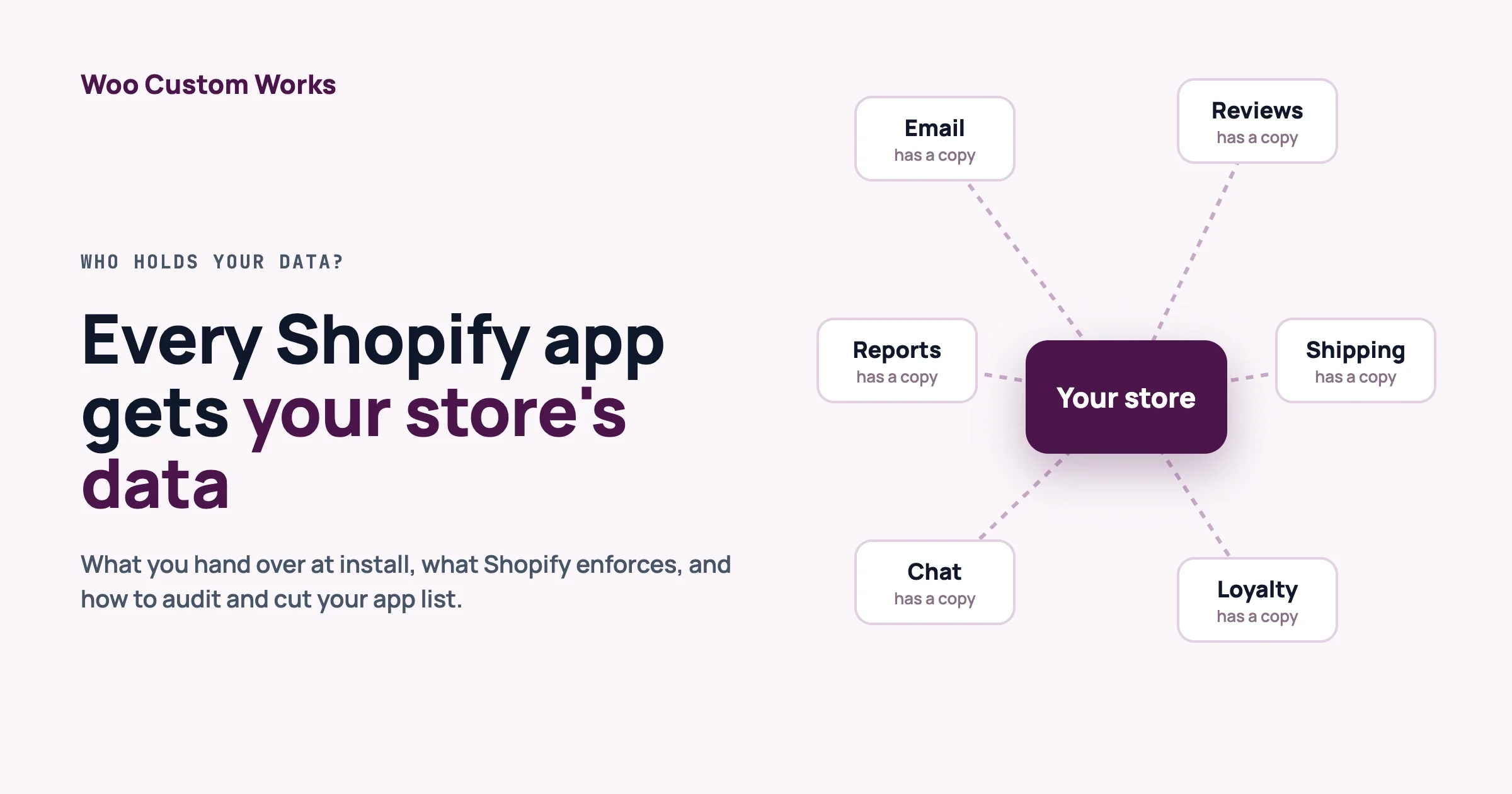
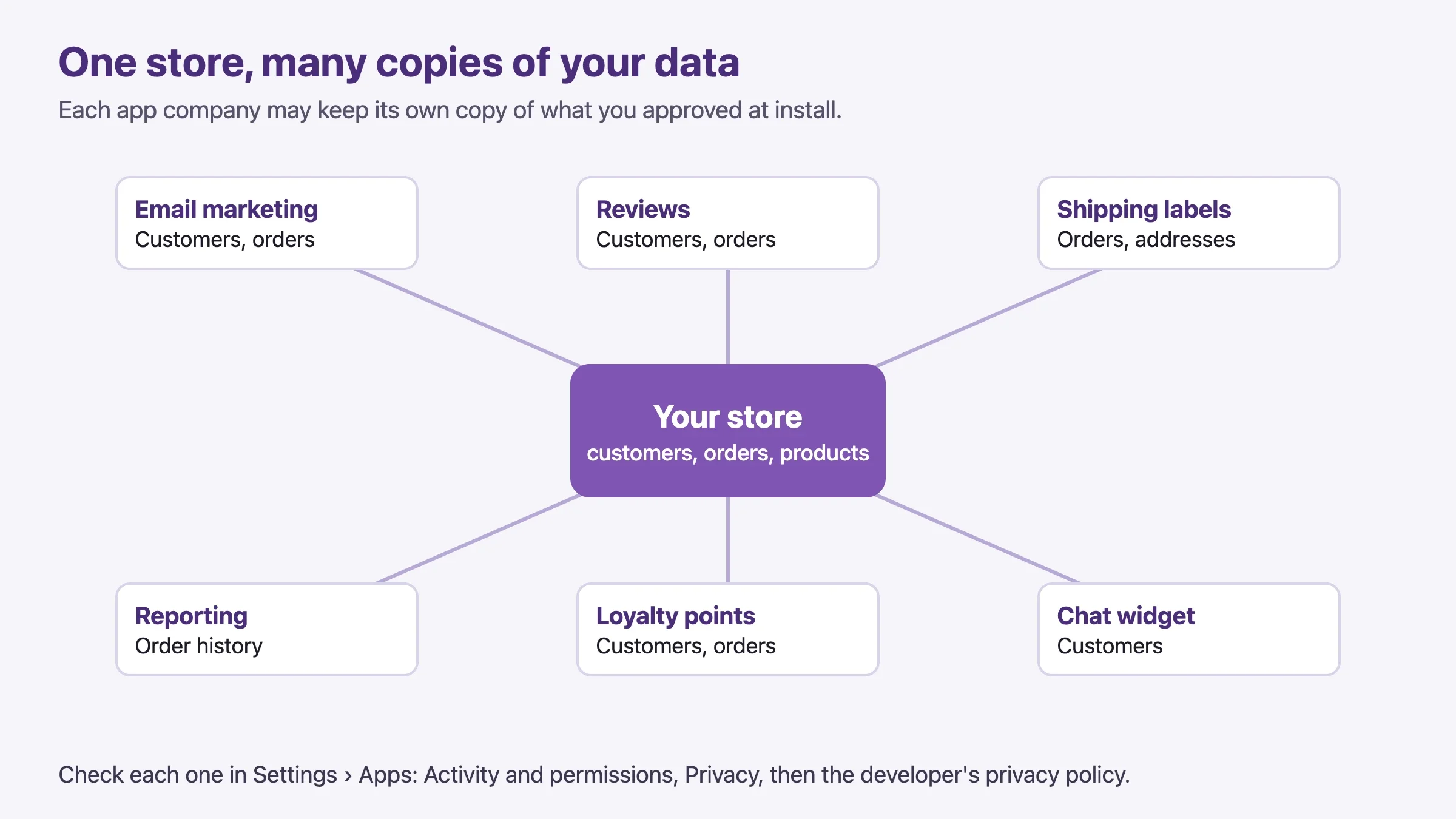
Shopify app data access is wider than most owners expect: every app you install gets access to some part of your store data. Many of those apps also keep their own copy on their own servers. If you run 20 apps, that can mean 20 companies holding your customers’ names, emails, addresses and order history. This guide explains what each app can see, what Shopify enforces to protect you, and how to audit and trim your list. It is fair to Shopify, because the platform does more here than most owners realise.
What is the quick answer?
Yes, apps get your data, and you approve it when you install. Shopify limits what apps can see, makes public apps ask for approval before they touch names, emails, phones or addresses, and forces every App Store app to answer deletion requests. You can see each app’s access in Settings › Apps. What Shopify cannot do is decide for you how many apps you need. That part is yours.
In this guide
- What an app gets when you install it
- Why many apps keep their own copy
- What Shopify actually enforces (and what it does not)
- What happens to the data after you uninstall
- How to audit your apps, step by step
- Does WooCommerce solve this? An honest answer
- Cost and ownership, briefly, and how to decide
- FAQ
How we checked this: every rule and timing below comes from Shopify’s own developer documentation and Help Center, read on 5 October 2026. We link each source at the end. Shopify changes these pages, so check the current page before you rely on a number. This is not legal advice.
How does Shopify app data access work when I install an app?
An app gets the permissions it asks for, which Shopify calls access scopes. A scope is a named permission, such as reading customers or writing products. Shopify’s developer documentation says access scopes control which store data an app can read and write.
A few details help you read an install screen with more confidence.
- You approve the scopes at install. The app declares what it needs, and the merchant approves those scopes when installing it.
- Write access includes read access. Shopify’s documentation says any scope that writes a resource also grants read access to it. An app that only needs to look should not ask to write.
- Order history has a default window. The normal orders scope covers orders created in roughly the last 60 days. An app needs a separate scope,
read_all_orders, for the full history, and Shopify must approve it first. - Some scopes need Shopify’s approval. The documentation marks certain scopes as requiring Shopify approval before an app can declare them, and says Shopify restricts access for apps with no legitimate use for the data.
In plain words: a review app might need to read orders to ask for reviews. An email tool might need customers. A shipping app might need orders and fulfilments. Ask yourself whether the permission list matches the job. A flash-sale countdown timer that wants customer data deserves a question.
Why do so many apps keep their own copy of my data?
Most apps are separate programs that run on the developer’s own servers, not inside your store. To work, they need to know what happens in your store, so they either ask Shopify each time or keep a synced copy. Shopify’s own documentation describes webhooks as a way to “stay in sync with Shopify”, which is exactly how a copy is kept up to date.
Keeping a copy is often reasonable. An email marketing app needs your customer list to send emails when your store is quiet. A reporting app needs history to draw charts. The point is not that copying is wrong. The point is that each copy is another place your customers’ data lives, with its own security, its own staff and its own retention rules.
What the extra copies mean for you
- More breach surface. A breach at any app company can expose the data that company holds, even if your store was never touched.
- More privacy paperwork. Under rules such as GDPR you are normally the party that decides why customer data is used, and each app is a processor acting for you. Shopify’s documentation says it expects apps to have privacy policies or data protection agreements with merchants. Each one is a document you should have read.
- More places to delete from. When a customer asks you to erase their data, it has to be removed from every app, not only from Shopify.
What does Shopify actually enforce to protect my customers?
More than many owners expect. Here are the real protections, stated as Shopify states them.
Approval before apps see names, emails, phones and addresses
Shopify calls customer information that identifies a person protected customer data. A public app that wants it must request access in the Partner Dashboard and explain why. Shopify’s documentation sets two levels.
Level | Data the app uses | What the app developer must do |
|---|---|---|
0 | No customer data | Nothing extra |
1 | Customer data without name, address, phone or email | Request access and meet level 1 requirements |
2 | Customer data including name, address, phone or email | Request access to each field, meet levels 1 and 2, and take part in data protection reviews |
Shopify says it will approve an app only if the requested data is the minimum the app needs to give the merchant its functionality. Approved apps then see only the fields they were approved for. Fields they were not approved for come back redacted.
What the requirements ask of app developers
The level 1 list includes: process only the minimum personal data needed, tell merchants what data is processed and why, stick to the stated purposes, respect customer consent and opt-outs, make privacy or data protection agreements with merchants, apply retention periods so data is not kept longer than needed, and encrypt data at rest and in transit.
Level 2 adds: encrypt backups, keep test and production data apart, have a data loss prevention plan, limit staff access, require strong staff passwords, keep an access log, and have a security incident response policy. Shopify also says it may run a detailed data protection review, and that reviews are likely to focus on apps with many installs, many customer records, more approved fields or long retention.
Mandatory privacy webhooks
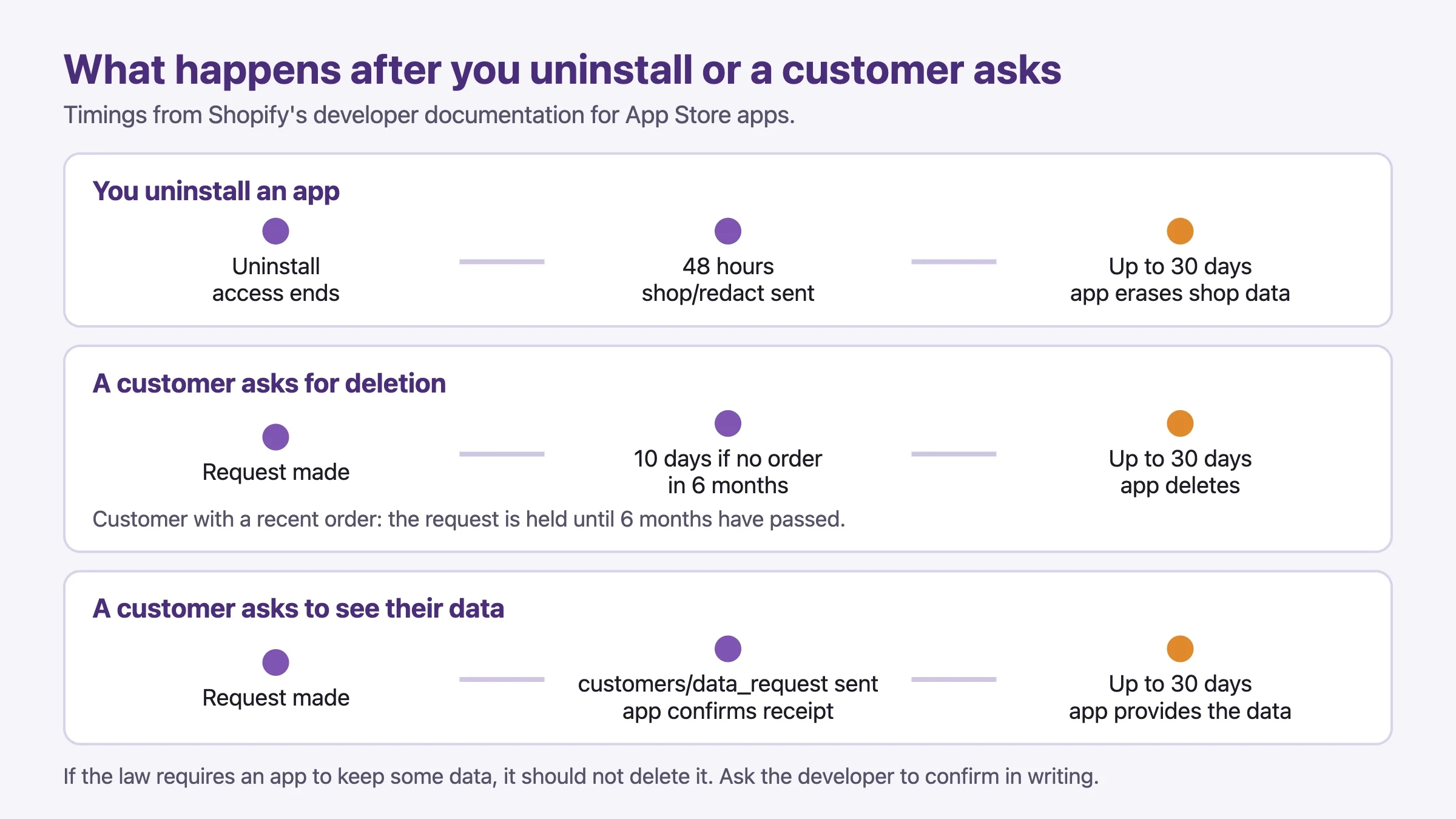
Every app listed on the Shopify App Store must subscribe to three compliance webhooks and answer them. A webhook is an automatic message from Shopify to the app.
Webhook | What it means | Timing from Shopify’s docs |
|---|---|---|
| A customer asked to see their data | App must confirm receipt, then complete the action within 30 days |
| A customer’s data must be deleted | Sent 10 days after the request if the customer has no order in the last 6 months. Otherwise held until 6 months have passed |
| Your shop’s data must be deleted | Sent 48 hours after you uninstall the app |
The documentation adds two useful details. Apps must finish these actions within 30 days of the request, and if a law requires the app to keep some data, it should not delete it. It also says Shopify takes a standard approach, requiring public apps to provide the same privacy rights for all personal data regardless of where a person is located.
An app that skips these webhooks, or does not respond to them as required, is rejected from the App Store review. That is a real check, not a suggestion.
Where the protections stop
Being fair also means saying where the edges are.
- The rules cover public App Store apps. The mandatory webhooks are required for apps distributed through the App Store. Custom apps built for one store follow other paths, and protected data access for them varies by app type and by plan.
- Shopify trusts its own apps. The Help Center says activity and permissions are tracked only for third-party apps, and that Shopify-made apps are trusted to work securely with your store data.
- Shopify cannot see inside an app company. It can require encryption and agreements, and it can review. It cannot guarantee how any one developer runs their servers day to day. The Help Center also notes that some apps store data you cannot recover after uninstalling.
- The legal responsibility stays with you. Shopify’s documentation says its page does not give legal advice, and recommends talking to a privacy professional. As the store owner you still choose which apps to trust.
What happens to my data when I uninstall an app?
Two things happen, and they are not the same. The app loses its access to your store. The app’s own copy is a separate matter: under the rules above, Shopify sends the app a shop/redact message 48 hours after uninstall so it can erase your store’s data, and the app has up to 30 days to complete the action.
Shopify’s Help Center lists other things to check before you uninstall:
- Theme code may stay behind. Some apps add code to your theme that is not removed when you uninstall. Check the app’s listing or ask the developer.
- Billing may continue elsewhere. Uninstalling cancels future recurring charges, but you may still pay for the current cycle. Apps that charge outside Shopify must be cancelled separately.
- Some data is gone for good. Export anything you need first.
- Automations stop. Anything that depends on the app stops working.
The app history view in Shopify shows install and uninstall history for each app, which is useful as a record that you removed it and when.
How do I see what each app can access in my Shopify admin?
Open Settings › Apps, then click an app name to open its about page. Shopify’s Help Center says the page shows billing, extensions, pixels, privacy details and permission details. Two sections matter most.
- Activity and permissions: which areas of your store the app can view or edit, with the date of its most recent activity in each area. Anything it has not used in the last 30 days is listed as Unused access. Click a recent activity date to see how many view and edit requests it made.
- Privacy: the types of personal data the app can access, grouped by category such as customers and staff, with a link to the developer’s privacy policy.
How do I audit and cut my Shopify apps, step by step?
Set aside an hour. You will need a spreadsheet with one row per app.
- Open Settings › Apps and list every app, including ones you forgot about and ones installed by past staff or agencies.
- For each app, write down what job it does and who on your team uses it. If nobody can answer, it is a removal candidate.
- Open each app’s about page. In Activity and permissions, note the areas it can view or edit, and any Unused access.
- In Privacy, note whether it reads customer data, and open its privacy policy. Look for where data is stored, how long it is kept, and how to request deletion.
- Mark each app: keep, replace with a lower-access option, or remove.
- Before removing, export any data you need and check for theme code that stays behind (see above).
- Uninstall from Settings › Apps using the menu on the app row. Pick a reason if you like.
- Write to the developer to confirm deletion of your data and ask when it is done. Keep the reply. Under the compliance webhooks, an App Store app should already be responding to the 48-hour message, but a written confirmation is good evidence.
- Repeat every quarter, and ask a simple question before any new install: can a setting or a theme feature do this instead?
A simple audit sheet
App | Job | Customer data? | Last used | Decision |
|---|---|---|---|---|
Reviews app | Ask buyers for reviews | Yes (email, orders) | This week | Keep, read privacy policy |
Countdown timer | Sale banner | No | Last year | Remove |
Old email tool | Replaced by new one | Yes (full list) | Never in 30 days | Export, remove, ask for deletion |
Tip: choose the app with the narrowest permission list that does the job. Two apps that do the same thing but ask for different amounts of customer data are not equal. The smaller list is the safer one.
Does WooCommerce solve the “who holds my data” problem?
Partly. On WooCommerce, the store runs on your own hosting, and your customer and order data lives in your own database by default. Most plugins run on your server and read that data in place, so they do not need to copy it anywhere. That is a real structural difference from apps that live on a developer’s servers.
It is not the whole story, and we want to be straight about it.
- Plugins that connect to outside services also send data out. Email marketing, analytics, shipping rate lookups, reviews, chat and AI tools often pass customer details to a company’s servers. The audit mindset is the same as on Shopify.
- Directory rules help, but only for directory plugins. The WordPress.org plugin guidelines say plugins may not track users without consent, and that plugins which rely on an outside service must document it in their readme. Those rules apply to plugins hosted on WordPress.org. Plugins you buy and install from elsewhere answer to their own terms.
- You carry the security work. Updates, backups, hosting security and access control are yours, or your host’s or agency’s.
How to audit a WooCommerce store the same way
- Open Plugins › Installed Plugins and list everything active.
- For each plugin, ask: does it connect to an outside service? Read its readme or settings page for an account, an API key or a “connect” button. Those usually mean data leaves your server.
- For each one that does, read the service’s privacy policy and note where data is stored and how deletion works.
- Remove plugins you do not use. Inactive plugins are not sending data, but they are still code to keep updated.
- Check Tools › Export Personal Data and Tools › Erase Personal Data in WordPress. These are the built-in tools for access and erasure requests. Plugins that store personal data should hook into them, so test with a sample request.
We cover the consent and erasure side in our WooCommerce GDPR and multilingual setup guide, and the security side in our WooCommerce store security checklist. Our sister sites cover GDPR and privacy plugins and the legal questions around AI plugins, which is where outside data flows are growing fastest.
Shopify and WooCommerce side by side on data
Question | Shopify | WooCommerce |
|---|---|---|
Where does core store data live? | On Shopify’s platform | In your own database on your host |
Where do add-ons run? | Mostly on the app developer’s servers | Mostly on your server, unless they connect to a service |
Who checks add-ons? | App Store review, protected data approval, mandatory deletion webhooks | WordPress.org review for directory plugins. None for plugins from elsewhere |
See what an add-on can access | Settings › Apps, per app | No single screen. You read code, readme and settings |
Who handles security and updates? | Shopify for the platform | You, your host or your agency |
Neither wins on every row. Shopify gives you a clear place to look and enforced rules. WooCommerce gives you control over where data lives, and asks you to do the looking.
What else should I weigh besides data: cost and ownership?
Data is one factor. A short, fair look at the rest helps you decide.
Why Shopify feels easy
You do not manage hosting, server updates or security patches for the platform itself. Checkout is built in. For many small stores that is worth real money, and we do not argue otherwise.
What ownership costs on each side
- Platform rules. Your store runs under Shopify’s terms and product decisions. On WooCommerce you set the rules, within the law and your host’s terms.
- URL structure. Shopify uses fixed paths such as
/products/and/collections/. WooCommerce lets you choose your product and category URLs. - Fees. Shopify’s pricing page lists a fee on sales that use a third-party payment provider instead of Shopify’s own payments. On the page we read, the fee was 2% on Basic, 1% on Grow, 0.6% on Advanced and 0.2% on Plus. Monthly plan prices vary by country, so check the page for yours. WooCommerce charges no platform fee on sales, but you still pay your payment gateway’s card fees and your hosting.
Here is what the third-party payment fee alone adds up to, using those percentages. This is on top of plan prices and card processing fees.
Store size | Monthly sales through a third-party gateway | Plan | Platform fee |
|---|---|---|---|
Small | $10,000 | Basic (2%) | $200 a month |
Medium | $50,000 | Grow (1%) | $500 a month |
Larger | $250,000 | Advanced (0.6%) | $1,500 a month |
Using Shopify’s own payment processing is a different fee structure, and many stores do. The point of the table is only to show how the third-party fee grows with sales, so you can compare it with the monthly cost of good WooCommerce hosting and care.
How can WooCommerce feel as easy as Shopify?
Choose managed WooCommerce hosting that handles server updates and backups, keep the plugin list short, and put the store on a care plan so someone checks updates, payments and emails every month. Our guide to five silent WooCommerce money leaks is a good starting checklist for that monthly routine.
A simple decision flow
- Do you want to avoid managing a server at all? Shopify is a strong fit. Keep the app list short and audit it quarterly.
- Do you need custom logic, odd product types, or tight control of where customer data lives? WooCommerce, with a developer or care plan, fits better.
- Do you already run 15 or more apps and pay for most of them monthly? Count the app fees and the data copies before deciding either way. Sometimes the fix is fewer apps, not a new platform.
Our longer comparison, WooCommerce vs Shopify vs a custom build, covers the full decision.
If you decide to move, how do you do it safely?
Whichever way you move, export first and check what you can take: products, customers, orders and redirects. Rehearse on a staging copy. Keep the old store running until the new one has taken real orders. Then uninstall apps on the old store and ask each app company to confirm deletion, as in the audit steps above.
When don’t you need this?
If your Shopify store runs five apps, all from well-known companies, and you have read their privacy policies, a yearly check is enough. If you sell only a few products and collect no customer accounts, there is less personal data to protect. If you are mid-launch, fix the checkout first and audit the apps next month. And if your WooCommerce store has only a handful of plugins, none of which connect to outside accounts, your data flows are already simple.
FAQ
Do all Shopify apps get my customers’ data?
No. Only apps whose permissions include customer or order data do, and public apps need Shopify’s approval before they see names, emails, phones or addresses. Check Settings › Apps for each app’s access.
Do Shopify apps store my data on their own servers?
Many do. Apps usually run on the developer’s servers and stay in sync with your store through API calls and webhooks. Read the app’s privacy policy for where data is kept and for how long.
What happens to my customer data when I uninstall an app?
Access to your store ends. For App Store apps, Shopify sends a shop redaction request 48 hours after uninstall, and the app has up to 30 days to complete it, unless the law requires it to keep the data. Ask the developer to confirm in writing.
How can I see what an app can access in Shopify?
Go to Settings › Apps, click the app, and read the Activity and permissions and Privacy sections. Shopify-made apps are not tracked in the same way.
Is WooCommerce safer for customer data?
It gives you more control over where the data lives, because it sits in your own database. It is not automatically safer. Plugins that connect to outside services send data out too, and you carry the security work yourself. Both platforms need an app or plugin audit.
Am I responsible for what apps do with my customers’ data?
In most privacy laws the store owner decides why customer data is collected and stays responsible for choosing trustworthy processors. Talk to a privacy professional about your own situation. This article is general information.
Want a second pair of eyes on your store?
We run free store reviews for owners who want a clear view of cost, data access and ownership. We look at your current apps or plugins, what each can see, where data is copied, and whether a change of platform or a cleanup would help. Ask us for a free store review and we will tell you honestly when staying put is the right call.
Sources we checked
- Shopify API access scopes
- Shopify: work with protected customer data
- Shopify: privacy law compliance and mandatory webhooks
- Shopify Help Center: managing apps
- Shopify Help Center: uninstalling apps
- Shopify pricing
- WordPress.org detailed plugin guidelines
Related reading
Plugins we build and run
We maintain these ourselves, which is why we can support them on your site.
- BuddyNextThe self-hosted community engine for WordPress
- BuddyXFree community theme, Pro when you outgrow it
- ReignPremium community theme. Add pieces, build anything
- JetonomyCommunity forum and Q&A for WordPress
- EventonomyEvents and RSVPs for WordPress communities
- LearnomyCourses and learning communities on WordPress
- ListoraDirectories and listings your members can browse
- SnipShareCode sharing built for developer communities
- WB Ad ManagerAd placements that turn traffic into revenue
- WP Career BoardA job board your community actually uses
- WP Sell ServicesSell services with offers, orders, and payouts
- MediaVersePhotos, video, and media albums for members
- WB GamificationPoints, badges, and rewards that keep members active
- Product RoadmapPublic roadmaps with voting your users trust