WooCommerce Wholesale Lead Capture Vulnerability: Patch Now
A critical unauthenticated file upload bug in WooCommerce Wholesale Lead Capture (CVE-2026-27540) is under active attack. How to check your store, patch, block it, and spot a webshell.

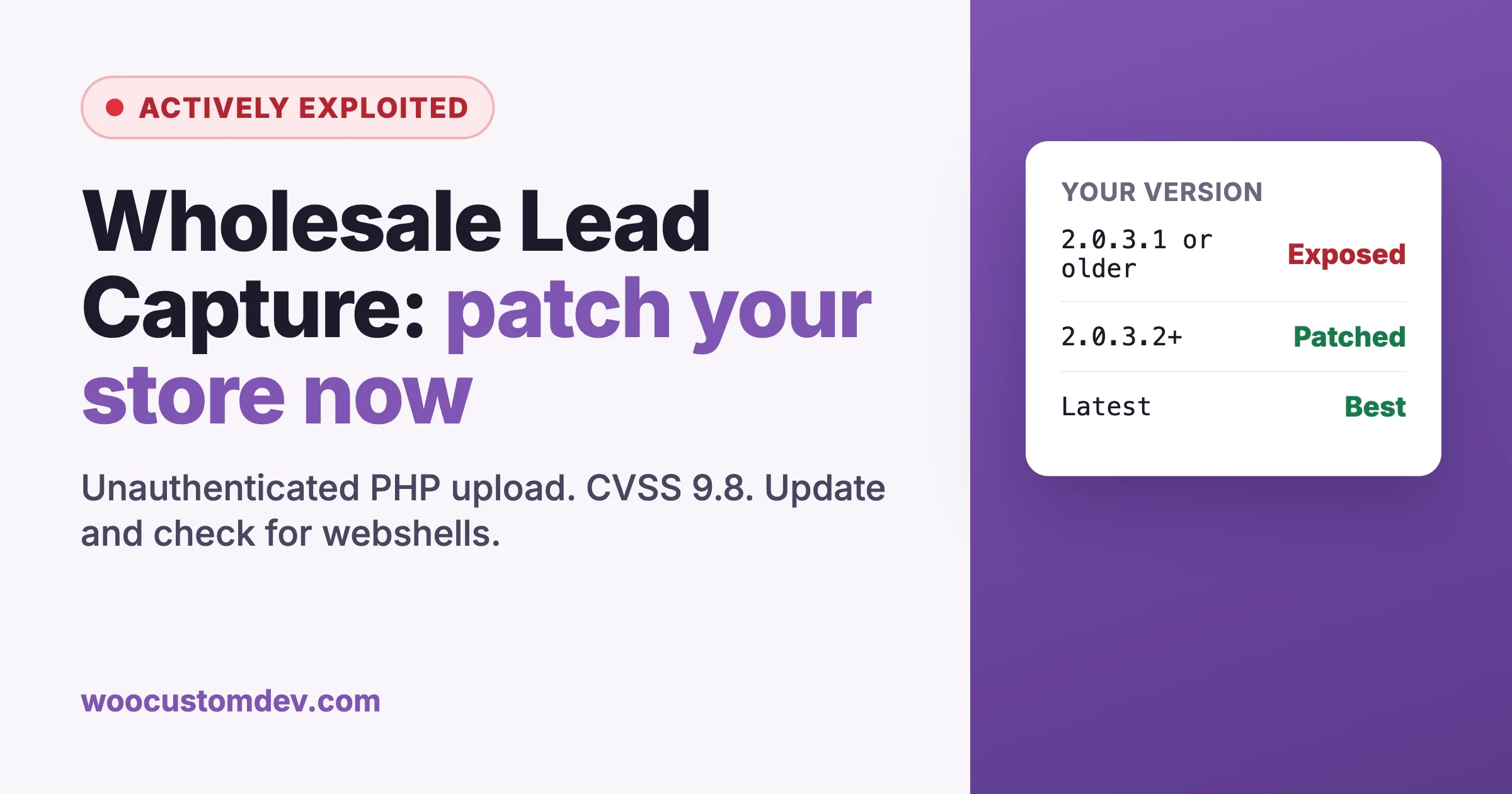
If your store uses WooCommerce Wholesale Lead Capture to take wholesale registrations, check the version today. A critical flaw in the plugin lets anyone on the internet upload a PHP file to your server without logging in, and attackers have been using it for months. Wordfence says its firewall has blocked more than 100,000 exploit attempts against this one bug.
The bug was publicly disclosed on February 20, 2026, and a patched version exists. The problem is that this is a premium plugin, updated from the vendor’s own server rather than WordPress.org, so it is easy for a store to fall behind without anyone noticing. A lapsed license, a staging-first update policy nobody followed through on, or a developer who left the project are all enough.
This guide is for store owners and the developers who look after their stores. We cover what the WooCommerce Wholesale Lead Capture bug is, who is exposed, how to check a store in a few minutes, how to patch or block it if you cannot update right away, what a compromise looks like, and why wholesale and B2B add-ons keep turning up in security advisories.
Every version number, date and figure below comes from the Wordfence advisory on active exploitation and the vendor’s public changelog for WooCommerce Wholesale Lead Capture. Where they disagree, we point it out.
The short version
- Plugin: WooCommerce Wholesale Lead Capture (slug
woocommerce-wholesale-lead-capture), a premium plugin from Wholesale Suite. Wordfence estimates about 6,000 active installations. - CVE: CVE-2026-27540.
- Severity: CVSS 9.8, critical.
- Type: unauthenticated arbitrary file upload, which leads to remote code execution.
- Affected versions: 2.0.3.1 and earlier.
- Patched version: 2.0.3.2, according to Wordfence. The vendor’s changelog now lists releases up to 2.0.6.
- Status: actively exploited. Wordfence reports more than 100,000 blocked attempts, with large waves between June 4 and June 17, 2026, and again on July 1 and August 30, 2026.
- Researcher credited: Teemu Saarentaus.
If your store runs 2.0.3.2 or later, this specific hole is closed. We still recommend moving to the latest release, and we still recommend the compromise checks further down if the store sat on an older version at any point this year.
What WooCommerce Wholesale Lead Capture does, and why that matters here
WooCommerce Wholesale Lead Capture adds a wholesale registration form to a WooCommerce store. A trade customer fills it in, the store owner approves them, and they get a wholesale role with its own pricing. It is part of the Wholesale Suite family and, according to the vendor changelog, has required the WooCommerce Wholesale Prices plugin since version 1.16.
The registration form supports custom fields, including file upload fields. Wholesale stores use those to collect things like a resale certificate, a tax exemption form or a business license before approving an account. That is a normal, sensible B2B workflow. It also means the plugin has to accept files from people who do not have an account yet, which is exactly where this bug lives.
How the vulnerability works
The plugin handles uploads through an AJAX action called wwlc_file_upload_handler. Wordfence confirmed this action is reachable by visitors who are not logged in, which is expected: a new applicant has no account.
The handler does check the file’s extension against a list of allowed types. The flaw is where that list comes from. In vulnerable versions, the allowed types and the maximum file size are read from a file_settings parameter that arrives with the request, instead of from the form settings the store owner saved on the server. So the attacker writes their own rules. They send a file_settings value that lists php as an allowed type, attach a file called something like shell.php, and the plugin accepts it.
The upload is then passed to WordPress’s wp_handle_upload() with the MIME type test switched off, and saved into a temporary upload directory the plugin sets up. The plugin also renames the file by adding a Unix timestamp before the extension, so shell.php is stored as something like shell-1718000000.php. That detail is useful when you go looking for it later.
Once a PHP file sits in a web-accessible folder, the attacker requests it in a browser and it runs with the same permissions as WordPress. From there they can create administrator accounts, read the database (customer names, addresses, order history), plant more backdoors, or inject card-skimming code into checkout.
The rule every developer should take from this: never trust a validation rule that the client sends you. Allowed file types, size limits, required fields, prices and user roles must be read from server-side settings, never from the request.
What the real attacks look like
Wordfence published a sample request from the attacks it blocked. It is a multipart POST to /wp-admin/admin-ajax.php with three parts: the action set to wwlc_file_upload_handler, a forged file_settings JSON value that allows php and sets a very large size limit, and a file named shell.php.
The sample shell is small. When loaded, it prints a marker string, and with the right query parameter it shows server details and a simple upload form so the attacker can push more files onto the site. It is a foothold tool, not the final payload. The damage comes from whatever gets uploaded through it next.
Who is exposed
Your store is exposed if all of these are true:
- WooCommerce Wholesale Lead Capture is installed and active.
- The installed version is 2.0.3.1 or lower.
- The server lets PHP execute from the upload location, which is the default on most shared and managed hosts unless someone has locked it down.
You do not need to have a file upload field on your registration form for the AJAX action to be callable. The attacker talks to the handler directly and never touches your form. Treat any active install below 2.0.3.2 as exposed.
Being behind a firewall helps but does not settle it. Wordfence says Premium, Care and Response customers got a firewall rule on February 27, 2026, and free Wordfence users got it on March 29, 2026. If your store ran a vulnerable version before your firewall had that rule, or runs a firewall that never added one, assume attempts reached the plugin.
Check your store today
From the WordPress dashboard
Go to Plugins, Installed Plugins, and find WooCommerce Wholesale Lead Capture. The version number is under the plugin name. If it says 2.0.3.1 or lower, update now. If there is no update notice even though you are on an old version, check the license key under the Wholesale menu. Premium plugins usually only offer updates to stores with an active license.
With WP-CLI
If you or your developer has shell access, this is faster and leaves a clear record:
# Installed version and whether it is active
wp plugin get woocommerce-wholesale-lead-capture --fields=name,status,version

# Related Wholesale Suite plugins, so you update them together
wp plugin list --fields=name,status,version,update_version | grep -i wholesale
Agencies with several stores can loop over WP-CLI aliases and flag anything below the patched release:
#!/usr/bin/env bash
# wwlc-audit.sh - flag stores running a vulnerable Wholesale Lead Capture
PATCHED="2.0.3.2"
for alias in $(wp cli alias list --format=json | jq -r 'keys[]' | grep -v '^@all$'); do
  ver=$(wp "$alias" plugin get woocommerce-wholesale-lead-capture --field=version 2>/dev/null)
  [ -z "$ver" ] && continue
  lowest=$(printf "%s\n%s\n" "$ver" "$PATCHED" | sort -V | head -n1)
  if [ "$ver" != "$PATCHED" ] && [ "$lowest" = "$ver" ]; then
    echo "VULNERABLE  $alias  $ver"
  else
    echo "ok          $alias  $ver"
  fi
done
How to patch
Step 1: back up first
Take a full backup of files and database before you change anything. If the store turns out to be compromised, that backup is also your evidence, so keep it separate from your normal rotation.
Step 2: update the plugin
Update WooCommerce Wholesale Lead Capture to the latest version the vendor offers. Update WooCommerce Wholesale Prices and, if you use it, WooCommerce Wholesale Prices Premium in the same pass, since these plugins are built to work together.
wp plugin update woocommerce-wholesale-lead-capture
wp plugin get woocommerce-wholesale-lead-capture --field=version
A note on version numbers. Wordfence lists 2.0.3.2 as the patched release. The vendor’s changelog lists “Unauthenticated arbitrary file upload in wwlc_file_upload_handler()” under 2.0.3.1, with 2.0.3.2 described as security fixes and hardening. We go with the more conservative reading: treat 2.0.3.1 as vulnerable and do not stop below 2.0.3.2. In practice there is no reason to stop there at all. Later releases (2.0.3.3 and 2.0.4.2) list further security hardening, including checks around user role assignment during registration.
After updating, submit a test wholesale registration with a file upload on staging or on the live store to confirm the form still works. Version 2.0.3.4 in the vendor changelog is a fix for “Uploading File Is Not Working”, so if you land on 2.0.3.2 or 2.0.3.3 and uploads break, keep going to a newer release.
Step 3: stop PHP from running in uploads
This is the hardening step that would have turned this bug from a site takeover into a harmless junk file. There is no reason for PHP to execute from wp-content/uploads on a normal WooCommerce store.
On Nginx, add this inside the server block and reload:
location ~* ^/wp-content/uploads/.*\.(php|phtml|phar)$ {
    deny all;
}
On Apache, place an .htaccess file inside wp-content/uploads:
<FilesMatch "\.(php|phtml|phar)$">
    Require all denied
</FilesMatch>
Test it by placing a harmless test.php in uploads and requesting it. You should get a 403, then delete the test file. Some managed hosts already do this for you. Check rather than assume.
If you cannot update today
Sometimes the license has expired, or the store is mid-sale and nobody wants to touch plugins. You can still close this hole in minutes by refusing the upload action until you update. Save this as wp-content/mu-plugins/block-wwlc-upload.php:
<?php
/**
 * Temporary: block the WooCommerce Wholesale Lead Capture upload handler
 * (CVE-2026-27540) until the plugin is updated. Remove after updating.
 */
add_action( 'admin_init', function () {
    if ( ! wp_doing_ajax() ) {
        return;
    }
    $action = isset( $_REQUEST['action'] ) ? sanitize_key( wp_unslash( $_REQUEST['action'] ) ) : '';
    if ( 'wwlc_file_upload_handler' === $action ) {
        wp_send_json(
            array(
                'status'  => 'fail',
                'message' => 'File uploads are temporarily unavailable. Please email your documents instead.',
            ),
            403
        );
    }
}, 0 );
WordPress runs admin_init inside admin-ajax.php before it dispatches the AJAX action, so this stops the request before the plugin’s handler sees it. The trade-off is that file upload fields on your wholesale form stop working, so tell applicants to email documents for a few days. That is a small price compared to a webshell. Delete the file once you are on a patched version.
Signs your store was already compromised
Wordfence’s guidance is to look for unexpected PHP files, especially under uploads, to review logs for the upload action and the attacking IP addresses, and to remove unknown administrator accounts. Here is how we turn that into concrete checks. None of these prove a store is clean. They find the common cases.
1. Look for PHP files where they do not belong
# Any PHP file in uploads is suspicious on a normal store
find wp-content/uploads -type f \( -name "*.php" -o -name "*.phtml" -o -name "*.phar" \) -ls

# Files that match the plugin's renaming pattern: name-UNIXTIMESTAMP.php
find wp-content -type f -regex '.*-[0-9]\{10\}\.php$' -ls

# The sample webshell Wordfence published prints the string "sohai"
grep -rl --include=*.php "sohai" wp-content/ 2>/dev/null

# PHP files changed in the last 120 days anywhere in wp-content
find wp-content -type f -name "*.php" -mtime -120 -printf "%TY-%Tm-%Td %p\n" | sort | tail -100
The sohai string only matches the one sample Wordfence showed. Attackers use many filenames and many shells, so an empty result there means very little on its own. The uploads check and the timestamp pattern are more useful.
2. Check your access logs
There is a catch with log searches for this bug. In the published attack, the action=wwlc_file_upload_handler value travels in the multipart request body, and standard web server access logs do not record request bodies. Your logs will show POST /wp-admin/admin-ajax.php and nothing more. So the useful searches are for those POSTs from the attacking addresses, and for requests to PHP files that should not exist:
LOG=/var/log/nginx/access.log

# Most active IPs Wordfence observed attacking this plugin
cat > wwlc-ips.txt <<'IPS'
92.241.13.213
31.59.129.150
2a0f:85c1:840:5389::1
92.241.13.140
23.137.105.214
23.180.120.140
104.194.9.138
187.75.114.36
114.10.43.203
37.114.144.209
IPS

# admin-ajax POSTs from those IPs
zgrep -h "POST /wp-admin/admin-ajax.php" $LOG* | grep -F -f wwlc-ips.txt | head -50

# Any request for a PHP file inside uploads
zgrep -h -E "GET /wp-content/uploads/.*\.php" $LOG* | head -50
A request for a .php file under uploads that returned 200 is the strongest sign in this list. If your host or firewall logs request bodies, search them for wwlc_file_upload_handler as well.
3. Review administrator and shop manager accounts
wp user list --role=administrator --fields=ID,user_login,user_email,user_registered --orderby=registered --order=DESC
wp user list --role=shop_manager --fields=ID,user_login,user_email,user_registered --orderby=registered --order=DESC
Any account you do not recognize, especially one created in the attack windows Wordfence mentions (June, July, late August 2026), needs investigating before you delete it. Note its creation time and match it to the logs first.
4. Check core and free plugin files
wp core verify-checksums
wp plugin verify-checksums --all
Premium plugins, including the Wholesale Suite plugins, will report that no checksums are available. That is normal. For those, reinstall a fresh copy from the vendor rather than trusting the files on disk.
5. Look at checkout for injected scripts
On a store, the payoff for an attacker is often card skimming, not defacement. View the source of your checkout page in a private window and look for script tags pointing at domains you do not recognize. Search the database too, since skimmers are often stored in options or widgets rather than files:
wp db search "<script" $(wp db prefix --quiet)options --stats
If you find something
Put the store in maintenance mode, keep your pre-change backup as evidence, then clean up in this order: update or remove the vulnerable plugin, delete the malicious files, remove unknown accounts, reinstall WordPress core and every plugin and theme from clean sources, reset all administrator and shop manager passwords, rotate the salts in wp-config.php, and rotate any API keys the store holds (payment gateway, shipping, ERP, email). If card data could have been exposed, talk to your payment provider about what they require from you. Our WooCommerce security checklist for store owners covers the hardening to put in place afterwards.
Why B2B and wholesale add-ons keep showing up in advisories
This is not a one-off. Wholesale plugins sit at the most exposed point of a store, and the same kinds of bugs keep returning. You can see it in this plugin’s own changelog.
They take input from strangers by design
A retail store needs little from a new visitor beyond an email address. A wholesale store needs a company name, tax ID, address, and often documents, all from someone who has no account yet. Every one of those fields is untrusted input, handled by code that runs for anonymous users. The more a form collects, the more there is to get wrong.
They assign roles and prices
The whole point of a wholesale registration flow is to move a user into a privileged role with better pricing. That makes role assignment a target. The vendor changelog for WooCommerce Wholesale Lead Capture shows this has come up more than once: version 1.6.9 stopped new wholesale customers from being set to administrator or shop manager roles, 2.0.2 lists “Security of user role for user creation”, 2.0.3.3 “strengthened security checks around user role assignment during registration”, and 2.0.4 fixed an unapproved user being able to log in through the password reset flow. None of those are unusual for this category. They are what happens when registration, approval and role changes all live in one plugin.
They are premium, so updates are easy to miss
Plugins hosted on WordPress.org show updates to every site automatically. Premium B2B add-ons update from the vendor’s own server and usually need an active license. When a license lapses, the update notice often just disappears. Stores keep running an old version for months without anyone noticing, and attackers know it. That is part of why a bug disclosed in February 2026 was still worth attacking in large waves in June and August.
They are often extended with custom code
B2B stores rarely run a wholesale plugin as-is. They add custom approval rules, ERP sync, custom pricing logic and extra registration fields. Custom code built around a plugin’s hooks tends to copy the plugin’s assumptions, including bad ones like trusting request data for validation rules. When we audit wholesale stores, the custom registration code gets as much attention as the plugin.
If you run a wholesale channel, a few habits cut this risk down a lot:
- Keep premium licenses active, or track vendor changelogs manually for any plugin whose license you let lapse.
- Block PHP execution in uploads on every store, permanently.
- Keep document uploads out of the public web root where you can, or behind access checks, since a resale certificate is sensitive data too.
- Review who holds administrator and shop manager roles every month.
- Have custom registration and approval code reviewed with the same care as payment code.
For a broader look at setting up role-based pricing, approval flows and B2B registration in a way that is easier to maintain, see our guide to configuring WooCommerce for wholesale B2B ordering and tiered pricing. And if registration spam is part of your problem, our guide to stopping WooCommerce registration spam covers the form-side defenses.
WooCommerce Wholesale Lead Capture checklist
- Confirm the installed version of WooCommerce Wholesale Lead Capture.
- Back up files and database.
- Update to the latest release, and never stay below 2.0.3.2. Update the other Wholesale Suite plugins in the same pass.
- If you cannot update, drop in the temporary mu-plugin to block the upload action.
- Deny PHP execution in
wp-content/uploadsand test it. - Search for PHP files in uploads, files named with a
-timestamp.phppattern, and the published webshell marker. - Check logs for admin-ajax POSTs from the listed IPs and for any requests to PHP files in uploads.
- Review administrator and shop manager accounts, verify core and plugin checksums, and inspect checkout for injected scripts.
- If anything looks wrong, clean up in order and rotate every password, salt and API key.
Need a hand with a wholesale store?
We build and maintain custom WooCommerce stores, including B2B and wholesale setups with custom registration, approval and pricing logic. If you want someone to audit your store after this advisory, clean up a compromise, or rebuild a wholesale flow so it does not depend on a fragile stack of add-ons, take a look at our WooCommerce development services and get in touch.
Sources
Plugins we build and run
We maintain these ourselves, which is why we can support them on your site.
- BuddyNextThe self-hosted community engine for WordPress
- BuddyXFree community theme, Pro when you outgrow it
- ReignPremium community theme. Add pieces, build anything
- JetonomyCommunity forum and Q&A for WordPress
- EventonomyEvents and RSVPs for WordPress communities
- LearnomyCourses and learning communities on WordPress
- ListoraDirectories and listings your members can browse
- SnipShareCode sharing built for developer communities
- WB Ad ManagerAd placements that turn traffic into revenue
- WP Career BoardA job board your community actually uses
- WP Sell ServicesSell services with offers, orders, and payouts
- MediaVersePhotos, video, and media albums for members
- WB GamificationPoints, badges, and rewards that keep members active
- Product RoadmapPublic roadmaps with voting your users trust