“Online course platform” covers two genuinely different categories that get compared as if they were one: fully hosted SaaS products where you rent space inside someone else’s system, and self-hosted WordPress platforms where the software runs on infrastructure you control. Both can sell a course. What they mean for ownership, cost structure over years, and how much control you actually have over your own student data are very different.
This comparison covers both categories honestly, hosted platforms like Kajabi, Teachable, and Thinkific alongside self-hosted WordPress options like Learnomy, LearnDash, and Tutor LMS, evaluated on the same criteria: course-building depth, checkout and payment handling, certificates, and what actually happens to your business if you ever want to leave.
Table of Contents
- Quick comparison
- Two categories, one comparison table
- 1. Learnomy: self-hosted, complete, and yours
- 2. Kajabi: the all-in-one hosted platform
- 3. Teachable: simple hosted checkout, less depth
- 4. Thinkific: the no-maintenance hosted option
- 5. Podia: hosted, bundles courses with digital downloads
- 6. LearnDash: the mature self-hosted standard
- 7. Tutor LMS: strong builder, checkout locked behind the paid tier
- 8. LifterLMS: native WooCommerce, generous free core
- The question underneath every platform comparison: who owns this?
- Total cost over three years, not the entry price
- Support and documentation across both categories
- Common mistakes choosing an online course platform
- FAQ
- Verdict
Quick comparison
| Platform | Hosting model | Native payments | Data portability | The deal |
|---|---|---|---|---|
| Learnomy | Self-hosted WordPress | Stripe + PayPal native, WooCommerce adapter | Full, it’s your database | No platform fees, what students pay is yours |
| Kajabi | Fully hosted SaaS | Native, built-in | Export tools, no direct database access | A monthly subscription forever, plus a cut on some plans |
| Teachable | Fully hosted SaaS | Native, built-in | Export tools, no direct database access | A monthly subscription plus a per-transaction fee on lower tiers |
| Thinkific | Fully hosted SaaS | Native, built-in | Export tools, no direct database access | A monthly subscription forever |
| Podia | Fully hosted SaaS | Native, built-in | Export tools, no direct database access | A monthly subscription forever |
| LearnDash | Self-hosted WordPress | Via WooCommerce/add-ons | Full, it’s your database | Annual license renewal |
| Tutor LMS | Self-hosted WordPress | Native checkout or WooCommerce, paid tier | Full, it’s your database | Annual license renewal, tiered |
| LifterLMS | Self-hosted WordPress | Via WooCommerce or official add-ons | Full, it’s your database | Free core, annual add-ons for depth |
Two categories, one comparison table
Before ranking anything, it’s worth being explicit about the structural split this list spans, because it changes what “best” even means. A hosted SaaS platform runs on the vendor’s servers, under the vendor’s terms of service, with your course data living in their database. You get zero server maintenance and a polished, opinionated interface in exchange for a recurring fee that continues for as long as you use the platform, and a degree of dependency that’s real if the vendor changes pricing, features, or policies in a direction you don’t like.
A self-hosted WordPress platform runs on infrastructure you choose, under a license (often GPL) rather than an ongoing rental agreement, with your student and course data sitting in a database you control directly. The tradeoff is real too: you’re responsible for hosting, updates, and backups, or for paying a managed WordPress host to handle that for you. Neither model is universally correct, but conflating the two in a single ranked list without naming the tradeoff does readers a disservice, so this comparison keeps the distinction explicit throughout.
1. Learnomy: self-hosted, complete, and yours
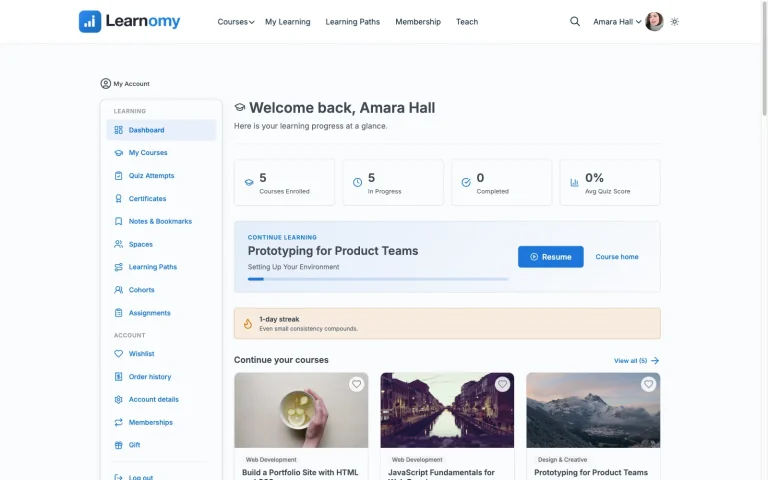
Learnomy is a complete learning platform for WordPress, the online school you own, not a course plugin and not a hosted rental. Courses support video, audio, PDF, and reading lessons through a drag-and-drop builder, with a front-end, wp-admin-free builder for instructors who shouldn’t need to touch the WordPress dashboard at all.
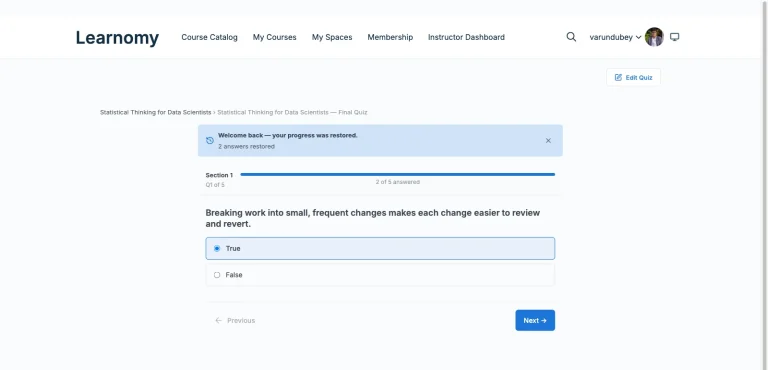
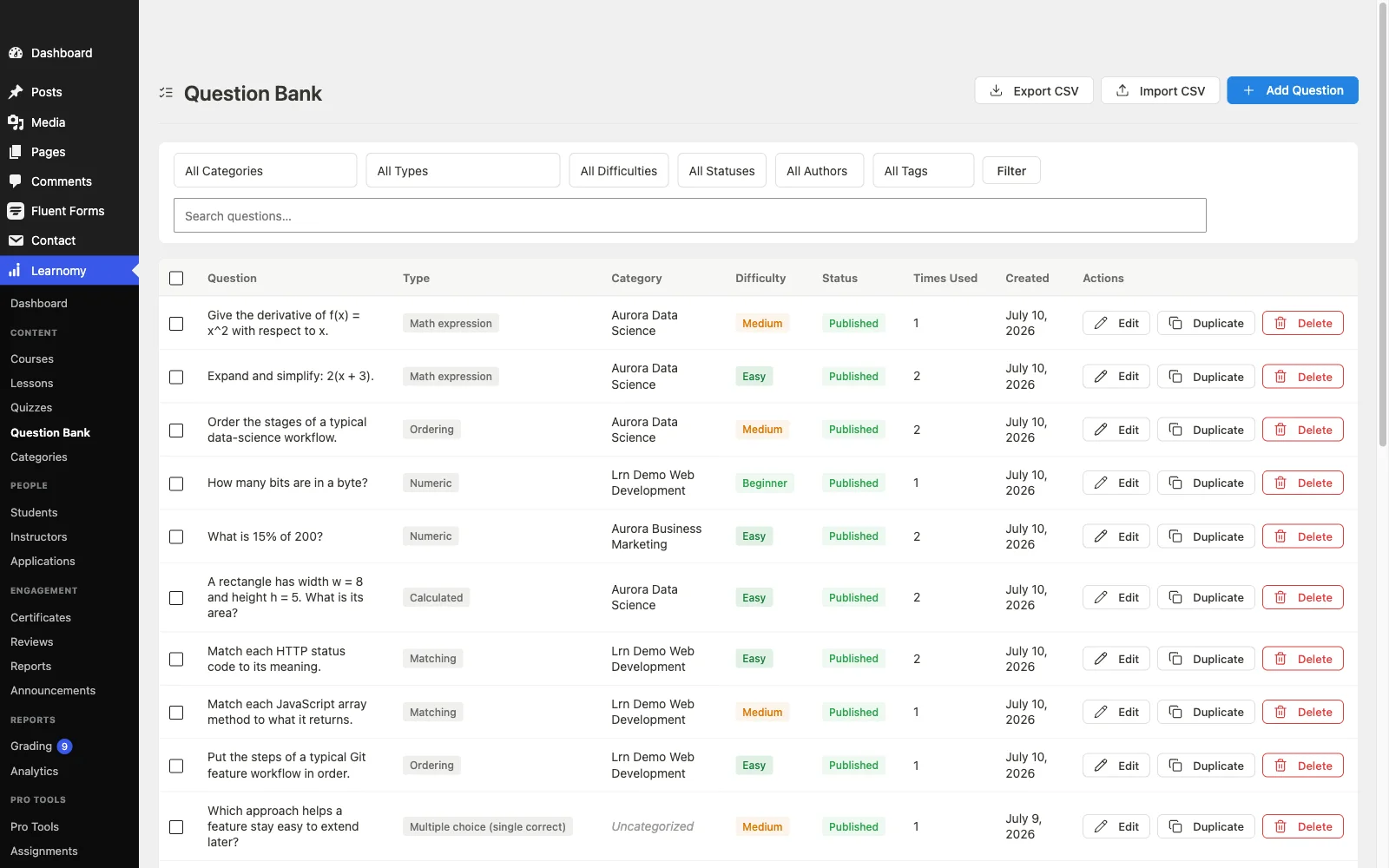
Assessment is genuinely deep: six quiz types, partial credit, question banks, anti-cheat tab-switch tracking, and an essay-grading inbox for the questions that need a human eye rather than an automated score. Learning paths sequence multiple courses with prerequisites and a path certificate at the end, useful for a growing catalog that needs real structure, not an unsorted list of courses.
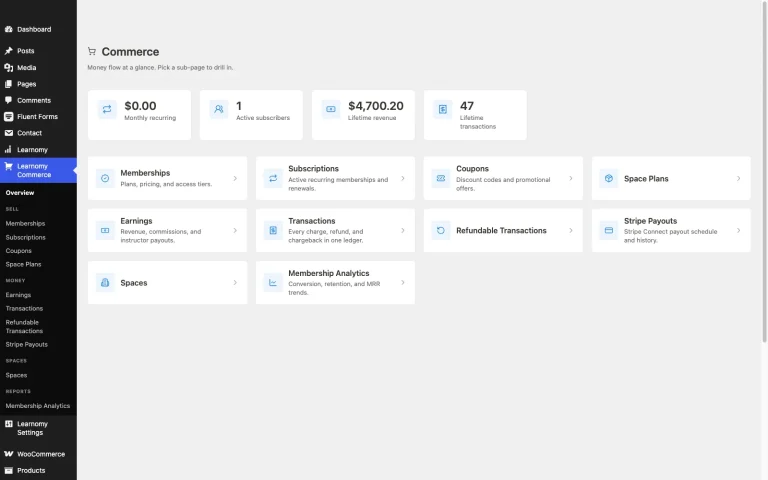
Certificates are digitally signed with a QR code resolving to a public verify page, shareable to LinkedIn, and backed by a visual certificate designer. On the business side, checkout runs directly through Stripe and PayPal, with a WooCommerce adapter for platforms that already run a store and want a unified checkout rather than a second, disconnected cart. Memberships come with trials and an automatic pricing page, and instructor revenue sharing supports Udemy-style splits with instructor applications and dashboards for a platform planning to scale past a single teacher.
The platform extends past the course itself: a learning community can grow around a school with course discussion boards and Q&A, gamified learning adds points, badges, and streaks, and a job board helps graduates turn a certificate into a real opportunity. Course videos can be protected from casual downloading, and the entire design layer is built for a school’s own branding, not a logo dropped into a shared hosted template. Full-text course search and Course structured data help a catalog stay discoverable, and PWA offline progress lets students keep learning without a live connection.
There are no platform fees on what a student pays, and a migration wizard imports directly from LearnDash, Tutor LMS, and LifterLMS for anyone moving off one of those specifically.
Best for: anyone who wants a fully hosted platform’s completeness, payments, certificates, community, without giving up ownership of the site, the data, or a recurring fee that never stops.
2. Kajabi: the all-in-one hosted platform

Kajabi bundles course delivery, email marketing, a sales pipeline builder, and community circles into one hosted dashboard, genuinely useful for a creator who wants marketing and delivery under a single login rather than stitching several tools together. The breadth is real and the polish is real. The structural tradeoff is the one every hosted platform in this list shares: a monthly subscription that continues for the life of the business, plus a percentage cut of revenue on certain plans, and no direct ownership of the underlying platform your course catalog and student base live on.
3. Teachable: simple hosted checkout, less depth
Teachable’s course builder and checkout flow are genuinely simple to set up, a real advantage for a first-time creator who wants to launch quickly without wrestling with configuration screens. Depth is the tradeoff: advanced quiz types, certificates, and deeper student engagement tools are thinner than dedicated LMS platforms, hosted or self-hosted. Lower-tier plans also carry a per-transaction fee on top of the monthly subscription, worth factoring into the realistic cost of a growing course business.
4. Thinkific: the no-maintenance hosted option
Thinkific removes WordPress hosting, plugin updates, and server maintenance entirely, a real, honest advantage for someone who genuinely doesn’t want to think about the technical side of running a website. Native payment processing and a clean course builder are included, with community functionality as a separate add-on product rather than a built-in layer. The tradeoff is the recurring monthly cost that compounds over the life of the business, and platform lock-in that’s harder to walk away from once a catalog and student base are established there.
5. Podia: hosted, bundles courses with digital downloads
Podia pairs course hosting with digital-download and community selling in one platform, a good fit for a creator whose business mixes courses with other digital products rather than courses alone. Its course-building depth is intentionally simpler than a dedicated LMS, quizzes and certificates are basic rather than a strength, so it fits a creator prioritizing simplicity and product-mix flexibility over deep assessment or credentialing features.
6. LearnDash: the mature self-hosted standard
LearnDash’s maturity and add-on ecosystem make it the default recommendation across the self-hosted WordPress LMS space, nearly any specific requirement has an existing add-on solving it. Membership and recurring billing now come via MemberDash, LearnDash’s own companion plugin bundled into every plan, or the payment processing can run through WooCommerce for stores that want it there instead. Either way, the add-on ecosystem that makes LearnDash adaptable also means assembling your actual toolkit takes more setup time and separate plugins than a platform with more built into one codebase natively.
7. Tutor LMS: strong builder, checkout locked behind the paid tier
Tutor LMS’s frontend course builder is genuinely well-regarded, letting creators build and preview a course without switching between the public site and wp-admin. Its free tier is a reasonable starting point, but content drip, a real certificate design tool, commission-based multi-instructor payouts, and native checkout all sit behind its paid tier. That native checkout works without WooCommerce, or it can connect to WooCommerce instead, either way it’s a paid-tier system to configure.
8. LifterLMS: native WooCommerce, generous free core
LifterLMS’s free core is unusually generous: unlimited courses and students, memberships, and a built-in engagement engine that triggers achievements, certificates, and emails off student actions, no paid add-on required for a basic certificate. Native WooCommerce integration handles payments cleanly for anyone already comfortable with WooCommerce’s checkout flow. Advanced quiz types and deeper reporting sit behind paid add-ons, priced and licensed separately from the core plugin.
The question underneath every platform comparison: who owns this?
Every feature comparison in this list matters less over a three-to-five-year horizon than one structural question: when this business is worth something, is it a business you own outright, or a tenancy on someone else’s platform? A hosted SaaS platform can change its pricing, its revenue-share terms, or its feature availability at any time, and a course business built entirely inside it inherits that risk with no real recourse beyond migrating, which is itself a real project once a student base and payment history are established there.
A self-hosted WordPress platform puts that risk back in your hands in exchange for taking on the hosting and maintenance responsibility yourself, or paying a managed host a fraction of what a hosted SaaS platform’s percentage-of-revenue model would eventually cost at scale. Neither choice is free of tradeoffs, but only one of them is a decision you’re making about your own asset rather than a decision the platform is making about your business on your behalf.
Total cost over three years, not the entry price
A platform’s advertised entry price rarely reflects what a real course business ends up paying within its first three years. Hosted platforms compound a monthly fee that rarely goes down as a business grows, and some layer a percentage-of-revenue cut on top, meaning the platform’s cost scales directly with your success rather than staying fixed. Self-hosted plugins avoid the revenue-share model entirely but often require stacking several paid add-ons, a payment bridge, a certificate extension, a reporting tool, to reach feature parity with what a hosted platform includes natively, and those add-on licenses renew annually regardless of how the business performs.
Run the honest three-year math for any platform you’re seriously considering: the entry price, plus every add-on or upgrade you can already tell you’ll need, plus (for hosted platforms with a revenue share) a realistic projection of what that percentage looks like once the business is actually working. The platform that looks cheapest on a pricing page is frequently not the cheapest once that full math is done.
Support and documentation across both categories
A platform’s support quality tends to matter most in the exact week it’s least convenient to discover it: the days right before a launch email goes out, when a payment webhook stops firing or a certificate template breaks on mobile. Hosted SaaS platforms generally centralize support into one channel, live chat or a ticket queue run by the vendor itself, which means one team is accountable for every layer of the stack, hosting, the builder, checkout, all at once. That consolidation is a real advantage when something breaks: there is nowhere to point fingers, and the same team that built the checkout also owns fixing it.
Self-hosted WordPress platforms split that responsibility across more parties by nature: the LMS vendor supports the LMS itself, your hosting provider supports the server, and if you’re stacking payment or certificate add-ons from separate vendors, each of those has its own support channel too. This is not automatically worse, a large third-party community around a mature plugin like LearnDash or Tutor LMS means a Google search on an error message often turns up a public forum thread even outside official support hours, coverage a smaller hosted platform’s narrower user base can’t always match. But it does mean a self-hosted setup’s effective support quality depends on how many vendors are actually in your stack, not just the core plugin’s own reputation.
Documentation depth is worth checking directly rather than assuming from a platform’s polish. A hosted platform’s documentation is typically built for its own no-code interface and covers the platform’s specific workflows well, since there’s only one way to do most things. A self-hosted plugin’s documentation has to cover a wider surface, hooks and filters for developers, configuration options for site owners, and troubleshooting for the interactions between the plugin and whatever else is running on the site, so the quality varies more by vendor. Complete platforms like Learnomy that consolidate the business layer into one product narrow this gap back down, since there are fewer integration points between separate vendors’ documentation to reconcile when something goes wrong.
Common mistakes choosing an online course platform
Comparing a hosted platform’s entry price to a self-hosted plugin’s entry price as if they were the same kind of number. One is a recurring rental fee; the other is often a license for software you keep. Compare total three-year cost and what you own at the end of it, not just the sticker price.
Ignoring the data-export question until you want to leave. Confirm, before committing, exactly what a hosted platform lets you export, student records, progress data, course content, and in what format, since “we have export tools” and “we give you a usable, portable copy of your own business” are not always the same claim.
Choosing based on course-builder polish alone. The builder is a one-time setup cost measured in hours; payment processing, certificates, and community are ongoing infrastructure measured in years. Weigh them accordingly.
Not planning for growth past a single instructor. A platform without native commission or revenue-sharing support for a second instructor turns a later expansion into a genuinely painful migration rather than a settings change.
FAQ
Is a hosted platform or a self-hosted WordPress platform better for a new course creator? A hosted platform removes technical setup entirely, a real advantage for a first course with no development resources. A self-hosted platform like Learnomy gives comparable ease of use through its own admin interface while keeping ownership of the underlying site and data, worth weighing against how much you value that ownership from day one versus later.
Do self-hosted platforms require technical skill to run? Not to use day to day, the admin interfaces are built for non-technical use. Initial setup and ongoing updates benefit from either some WordPress comfort or a managed WordPress host handling that layer for you.
Can I migrate from a hosted platform to a self-hosted one later? It’s possible but genuinely more involved than migrating between two self-hosted WordPress plugins, since a hosted platform’s export format rarely maps directly onto WordPress’s data structure. Plan the migration path deliberately rather than assuming it’ll be simple whenever you decide to make the move.
Is Learnomy free to use? Learnomy isn’t measured on a free-versus-paid split, it’s a complete learning platform with no platform fees on what students pay, structurally different from both the hosted-SaaS-subscription model and the plugin-license model most of this comparison runs on.
Which platforms can Learnomy import a course catalog from? Learnomy’s migration wizard supports direct imports from LearnDash, Tutor LMS, and LifterLMS.
Verdict
If ownership matters and you want a platform as complete as a hosted SaaS product, native payments, certificates, community, without renting your business from someone else, Learnomy is the strongest pick in this comparison. Kajabi is the strongest hosted, all-in-one option for a creator who wants marketing and delivery under one login and is comfortable with the recurring cost. LearnDash remains the deepest self-hosted option for a team with development resources willing to assemble a broader add-on stack. The remaining platforms each serve a real, narrower use case, worth checking directly against your own three-year cost and ownership priorities before committing.
Want a hosted platform’s completeness without giving up ownership?
Learnomy runs on your own WordPress site with native Stripe/PayPal checkout, verifiable certificates, community, and instructor revenue sharing, all in one platform with no platform fees on what students pay.
Get Learnomy