Build Interactive Content Carousels for WooCommerce Stores
Stop building custom carousels from scratch. WP Stories gives you three production-ready display styles that cover 90% of client carousel requests, with shortcode embedding, CSS customization, and performance optimization built in.


The Carousel Request That Never Stops Coming
If you have been building WooCommerce stores for any length of time, you know this conversation by heart. The client leans forward in the meeting and says: “We need a carousel on the homepage. Something that shows off our products. Like stories on Instagram.”
And you know what happens next. You start evaluating slider plugins. You test five of them. Three conflict with the theme. One breaks on mobile. The last one works but looks nothing like what the client imagined. So you end up writing custom JavaScript, wrestling with touch events, building responsive breakpoints, and debugging animation glitches across browsers.
What should take an afternoon consumes a week. And the result is a fragile, one-off solution that you will have to maintain for the life of the project. If you are already struggling with common store setup mistakes, adding a buggy carousel on top only compounds the problem.
There is a better path. WP Stories is a WordPress plugin that provides three distinct, production-ready carousel display styles designed specifically for the kind of interactive content presentation that WooCommerce store owners keep requesting. Instead of building from scratch every time, you configure, embed, and customize an existing system that handles the hard parts for you.
This guide walks through how each display style works, when to use which one, and how to customize the output to match any store design. By the end, you will have a repeatable approach to delivering carousel features faster and with far less maintenance overhead.
Understanding the Three Display Styles
WP Stories ships with three display engines, each modeled after a familiar social media pattern. The names might sound playful, but each one solves a specific UX problem that comes up regularly in ecommerce projects.
Snapgram: The Full-Screen Immersive Carousel
Snapgram is the display style that most closely mirrors Instagram Stories. Content appears as full-screen, vertically-oriented slides that users tap or swipe through. Each slide can contain images, video, text overlays, and call-to-action buttons.
This style works best when the content is highly visual and benefits from an immersive, distraction-free viewing experience. Think product launches, seasonal lookbooks, or behind-the-scenes brand content. The full-screen format commands attention and creates a focused path through the content.
From a technical standpoint, Snapgram handles touch gestures natively, supports autoplay with configurable timing, and includes a progress bar that shows how far the viewer has advanced. It loads slides lazily, so only the current and adjacent slides are in memory at any given time.
For WooCommerce stores, Snapgram excels as a product showcase tool. A jewelry store can walk customers through a collection piece by piece. A clothing brand can present an outfit-of-the-day series. A food brand can show recipes that use their products, one step per slide. If you are building custom product types, Snapgram carousels can showcase them with far more visual impact than a standard product grid.
Snapssenger: The Horizontal Story Strip
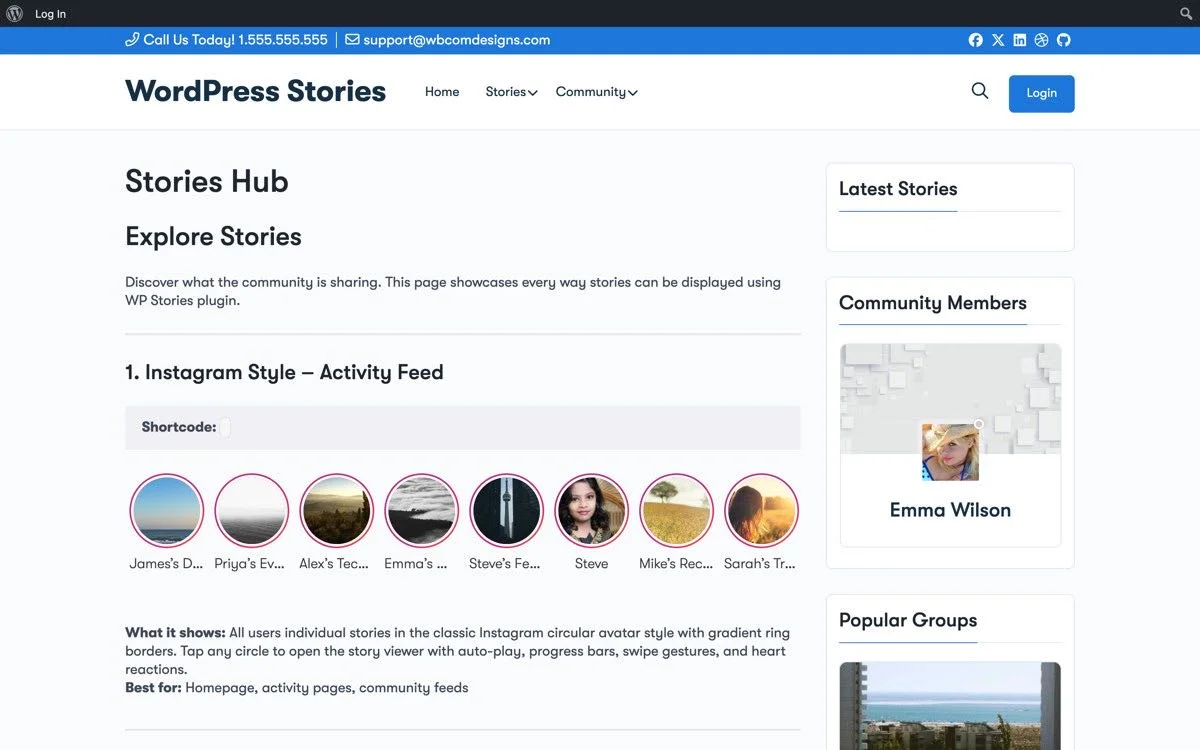
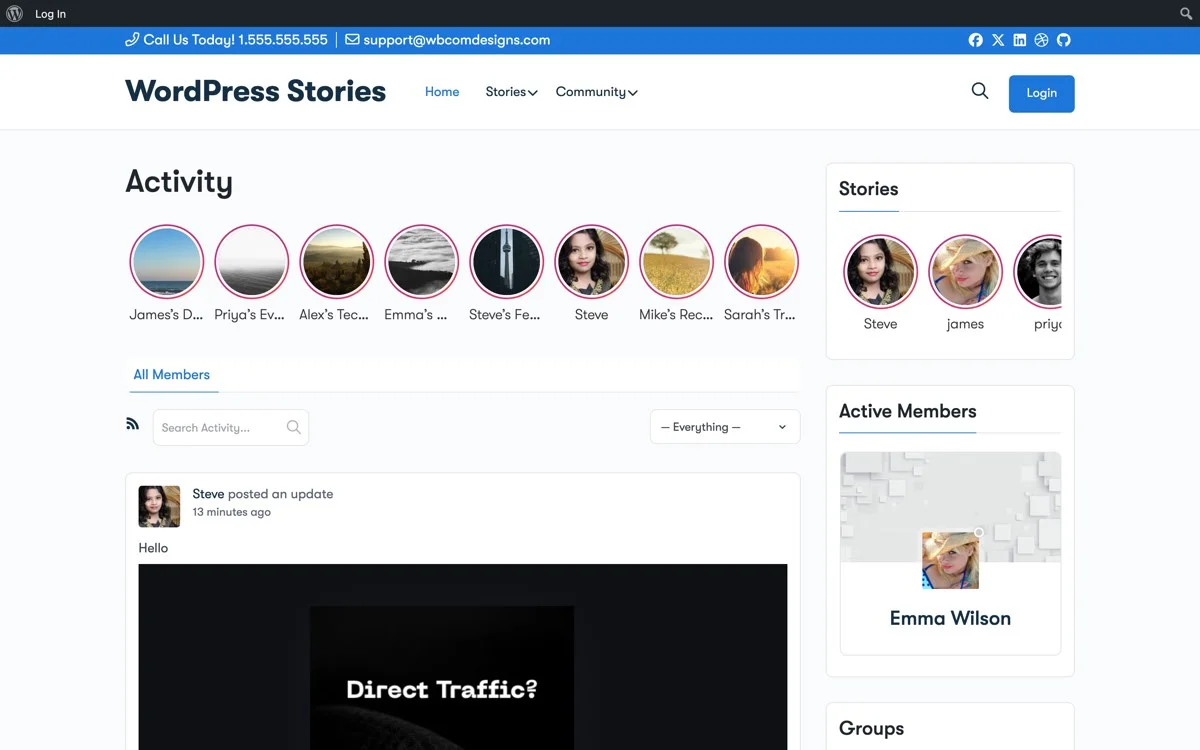
Snapssenger takes its cues from Facebook Messenger stories. Instead of full-screen immersion, it presents stories as a horizontal strip of circular thumbnails. Tapping any thumbnail opens that story in a lightbox-style overlay.
This style is ideal for situations where you want to surface multiple story threads without dominating the page layout. It works well in headers, sidebars, or as a content section between other page elements. The compact footprint means it can coexist with product grids, testimonials, and other conversion-focused content without competing for vertical space.
Snapssenger is the style most clients gravitate toward when they say they want something “like stories” on their site. The circular avatar pattern is immediately recognizable to anyone who uses social media, which means zero learning curve for shoppers.
For developers, Snapssenger is also the easiest to integrate into existing layouts. The horizontal strip can be placed anywhere via shortcode or widget, and its height is predictable and consistent. You do not need to worry about it pushing content below the fold or disrupting the visual hierarchy of the page.
Vemdezap: The Chat-Style Media Wall
Vemdezap draws from WhatsApp status updates. It presents stories in a vertical list format, similar to a chat interface where each story shows a preview, timestamp, and the author’s avatar. Tapping opens the full story.
This style shines in community-oriented stores where multiple authors or contributors create content. If your WooCommerce store has a team blog, user-generated content, or ambassador program, Vemdezap presents those stories in a way that feels personal and conversational.
The list format also works well on mobile, where vertical scrolling is the dominant interaction pattern. Unlike horizontal carousels that can feel awkward on small screens, Vemdezap’s vertical layout matches how people naturally browse on phones.
For stores with a strong community angle, this is often the right choice. A fitness brand with trainer-created content, a craft supply store with customer project showcases, or a local marketplace featuring vendor stories all benefit from the chat-style presentation.
Choosing the Right Style for the Client Request
Matching the right display style to the client’s actual need is where you add value as a developer. Here is a decision framework that has worked well across dozens of store builds.
Use Snapgram When the Content Deserves Full Attention
Choose Snapgram for product launches, seasonal campaigns, and any content where you want the viewer to stop scrolling and engage deeply. The full-screen format creates a tunnel effect that is perfect for storytelling sequences where each slide builds on the previous one.
Snapgram is also the right choice when the content is primarily video. The full-screen player handles video natively, with autoplay and manual controls, and the format is what users expect for video content thanks to Instagram Reels and TikTok.
Use Snapssenger When Space is Limited but Visibility Matters
Choose Snapssenger when the carousel needs to fit into a larger page without dominating it. Homepage hero sections, category page headers, and sidebar widgets are all natural homes for this style.
Snapssenger is also the best choice when you have many stories to surface at once. The horizontal strip can show a dozen or more thumbnails in a small space, giving users a visual menu of available content. This works particularly well for stores with multiple product categories, each with its own story.
Use Vemdezap When Community and Freshness Matter
Choose Vemdezap when the content comes from multiple authors and you want to emphasize recency and personal connection. The timestamp and avatar format signals “this is fresh, real content from real people,” which builds trust in ways that polished marketing carousels cannot.
Vemdezap is also a good choice for stores that publish stories frequently. The list format handles a high volume of content gracefully, whereas Snapssenger’s horizontal strip can feel crowded with too many items and Snapgram’s full-screen format does not provide a good overview of available content.
Embedding Stories with Shortcodes and Widgets
Once you have chosen a display style and created stories in the WP Stories admin, getting them onto the frontend takes just a few steps. WP Stories provides both shortcodes and widgets for maximum flexibility.
Shortcode Embedding
The basic shortcode follows a straightforward pattern. You specify the display style and optionally filter by category, author, or specific story IDs. Here are the most common patterns you will use:
To display all stories in the Snapgram style, use the shortcode with the style parameter set to snapgram. You can add a count parameter to limit how many stories appear, and a category parameter to filter by story category. The orderby parameter accepts date, title, or random, giving you control over which stories appear first.
For Snapssenger, the same shortcode structure applies but with the style set to snapssenger. You can additionally control the thumbnail size and the number of visible thumbnails before the strip becomes scrollable.
Vemdezap shortcodes accept the same filtering parameters plus an option to show or hide timestamps and author avatars.
Widget Embedding
WP Stories registers a widget for each display style that you can place in any widget area. The widget configuration mirrors the shortcode parameters with a visual interface. This is particularly useful for sidebar placement, where Snapssenger thumbnails or a Vemdezap list can add engaging content without requiring shortcode knowledge from the client.
For theme developers working with block themes, WP Stories content can also be integrated through template parts and block patterns, providing even deeper integration with modern WordPress architecture.
CSS Customization and Template Overrides
Out of the box, WP Stories looks good. But every store has its own brand identity, and you will almost always need to adjust the visual output. WP Stories supports two levels of customization: CSS overrides for styling changes and template overrides for structural changes.
CSS Customization Approach
WP Stories uses well-structured CSS classes that follow a consistent naming pattern. Each display style has its own namespace, so your customizations for one style will never accidentally affect another.
Common CSS customizations include adjusting the thumbnail border radius and size in Snapssenger, changing the progress bar color in Snapgram to match the store’s brand color, modifying the background overlay opacity for text readability, and adjusting the font sizing and spacing of story titles and descriptions.
The plugin’s CSS is loaded with a specificity level that makes it easy to override. You do not need to resort to !important declarations in most cases. Adding your overrides in the theme’s stylesheet or in the Customizer’s Additional CSS section is sufficient.
For responsive adjustments, WP Stories uses mobile-first breakpoints. The plugin handles the core responsive behavior, including touch gestures, swipe detection, and viewport-aware sizing. Your CSS customizations typically only need to address brand-specific details like colors, fonts, and spacing.
Template Overrides for Structural Changes
When CSS alone is not enough, WP Stories supports template overrides through the standard WordPress template hierarchy. Copy the plugin’s template files to your theme directory, and your versions will take precedence over the originals.
This is the right approach when you need to change the HTML structure of story cards, add custom data attributes for JavaScript integrations, include additional metadata like product prices or ratings, or integrate with WooCommerce product data directly in the story markup.
Template overrides also give you the ability to add schema markup, custom tracking attributes, or third-party integration hooks that would not be possible through CSS alone.
A practical example: for a fashion store, you might override the Snapgram template to include a “Shop This Look” button that links directly to the WooCommerce product page. The template override lets you access the story’s custom fields where you have stored the product ID, and render a linked button with the product price.
Performance Optimization for Production Stores
Carousels are notorious for killing page load times. Heavy images, multiple JavaScript libraries, and render-blocking animations can turn a beautiful design into a performance liability. WP Stories addresses these concerns at the architecture level, but there are additional steps you should take for production stores.
Built-In Performance Features
WP Stories includes several performance optimizations out of the box. Lazy loading ensures that only visible stories and their immediate neighbors load media assets. The JavaScript bundle is loaded asynchronously and only initializes when a story component enters the viewport. Image srcset support means the browser downloads the appropriate image size for the device, not a one-size-fits-all version.
The plugin also supports native browser caching for story data through the WordPress REST API. Once a set of stories is loaded, subsequent page views can pull the data from cache rather than making fresh API calls.
Additional Optimization Steps
For stores where performance is critical, and it should always be critical, take these additional steps.
First, optimize your story images before uploading them. WP Stories will serve whatever you give it, so starting with properly sized, compressed images makes a meaningful difference. Target 1200 pixels wide for Snapgram stories, 400 pixels for Snapssenger thumbnails, and 600 pixels for Vemdezap previews.
Second, use a CDN for media delivery. WP Stories works with any CDN that WordPress supports. Offloading story images to a CDN reduces server load and improves delivery speed for visitors across different geographic regions.
Third, consider the number of stories loaded on any single page. While WP Stories handles lazy loading well, the initial DOM footprint still matters. For homepage carousels, limit the visible count to what fits in the viewport plus a small buffer. The count parameter in shortcodes and widgets gives you precise control over this.
Fourth, if you are using video stories, provide both MP4 and WebM formats for optimal browser compatibility and compression. WP Stories will serve the format that the visitor’s browser handles best.
Fifth, test your implementation with Google Lighthouse and Core Web Vitals tools. WP Stories is designed to not impact Largest Contentful Paint (LCP) or Cumulative Layout Shift (CLS), but your specific implementation choices, particularly image sizes and above-the-fold placement, can affect these metrics.
Real-World Implementation Patterns
Having built carousel features for WooCommerce stores across multiple industries, certain patterns emerge as consistently effective. Here are the implementations that deliver the most value with the least friction.
The Homepage Story Bar
Place a Snapssenger strip directly below the header and above the main product grid. Populate it with five to eight stories that rotate weekly. Each story covers a different angle: new arrivals, sale items, behind-the-scenes content, customer spotlights, and how-to guides. This pattern keeps the homepage feeling fresh without requiring layout changes, and it gives returning visitors a reason to explore beyond their usual purchase flow.
The Product Category Showcase
On category archive pages, add a Snapgram carousel at the top featuring three to five stories that relate to that category. A sportswear store’s “Running Shoes” category page, for example, might feature stories about trail running tips, shoe technology explainers, and athlete endorsements. This adds context and buying motivation above the product grid without disrupting the shopping flow.
The Customer Community Wall
On a dedicated community or inspiration page, use Vemdezap to display customer-contributed stories. Enable frontend uploads so customers can share their own photos and videos of your products in use. The chat-style list format makes the page feel alive and active, encouraging more submissions and creating a virtuous cycle of user-generated content. For a deeper dive into managing automated customer management alongside community content, a CRM integration can help you track your most active contributors.
The Seasonal Campaign Launcher
For major sales events like Black Friday, holiday collections, or seasonal launches, create a temporary Snapgram carousel that takes over the homepage hero area. Set the stories to auto-advance every five seconds and include direct links to product pages or sale categories. After the event, remove the shortcode and the page reverts to its standard layout.
Delivering Faster with WP Stories
The real value proposition for developers is not just that WP Stories saves time on the initial build. It saves time across the entire project lifecycle.
During the build phase, you avoid the research, evaluation, and custom development that carousel features typically require. You choose a display style, configure it, and embed it. The time savings here is measured in days, not hours.
During client handoff, WP Stories provides an admin interface that clients can actually use. They can create new stories, reorder them, and manage the content without developer intervention. This reduces the ongoing support burden and gives clients the independence they want.
During maintenance, you benefit from a plugin that is actively maintained and tested against WordPress core updates. You are not maintaining a custom JavaScript solution that might break with the next jQuery deprecation or browser update.
And during future requests, when the client inevitably asks for a different carousel style on a different page, you can deliver it in minutes rather than starting from scratch. The three display styles cover such a broad range of use cases that the second and third carousel requests on a project often take less than thirty minutes to implement.
Getting Started
If you are tired of reinventing the carousel wheel on every WooCommerce project, WP Stories is worth evaluating. The three display styles, Snapgram, Snapssenger, and Vemdezap, handle the vast majority of carousel requests that come up in ecommerce development. The shortcode and widget system makes embedding straightforward, the CSS architecture supports clean customization, and the performance optimizations mean you are not trading visual appeal for page speed.
The next time a client says “we need a carousel,” you will have an answer ready.
Ready to stop building carousels from scratch? Get WP Stories and start delivering interactive content carousels in minutes instead of days.
Plugins we build and run
We maintain these ourselves, which is why we can support them on your site.
- BuddyNextThe self-hosted community engine for WordPress
- BuddyXFree community theme, Pro when you outgrow it
- ReignPremium community theme. Add pieces, build anything
- JetonomyCommunity forum and Q&A for WordPress
- EventonomyEvents and RSVPs for WordPress communities
- LearnomyCourses and learning communities on WordPress
- ListoraDirectories and listings your members can browse
- SnipShareCode sharing built for developer communities
- WB Ad ManagerAd placements that turn traffic into revenue
- WP Career BoardA job board your community actually uses
- WP Sell ServicesSell services with offers, orders, and payouts
- MediaVersePhotos, video, and media albums for members
- WB GamificationPoints, badges, and rewards that keep members active
- Product RoadmapPublic roadmaps with voting your users trust