A platform can sell a course beautifully and still be a genuinely frustrating place to build one. This comparison sets aside checkout, marketing, and business-model questions (covered in our broader online course platforms comparison) and looks specifically at the authoring experience: how easy it is to actually build a course, what content types are supported, how deep the quiz and assessment tools go, and whether an instructor can work without wrestling with the tool itself.
This comparison covers eight platforms specifically as course-creation tools, the software an instructor spends hours inside while turning expertise into structured lessons, not just the storefront wrapped around the finished product.
Table of Contents
- Quick comparison
- What makes a course-creation tool good, not just functional
- 1. Learnomy: drag-and-drop, front-end, wp-admin-free
- 2. Tutor LMS: the strongest frontend builder among WordPress plugins
- 3. LearnDash: mature but admin-side, add-on-dependent for depth
- 4. LifterLMS: solid native builder, engagement-focused
- 5. MasterStudy LMS: Gutenberg-native block building
- 6. Thinkific: no-code, hosted, less multimedia flexibility
- 7. Teachable: simple, shallow for complex curricula
- 8. Sensei LMS: block-editor-based, tightly WooCommerce-scoped
- Builder ease versus assessment depth: the real tradeoff
- Where AI-assisted drafting actually helps
- Building on the go: mobile and offline considerations
- Common mistakes evaluating a course-creation tool
- FAQ
- Verdict
Quick comparison
| Platform | Builder location | Content types | Quiz depth | The deal |
|---|---|---|---|---|
| Learnomy | Front-end, four-step wizard, no wp-admin needed | Video, audio, PDF, reading lessons | Six quiz types, partial credit, question banks, essay grading | No platform fees, what students pay is yours |
| Tutor LMS | Front-end drag-and-drop | Video, text, downloadable files | Several types free, deeper options paid | Annual license renewal, tiered |
| LearnDash | wp-admin, add-on-extensible | Video, text, downloadable files | Solid core, advanced types via add-ons | Annual license renewal |
| LifterLMS | wp-admin native builder | Video, text, quizzes, assignments | Core types free, advanced paid | Free core, annual add-ons for depth |
| MasterStudy LMS | Gutenberg block editor | Video, text, block-based layouts | Multiple types free, deeper on paid tier | Annual license renewal, tiered |
| Thinkific | Hosted no-code builder | Video, text, limited multimedia mixing | Core types, no advanced anti-cheat | A monthly subscription forever |
| Teachable | Hosted, simple builder | Video, text, basic downloads | Basic multiple choice, limited depth | A monthly subscription plus per-transaction fee on lower tiers |
| Sensei LMS | Block editor, WooCommerce-scoped | Video, text via blocks | Core quiz block, deeper types paid | Free core, WooCommerce dependency |
What makes a course-creation tool good, not just functional
Nearly every platform in this comparison can technically produce a working course. What separates a genuinely good course-creation tool from a merely functional one comes down to four things that only become obvious once you’ve spent real hours inside the builder: whether an instructor needs to leave the builder to do something basic (switching between wp-admin and the public site to check formatting, for instance), how many content types are natively supported without a workaround, how much assessment depth exists before hitting a paywall, and whether the interface gets out of the way or constantly demands attention just to keep working.
A course-creation tool that looks similar to a competitor in a feature-list comparison can be a meaningfully worse place to actually spend a week building a curriculum, and that difference rarely shows up until you’re already committed to a platform.
1. Learnomy: drag-and-drop, front-end, wp-admin-free
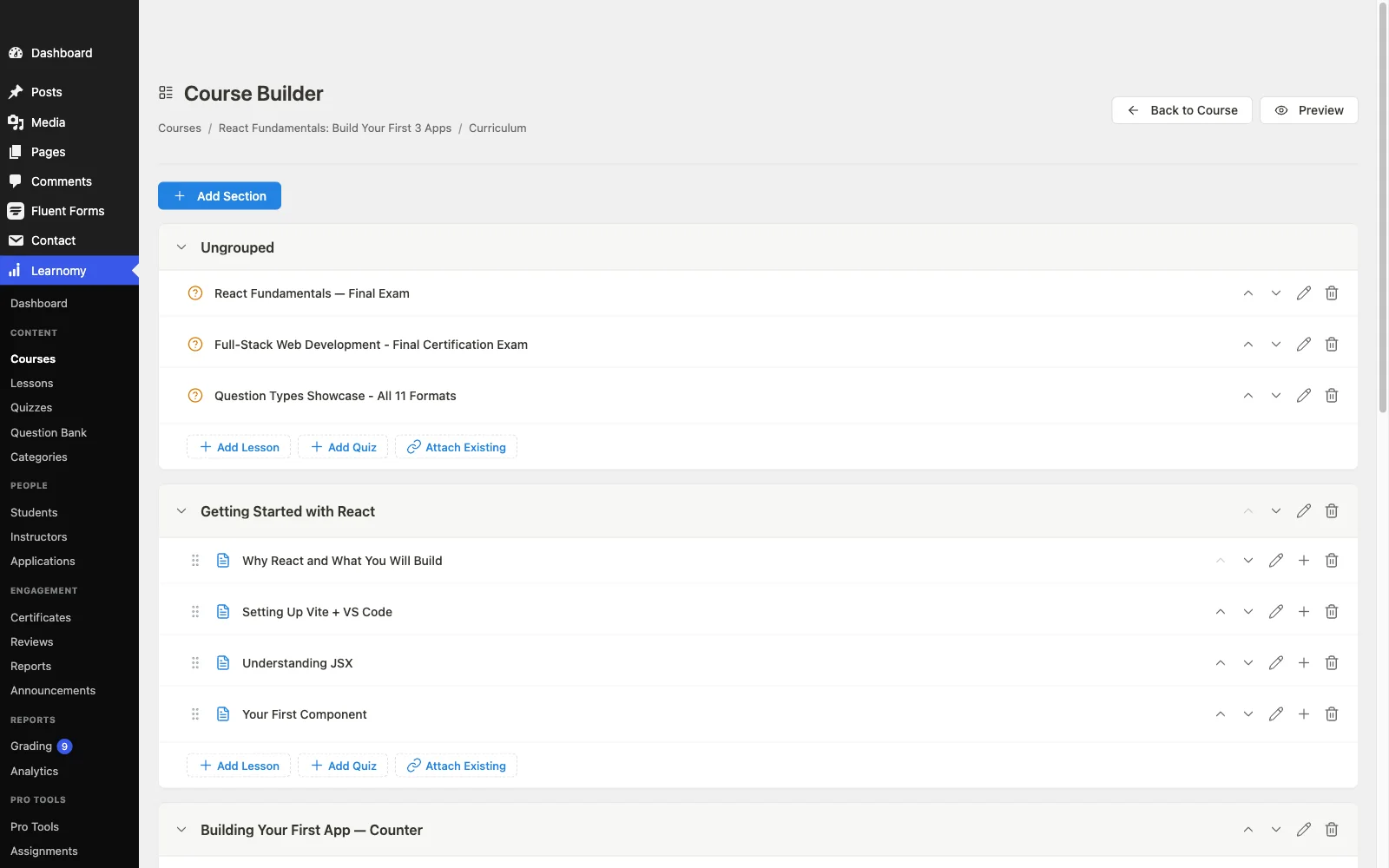
Learnomy’s course builder is designed around a specific decision: instructors shouldn’t need to touch wp-admin at all. The front-end, four-step wizard covers curriculum structure, content, review, and publishing without ever routing an instructor through the WordPress dashboard, a meaningful difference for a school with instructors who aren’t comfortable in WordPress’s admin interface, or for a school that simply doesn’t want to grant dashboard access to every content contributor.
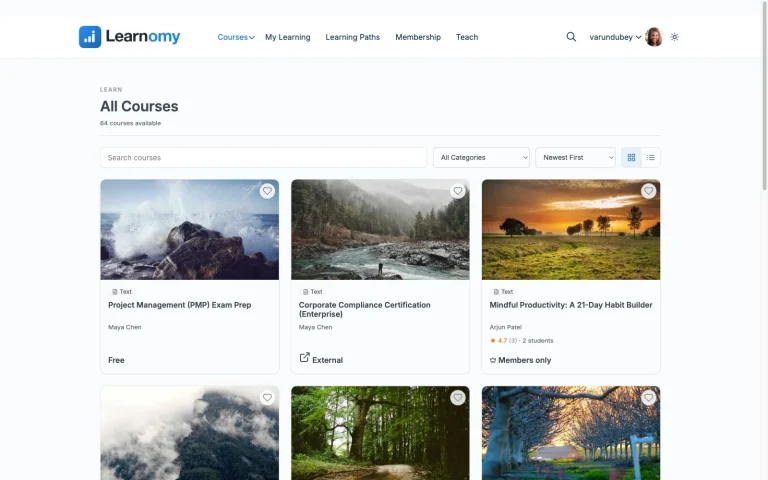
Courses mix video, audio, PDF, and reading lessons through a drag-and-drop curriculum builder, with no separate page-builder plugin required to lay out a course page. Learning paths sequence multiple courses with prerequisites, letting a builder structure a multi-course curriculum as a genuine sequence rather than an unsorted catalog, with a path certificate waiting at the end of the full sequence.
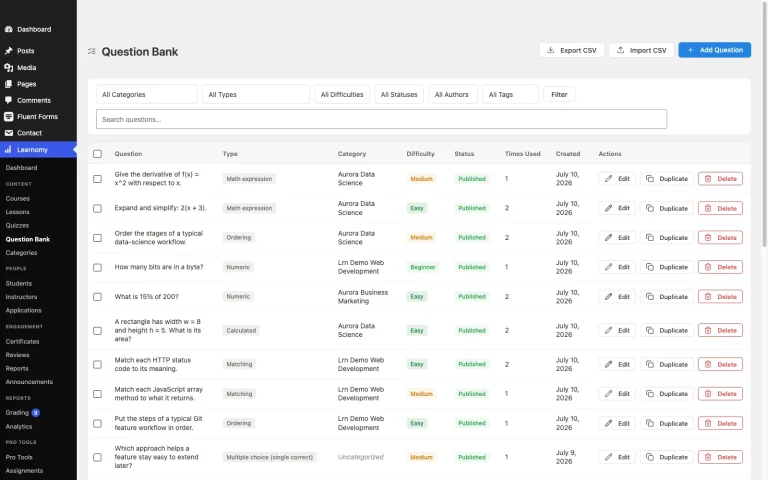
Assessment is where Learnomy’s builder pulls ahead most clearly: six quiz types, partial credit scoring, question banks for reusing and randomizing questions across attempts, anti-cheat tab-switch tracking for graded assessments, and an essay-grading inbox for the open-ended questions that need a human reviewer rather than an automated score. Grading rolls a course’s quizzes, assignments, and SCORM packages into one weighted grade automatically, instead of leaving an instructor to average separate scores by hand.
Certificates are built with a visual designer rather than a fixed template, digitally signed, and carry a QR code resolving to a public verify page. On the business side, checkout runs through Stripe and PayPal directly, with a WooCommerce adapter available, and the whole design layer runs on a school’s own branding, colors, typography, and layouts, not a template with a logo swapped in.
Best for: a school or course business that wants a genuinely deep builder, especially on the assessment side, without forcing every instructor into wp-admin to use it.
2. Tutor LMS: the strongest frontend builder among WordPress plugins
Tutor LMS’s frontend course builder is genuinely well-regarded, letting an instructor build and preview a course from the public-facing side of the site rather than switching constantly between wp-admin and a live preview. The builder covers video, text, and downloadable lesson types cleanly, and the free quiz engine supports more than basic multiple choice. Where it lags Learnomy specifically is assessment depth and grading tools at the free tier, content drip, a real certificate design tool, and deeper quiz behavior sit behind the paid tiers.
3. LearnDash: mature but admin-side, add-on-dependent for depth
LearnDash’s builder runs through wp-admin rather than the front end, a real difference in day-to-day workflow for instructors who’d rather not learn the WordPress dashboard. Its content depth is genuinely strong once relevant add-ons are in place, LearnDash’s ecosystem covers nearly any specific curriculum need, but reaching that depth means researching and installing the right combination of add-ons rather than finding it built in from the start.
4. LifterLMS: solid native builder, engagement-focused
LifterLMS’s native course builder is capable and covers quizzes and assignments in its free core, unusually generous for a WordPress LMS plugin. Its real strength as a creation tool is the built-in engagement engine, triggering achievements, emails, and certificates off specific student actions, useful for building a curriculum with automated milestones baked in from the start rather than configured after the fact. Advanced quiz types and richer content structuring sit behind paid add-ons.
5. MasterStudy LMS: Gutenberg-native block building
MasterStudy LMS leans fully into the WordPress block editor, a genuinely comfortable building experience for anyone already used to Gutenberg’s drag-and-drop block model. Layout flexibility for course pages is a real strength here. Content drip and deeper multimedia handling sit behind the paid tier, and the quiz engine, while supporting more than one question type free, doesn’t reach Learnomy’s or LifterLMS’s depth on partial credit or question banking.
6. Thinkific: no-code, hosted, less multimedia flexibility
Thinkific’s builder is genuinely approachable for a non-technical instructor, a clean, hosted, no-code interface with drag-and-drop lesson ordering. Multimedia flexibility is narrower than a self-hosted WordPress builder, mixing video, downloadable content, and interactive elements within a single lesson has more constraints than a platform built on WordPress’s more open content model. Advanced anti-cheat and assessment depth aren’t a strength here either.
7. Teachable: simple, shallow for complex curricula
Teachable’s builder prioritizes simplicity above nearly everything else, a genuine advantage for a first course with a straightforward, linear structure. For a complex, multi-track curriculum with branching content or deep assessment requirements, the builder’s simplicity becomes a real limitation, worth testing directly against your specific curriculum’s structure before committing rather than assuming simple scales to complex.
8. Sensei LMS: block-editor-based, tightly WooCommerce-scoped
Sensei’s block-editor-based builder is straightforward for basic course structures, video and text lessons through the standard WordPress block editor, with a quiz block supporting multiple question types. Content drip, prerequisites, and structured multi-course paths sit behind the paid tier, and the builder itself doesn’t offer the front-end, no-wp-admin workflow some competitors provide.
Builder ease versus assessment depth: the real tradeoff
Across this comparison, a consistent pattern shows up: platforms optimized purely for ease of use (Thinkific, Teachable) tend to have shallower assessment tools, while platforms with genuinely deep assessment (LifterLMS’s engagement engine, Learnomy’s six quiz types and grading system) generally ask a bit more of the builder itself. This isn’t a universal rule, Learnomy specifically targets both, a simple front-end builder paired with deep assessment tools, but it’s worth checking where each platform actually sits on this spectrum rather than assuming ease of use and depth always trade off evenly.
Which side of that tradeoff matters more depends entirely on what you’re building. A single, straightforward course with a quiz at the end doesn’t need six quiz types and an essay-grading inbox. A certification program, a professional training curriculum, or anything where a graded outcome matters to the student’s career genuinely does, and choosing a platform built for the simpler case will show its limits the moment the curriculum gets more demanding.
Where AI-assisted drafting actually helps
Several platforms in the broader course-creation market now offer some form of AI-assisted content drafting, curriculum outlines, lesson-level content, or quiz questions generated from a topic and a few parameters. The genuinely useful version of this gives an instructor a real starting draft to edit and personalize rather than a generic template that still requires building from scratch. Treat any AI claim with the same scrutiny you’d apply to any other feature claim: ask specifically what a given input produces as output before assuming it saves meaningful time, since “AI-powered” has become a marketing phrase attached to features of wildly different actual usefulness across this market.
Building on the go: mobile and offline considerations
Course creation rarely happens entirely at a desk. An instructor drafting a lesson outline on a commute, reviewing a submitted assignment between meetings, or checking how a course page actually renders on a phone before publishing all need a builder that works reasonably well outside a full desktop session, and this is a dimension most course-creation comparisons skip entirely because it doesn’t show up in a feature-list demo.
Front-end builders generally handle this better than admin-side ones, since a front-end interface is built to render on the same responsive layout as the rest of the public site, while a wp-admin dashboard is optimized for a desktop browser and tends to degrade on a phone screen. Learnomy’s builder, running entirely on the front end, inherits this advantage directly: an instructor can review and adjust curriculum from a phone or tablet using the same interface as the desktop version, rather than a stripped-down mobile view with reduced functionality. LearnDash and LifterLMS, both built primarily for wp-admin, are noticeably harder to use for anything beyond checking a notification on a small screen.
Offline access matters on the student side more than the builder side, but it’s worth checking for both. Learnomy runs as a progressive web app with offline progress tracking, meaning a student without a reliable connection can continue through material they’ve already loaded, and progress syncs once connectivity returns. None of the hosted, no-code platforms in this comparison offer an equivalent, since their entire model assumes a live connection to the vendor’s servers at all times. For a course catalog serving students in areas with inconsistent connectivity, or simply students who commute through dead zones, this is a real, practical differentiator rather than a nice-to-have checkbox.
Common mistakes evaluating a course-creation tool
Judging a builder from a five-minute demo instead of a real build. A builder that looks clean in a two-minute product tour can become tedious across the dozens of hours a real curriculum actually takes to build. Build at least one full lesson with real content before committing.
Not checking assessment depth until quiz-writing time. A platform that looked complete during course-structure setup can reveal real gaps once you’re trying to build a graded assessment with partial credit or a question bank, confirm quiz depth early, not after the curriculum is otherwise finished.
Ignoring how instructors without WordPress experience will actually use the tool. A wp-admin-based builder is a real barrier for a co-instructor or contractor who isn’t comfortable in WordPress’s dashboard. A front-end, no-wp-admin builder removes that barrier entirely.
Assuming a bigger feature list means a better building experience. A platform with more checkboxes on a feature comparison page isn’t automatically more pleasant to actually build in. Weigh hands-on building time over a feature-count comparison.
FAQ
Do instructors need WordPress experience to use Learnomy’s builder? No, the front-end, four-step builder is designed specifically so instructors never need wp-admin access to build and publish a course.
Which platform has the deepest quiz and assessment tools? Learnomy and LifterLMS both offer genuine depth in their respective ways, Learnomy through six quiz types with partial credit, question banks, and essay grading, LifterLMS through its engagement-triggered achievement and certificate system. Most hosted, simplicity-focused platforms (Teachable, Thinkific) are noticeably shallower here.
Is a front-end builder actually better than an admin-side one? For schools with multiple instructors who aren’t WordPress-savvy, generally yes, it removes a real access and training barrier. For a solo creator already comfortable in wp-admin, the difference matters less.
Can Learnomy handle a multi-course certification program? Yes, learning paths sequence multiple courses with prerequisites and issue a path certificate at completion, built specifically for structured, multi-course curricula rather than single standalone courses.
Is Learnomy’s builder free to try? Learnomy isn’t scored on a free-versus-paid split, it’s a complete learning platform with no platform fees on what students pay, the more useful comparison is the builder’s actual depth and workflow, covered above.
Verdict
For a school or course business that wants both a genuinely easy front-end building experience and real assessment depth, Learnomy’s combination of a wp-admin-free builder with six quiz types, question banks, and automated grading is the strongest pick in this comparison. Tutor LMS is the strongest alternative for a frontend-building experience within the free-plugin space, and LifterLMS is worth a close look specifically for its engagement-triggered achievement system. The remaining platforms are each solid for a narrower use case, simple, linear courses especially, worth testing hands-on against your specific curriculum before committing.
Building a curriculum that needs real assessment depth?
Learnomy pairs a front-end, wp-admin-free course builder with six quiz types, question banks, essay grading, and automated weighted grading, all in one platform with no platform fees on what students pay.
Get Learnomy