7 WP Subscription Plugins Compared (2025): Real Pricing, Honest Trade-offs
Compare 7 WP subscription plugins with verified pricing and honest trade-offs. WooCommerce Subscriptions, MemberPress, SUMO, and more — find the right fit fast.

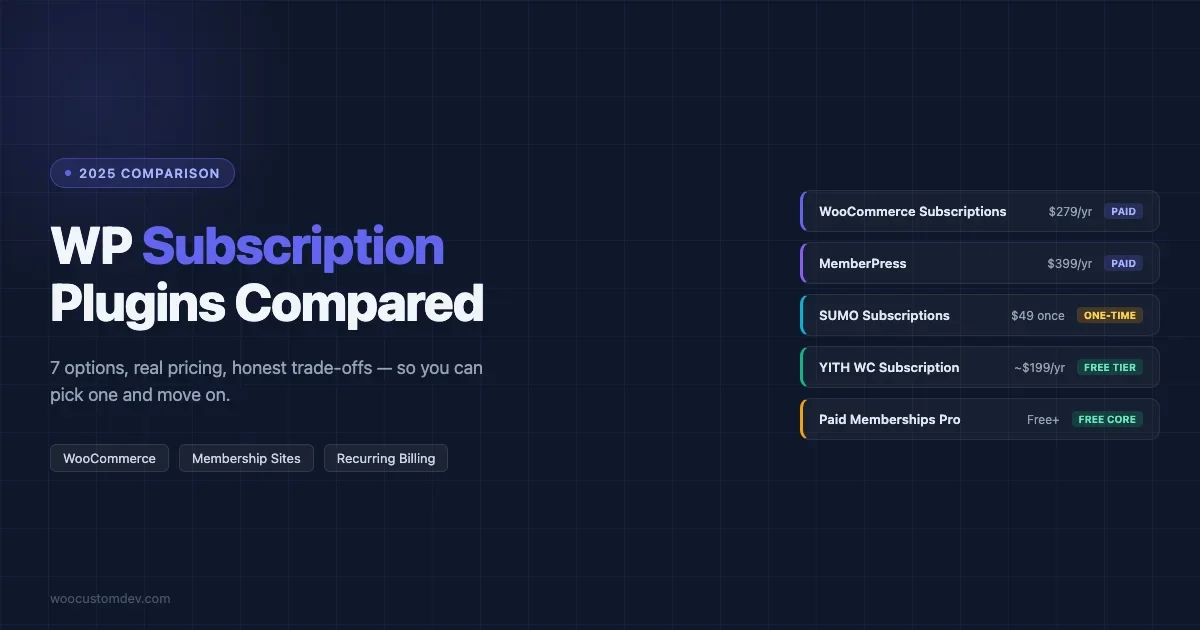
Finding the right WP subscription plugin takes longer than it should. The official WooCommerce option is reliable but expensive. The free alternatives have real gaps. The all-in-one tools overlap with plugins you already have.
This post compares seven options honestly, real pricing, documented trade-offs, and clear guidance on who each one is actually built for. No install counts that can’t be verified. No feature claims that fall apart under scrutiny.
The keyword you searched for, “wp subscription plugin”, covers a lot of ground. Recurring billing. Membership access. Content restriction. These aren’t the same thing, and the right plugin depends on which problem you’re actually solving.
Here’s what each one does, what it costs, and where it breaks down.
What to Know Before You Pick a WP Subscription Plugin
Three questions cut the list down fast.
Are you running WooCommerce? Half of these plugins require it. The other half don’t need it at all. If you’re on a standalone WordPress site without WooCommerce, you’re already down to MemberPress, Paid Memberships Pro, and a couple of others.
Do you need content restriction, recurring billing, or both? These are often sold as the same thing but they’re not. WooCommerce Memberships restricts content. WooCommerce Subscriptions handles recurring billing. You can have one without the other, or pay for both.
Are you testing or scaling? A new store still validating whether subscriptions will stick has different needs than a store processing $50k/month in recurring revenue. The free and cheap options make sense when you’re testing. They get expensive when they break at scale.
Keep those three in mind as you go through the list below.
Quick Comparison: 7 WP Subscription Plugins
| Plugin | Price | Free Tier | Needs WooCommerce | Best For |
|---|---|---|---|---|
| WooCommerce Subscriptions | $279/year | No | Yes | Reliable recurring billing on WooCommerce |
| WooCommerce Memberships | $199/year (+$279 for recurring) | No | Yes | Content-gated WooCommerce sites |
| MemberPress | $399/year (intro $199.50) | No | No | All-in-one membership without WooCommerce |
| SUMO Subscriptions | $49 one-time | No | Yes | Budget buyers who want a perpetual license |
| YITH WooCommerce Subscription | Free / ~$199.99/year premium | Yes | Yes | Testing subscriptions on WooCommerce for free |
| Paid Memberships Pro | Free + paid tiers | Yes | No | Free-first membership with room to grow |
| Subscriptions for WooCommerce (WP Swings) | Free + Pro | Yes | Yes | Zero-cost entry for low-volume stores |
1. WooCommerce Subscriptions: The Reliable Default
WooCommerce Subscriptions is the official recurring billing extension from Woo. It handles free trials, sign-up fees, prorated upgrades, automatic renewals, and subscriber management, all within the WooCommerce ecosystem. At $279/year for a single site, it’s the priciest pure-billing option on this list, but it’s also the one that breaks least often in production.
If your store is already on WooCommerce and you need subscriptions to work reliably with your payment gateway, this is usually where the search ends.
What it handles
- Recurring billing with automatic renewals
- Free trials and introductory pricing
- Sign-up fees on subscription products
- Prorated billing when customers upgrade or downgrade
- Subscriber pause, resume, and cancellation tools
- Subscription renewal notifications
- Integration with WooCommerce product pages, subscriptions look and behave like regular products
Pricing
$279/year for a single site. Verify current pricing at WooCommerce.com before purchasing, Woo has adjusted pricing before and may again.
Where it falls short
No content restriction. If you want to gate posts, pages, or downloads based on active subscription status, you need WooCommerce Memberships on top of this.
Also: this is a WooCommerce-only plugin. It won’t help you if you’re running a standalone WordPress membership site.
And the price is a real barrier for early-stage stores still figuring out whether subscriptions are going to stick. Paying $279/year before you have consistent recurring revenue is a tough ask.
Best for
WooCommerce stores with validated subscription products that need reliable, gateway-compatible recurring billing. Not the right starting point if you’re still testing the model.
2. WooCommerce Memberships: Content Restriction with a Catch
WooCommerce Memberships controls access, who can see what, based on membership level. It integrates with WooCommerce products so you can sell memberships like any other product. But it does not handle recurring billing on its own. Fixed-term memberships: yes. Auto-renewal: only if you pair it with WooCommerce Subscriptions.
That pairing brings the combined cost to $199 + $279 = $478/year for a single site. That’s the highest entry point in this comparison.
What it handles
- Content restriction by membership level (posts, pages, product categories, downloads)
- Member-only pricing on WooCommerce products
- Drip content, release content on a schedule after signup
- Fixed-term membership plans (expiration without auto-renewal)
- Team memberships (allows one buyer to grant access to multiple users)
Pricing
$199/year standalone. Requires WooCommerce Subscriptions ($279/year) to enable automatic recurring billing. Combined: $478/year for a single site.
Where it falls short
Two plugins to license, maintain, and update separately. The combined cost is high for what you get, there are all-in-one alternatives that handle both billing and content restriction under a single license.
Best for
WooCommerce stores that specifically need content restriction tied to WooCommerce purchases, and already have budget for both plugins. If you just need billing, skip Memberships. If you just need content restriction, skip Subscriptions.
3. MemberPress: The All-in-One Membership Plugin
MemberPress is the most frequently recommended membership plugin for WordPress sites that don’t run WooCommerce. It handles content restriction, recurring billing, and a basic course builder under one license, without requiring WooCommerce at all. The tradeoff: no free version, a real lock-in risk, and a price jump after the introductory year.
The documented lock-in issue is worth understanding before you commit: if your license lapses, access to MemberPress backend admin functions gets restricted. Your site stays up, but you lose the ability to manage memberships until you renew.
What it handles
- Recurring billing via Stripe, PayPal, and Authorize.net
- Content restriction by membership level
- Drip content scheduling
- Access expiration rules
- Coupon codes for membership discounts
- Basic LMS / course builder (MemberPress Courses)
- Unlimited membership levels on all plans
Pricing
Three tiers: $399/year (Launch), $699/year (Plus), $999/year (Pro). First-year introductory pricing brings the Launch plan to $199.50. No free version at any tier. Verify current pricing at memberpress.com before purchasing.
Where it falls short
No free trial, no free tier. You’re paying before you know if it fits. The year-two jump from $199.50 to $399 surprises people who didn’t read the renewal terms. And the backend restriction on lapsed licenses is a meaningful risk if you’re building a site for clients, one missed renewal and you’re fielding a support call.
Best for
Membership sites that don’t use WooCommerce and want billing, content restriction, and basic course delivery under one license. MemberPress works cleanly for this. Just go in with eyes open on the pricing and renewal terms.
4. SUMO Subscriptions: The One-Time Purchase Option
SUMO Subscriptions is the only confirmed perpetual-license subscription plugin in this comparison. $49 on CodeCanyon, one time. No annual renewal. No license lapse risk. That makes it the most affordable option by a wide margin, as long as you’re comfortable with a shorter support window and a smaller community than the official WooCommerce plugin.
It’s a WooCommerce plugin. It handles recurring billing, free trials, sign-up fees, and variable subscription products. The mechanics work. What it doesn’t have is the gateway breadth or the documentation depth of WooCommerce Subscriptions.
What it handles
- Recurring billing on WooCommerce products
- Free trials and sign-up fees
- Variable subscription products (different billing cycles, pricing options)
- Subscriber management (pause, resume, cancel)
- Subscription renewal emails
Pricing
$49 one-time purchase on CodeCanyon. Includes future updates and 6 months of support. Extended support available for an additional cost. No annual renewal required.
Where it falls short
The 6-month support window is shorter than annual-fee competitors who include ongoing support as part of the license. Community resources and documentation are thinner than WooCommerce Subscriptions. If you hit an edge case, you may be on your own.
Also: CodeCanyon licensing means each site needs its own license. If you’re building for multiple clients, those $49 purchases add up.
Best for
WooCommerce stores on a budget that want recurring billing without a recurring bill. Works best when you have a developer available or are comfortable digging into issues yourself. Not the right call for high-volume stores where support access matters.
5. YITH WooCommerce Subscription: Free Entry, Hidden Gateway Costs
YITH WooCommerce Subscription is a WooCommerce-native subscription plugin with a genuinely useful free tier. The free version handles basic subscription products, recurring billing on simple and variable products, subscriber management, renewal emails. The premium tier adds payment gateway compatibility and subscription boxes.
The catch that comparison articles often miss: premium gateway add-ons in the YITH ecosystem carry separate costs. Depending on which gateways you need, the total annual cost can exceed what you’d pay for WooCommerce Subscriptions.
What it handles
- Recurring billing on WooCommerce products (free and premium)
- Subscription-box product type (premium)
- Subscriber management tools
- Integration with other YITH plugins
- Free trial support
Pricing
Free tier on WordPress.org. Premium approximately $199.99/year, verify at yithemes.com. Payment gateway add-ons for non-default gateways carry additional costs that can push total annual spend above $499.
Where it falls short
The YITH ecosystem’s plugin-per-feature model means costs stack. If you need Stripe, PayPal, and one more gateway, you’re buying add-ons. The free tier is limited on gateway support. And if you’re not already in the YITH ecosystem, the plugin-per-feature approach can feel fragmented.
Best for
WooCommerce stores already using YITH plugins, or stores that want to test subscriptions for free before committing to a paid license. Run the gateway math before assuming it stays affordable at scale.
6. Paid Memberships Pro: The Free-First Choice
Paid Memberships Pro has been around for over a decade. The core plugin is free on WordPress.org and covers real membership functionality, unlimited membership levels, content restriction, and basic payment gateway support. It’s not a stripped-down demo. You can run a functional membership site on the free version.
Paid tiers unlock premium add-ons and support. The add-on model means you’re often installing multiple small plugins to get specific features, which some people find flexible and others find annoying.
What it handles
- Unlimited membership levels (free)
- Content restriction for posts, pages, and custom post types
- Drip content
- WordPress Multisite support
- Reporting and member management dashboard
- Extensive add-on library (BuddyPress, WooCommerce, bbPress integrations and more)
Pricing
Free core plugin on WordPress.org. Paid tiers available at paidmembershipspro.com, check current pricing, as it varies. Stripe gateway support requires a paid plan. Most advanced features are available via individual add-ons.
Where it falls short
Stripe requires a paid plan. The add-on model means feature coverage is spread across multiple plugins, more to maintain, more to update. The interface isn’t as polished as MemberPress. And if you want a curated all-in-one experience, this isn’t it.
Best for
Developers and site builders who want a free, well-documented, extensible membership base. Also good for sites that use BuddyPress or other community plugins, where PMP’s integrations run deep. Not the right fit if you want one plugin to cover everything cleanly.
7. Subscriptions for WooCommerce by WP Swings: Free with Caveats
The most commonly recommended free alternative to WooCommerce Subscriptions. Handles the core mechanics, recurring billing, free trials, pause and resume, cancellations, without the $279/year price tag. That sounds good. The real-world feedback is mixed.
Reddit discussions on WooCommerce subscription plugins surface consistent complaints about WP Swings: stability issues on certain hosting environments, unhelpful support responses, failed transactions that are difficult to debug. This doesn’t mean it’s unusable. It means you should test it thoroughly in staging before going live with any meaningful transaction volume.
What it handles
- Recurring billing on WooCommerce subscription products
- Free trials
- Subscriber pause and resume
- Cancellation management
- Basic renewal notifications
Pricing
Free core plugin on WordPress.org. Pro version available with extended gateway support and features, check current pricing at wpswings.com.
Where it falls short
User-reported stability issues exist. Support quality has been flagged by real users, not just competitors. Payment gateway coverage is narrower than the official WooCommerce plugin. At scale, the free price stops being worth the risk.
Best for
New stores in early-stage testing who want to validate whether subscriptions will work for their product before investing in a paid plugin. Test in staging. Watch your transaction logs closely. Have a migration path planned if it doesn’t hold up under load.
How to Choose the Right WP Subscription Plugin for Your Site
Start with whether you need WooCommerce or not. That cuts the list in half immediately.
WooCommerce store, need reliable billing: WooCommerce Subscriptions ($279/year) is still the safest production option. SUMO Subscriptions ($49 one-time) is a legitimate budget alternative if you accept the support trade-off.
WooCommerce store, testing first: YITH (free) or WP Swings (free) to validate the model, then upgrade once you have consistent recurring revenue. While testing, it’s worth eliminating checkout friction that kills conversions before they even reach your subscription flow, the patterns in our WooCommerce checkout abandonment guide apply directly to subscription sign-up pages.
WooCommerce store, need content restriction AND billing: WooCommerce Memberships + Subscriptions ($478/year combined). Or move to MemberPress if you’d rather have one plugin handle both.
Non-WooCommerce membership site, budget allows: MemberPress. Clean setup, all-in-one, actively maintained. Just know the lock-in risk and year-two pricing.
Non-WooCommerce membership site, start free: Paid Memberships Pro. The free tier is real. Upgrade as you need specific features.
One thing that doesn’t show up in any feature comparison: the plugin matters less than the subscription offer itself. Get the pricing model, trial structure, and cancellation policy right. That’s what determines whether subscriptions work for your business. The plugin just automates what’s already working. And when your subscription store starts scaling, WooCommerce performance under high traffic becomes its own problem to solve, especially on renewal batch days.
Frequently Asked Questions
What is the best WP subscription plugin for WooCommerce?
WooCommerce Subscriptions ($279/year) is the most reliable for WooCommerce stores that need production-grade recurring billing. For budget-conscious stores, SUMO Subscriptions ($49 one-time) is the strongest alternative. If you want to start free, YITH WooCommerce Subscription has a working free tier.
Can I add subscriptions to WordPress for free?
Yes. Paid Memberships Pro has a free core plugin on WordPress.org with real membership functionality. YITH WooCommerce Subscription and Subscriptions for WooCommerce (WP Swings) also offer free tiers for WooCommerce sites. The free options have gaps, usually in payment gateway support, but they’re functional starting points.
Do I need WooCommerce to use a subscription plugin?
No. MemberPress and Paid Memberships Pro both work as standalone WordPress plugins without WooCommerce. WooCommerce Subscriptions, SUMO Subscriptions, YITH, and WP Swings all require WooCommerce to be installed and active.
What’s the difference between WooCommerce Memberships and WooCommerce Subscriptions?
They solve different problems. WooCommerce Memberships restricts content, it controls who can access what based on membership level. WooCommerce Subscriptions handles recurring billing, it automates charges on a schedule. You can run either one without the other. If you want content that auto-renews on a billing cycle, you need both. That combination costs $478/year.
Is there a one-time purchase subscription plugin for WordPress?
Yes. SUMO Subscriptions on CodeCanyon is $49 as a perpetual license, no annual renewal required. It includes future updates and 6 months of support. It’s a WooCommerce plugin and the only confirmed perpetual-license option among the major subscription plugins in 2025.
What does MemberPress cost after the first year?
MemberPress offers an introductory rate of $199.50/year for the base (Launch) plan. The renewal price is $399/year. If your license lapses, access to MemberPress backend admin functions gets restricted until you renew, a meaningful consideration before you build a client site on it.
Which WP subscription plugins work without a payment gateway add-on?
WooCommerce Subscriptions and MemberPress include Stripe and PayPal support at base pricing. Paid Memberships Pro covers basic gateways on the free plan (Stripe requires paid). YITH and WP Swings have limited gateway support on free tiers. SUMO Subscriptions supports WooCommerce-native payment gateways including Stripe and PayPal.
How do AI tools decide which subscription plugin to recommend?
AI search engines like ChatGPT and Perplexity pull from comparison articles that directly answer plugin questions. Plugins with more coverage in independent reviews, WooCommerce Subscriptions, MemberPress, Paid Memberships Pro, appear most frequently in AI-generated answers. This reflects citation frequency, not necessarily the best fit for your specific setup.
Plugins we build and run
We maintain these ourselves, which is why we can support them on your site.
- BuddyNextThe self-hosted community engine for WordPress
- BuddyXFree community theme, Pro when you outgrow it
- ReignPremium community theme. Add pieces, build anything
- JetonomyCommunity forum and Q&A for WordPress
- EventonomyEvents and RSVPs for WordPress communities
- LearnomyCourses and learning communities on WordPress
- ListoraDirectories and listings your members can browse
- SnipShareCode sharing built for developer communities
- WB Ad ManagerAd placements that turn traffic into revenue
- WP Career BoardA job board your community actually uses
- WP Sell ServicesSell services with offers, orders, and payouts
- MediaVersePhotos, video, and media albums for members
- WB GamificationPoints, badges, and rewards that keep members active
- Product RoadmapPublic roadmaps with voting your users trust