Subscription Cancellation Reasons: What WooCommerce Data Actually Shows
The real reasons subscribers cancel — backed by verified data. Churn benchmarks, WooCommerce cancellation survey defaults, native retention tools, and what each reason actually requires to fix.

Most subscription businesses treat cancellation as a failure. A subscriber clicks cancel, disappears, and the store moves on. That’s the wrong frame.
Cancellation is data. It tells you exactly what broke down, pricing, product fit, shipping expectations, or just timing. The problem is most stores never read it.
This post covers the real subscription cancellation reasons backed by verified data, what WooCommerce shows you natively about why people leave, and what you can actually do about each one before the subscriber is gone.
The Numbers First: What Churn Actually Looks Like
Before getting into why people cancel, it helps to know what’s normal. Because most subscription operators anchor to the wrong benchmarks.
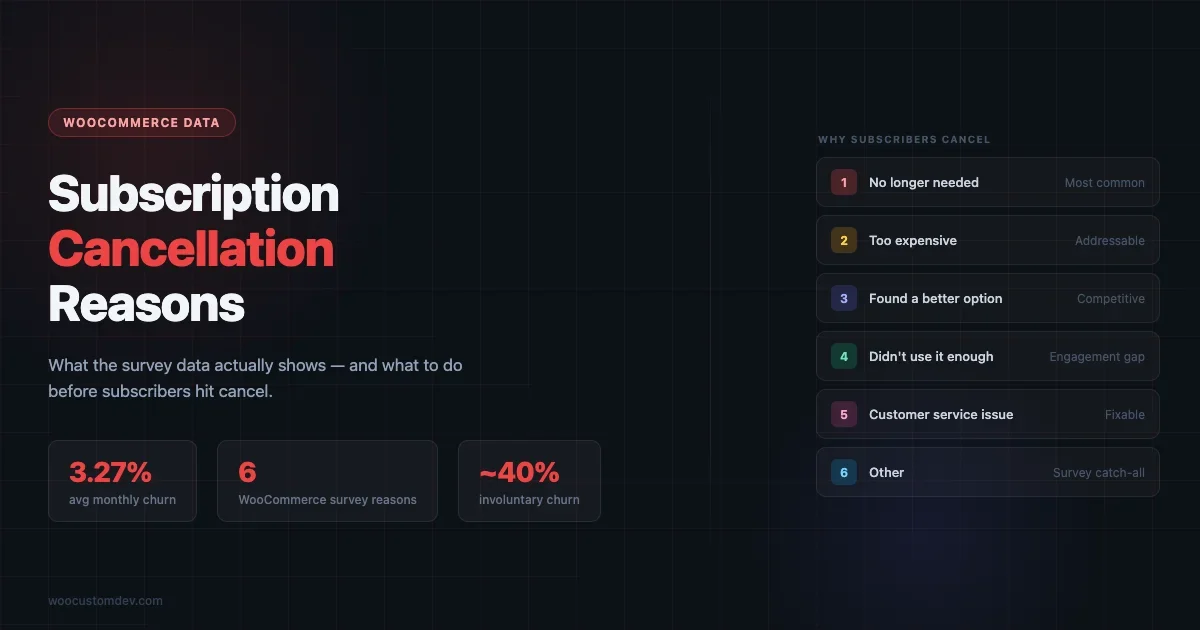
The cross-industry average monthly churn rate is 3.27%, according to Recurly’s analysis of 2,000+ subscription businesses. That sounds manageable until you realize it compounds. 3.27% monthly is roughly 33% annually.
But that number is skewed toward B2B SaaS. If you run a WooCommerce subscription store, physical products, digital goods, or memberships sold direct to consumers, your relevant benchmark is closer to 6.5% monthly. That’s the DTC average from the same dataset. About 1.7x higher than B2B counterparts.
Here’s what most retention articles skip: roughly one in four cancellations isn’t a cancellation at all. The Recurly data shows 0.86% of that 3.27% is involuntary churn, failed payments. People who didn’t intend to leave. They just had a card decline. If you’re not running dunning management on your WooCommerce subscriptions, you’re losing subscribers who didn’t want to go.
So the 6.5% DTC monthly rate breaks down roughly as:
- ~5% voluntary, customers who actively chose to cancel
- ~1.5% involuntary, payment failures that weren’t recovered
Different problems. Different solutions.
Why Subscription Cancellation Data Is Harder to Trust Than It Looks
A quick note before the reasons list, because this matters for how you use this data.
Most “top reasons customers cancel” statistics come from billing platform vendors, Recurly, sticky.io, Chargebee, publishing from their own customer bases. These aren’t random samples. They’re skewed toward businesses already paying for sophisticated subscription tooling, which means smaller WooCommerce stores with simpler setups may not be well-represented.
There’s also no large-scale public study on why customers cancel WooCommerce-specific subscriptions. The Metorik WooCommerce Insights report (65M+ orders, 6,000+ stores) covers behavioral timing data, when people cancel, but not why. That gap matters.
What we do have that’s WooCommerce-specific and primary-sourced: the six default cancellation reasons built into WooCommerce Subscriptions’ own cancellation survey. These aren’t survey results, they’re what Woo chose to ask. But they map closely to what the broader subscription research surfaces as the dominant categories.
The Six Subscription Cancellation Reasons WooCommerce Surfaces by Default
WooCommerce Subscriptions includes a built-in cancellation survey. When a subscriber clicks to cancel, you can present them with a reason prompt before the cancellation completes. The six default reasons, verbatim from the official documentation:
- “I no longer need the product”
- “I found a better alternative”
- “The product is too expensive”
- “I’m not satisfied with the quality of the product”
- “The product did not meet my expectations”
- “Other (please specify)”
These six group into three categories that show up repeatedly across subscription research: cost/value, engagement/need, and product-market fit. The split matters because the right retention response is completely different depending on which category is driving cancellations.
Cost/value problems respond to discounts and pauses. Engagement problems respond to onboarding fixes and usage nudges. Product-market fit problems require rethinking what you’re selling, not retention tactics.
How to Configure the WooCommerce Cancellation Survey
The cancellation survey isn’t enabled by default in WooCommerce Subscriptions. You need to turn it on manually, and most stores that have the plugin installed have never done this.
To enable it: go to WooCommerce → Settings → Subscriptions and look for the Cancellation Survey section. Enable the survey toggle. You’ll see the six default reasons listed, you can edit the text of each reason to better match your product type. A software subscription might say “I found a better tool” rather than “I found a better alternative.” A subscription box might specify quality more concretely than the generic default.
Next, pair each reason with a retention offer. The two native options are:
- Coupon Discount, generates and applies a discount coupon automatically if the subscriber accepts the offer. You set the discount amount or percentage. Works best paired with the “too expensive” reason.
- Skip Next Renewal, postpones the subscriber’s next billing cycle by one period. No payment is permanently skipped, just deferred. Works best for “I no longer need it right now” situations.
You can also choose to show no offer for certain reasons. For “not satisfied with quality”, offering a discount to someone who thinks your product is bad sends the wrong signal. Skip the retention offer and follow up with a customer service email instead.
Survey responses are stored on each subscription record in WooCommerce. You can view them individually on the subscription detail page. For aggregate analysis, export your subscriptions data and filter by the cancellation reason column, that’s where the real patterns emerge once you have enough volume.
One practical note: the survey only fires if the subscriber cancels through the My Account portal. Cancellations processed manually via the WooCommerce admin panel don’t trigger the survey. If your support team processes cancellation requests via email, you’re missing the survey data on every one of those subscribers.
Reason 1: Price, The Cancellation Reason Everyone Overestimates
“Too expensive” is the reason subscribers give most often. It’s also the one that most often masks something else.
People say price when what they actually mean is “I’m not getting enough value at this price.” A $15/month product that delivers on its promise doesn’t feel too expensive. A $9/month product that collects dust does. The price complaint is usually a value complaint in disguise.
For WooCommerce subscription stores selling physical products, this gets specific. Research from a PYMNTS/sticky.io study of 2,242 US retail subscribers found that 62% cited free shipping as their primary reason for subscribing in the first place. Which means 41% said they would cancel if free shipping were discontinued. The perceived value of the subscription was, for many subscribers, mostly about the shipping benefit, not the product.
If you remove or restrict free shipping, expect a spike in cancellations framed as “too expensive.”
What to do about it
WooCommerce Subscriptions lets you pair a cancellation survey response with a retention offer. For the “too expensive” reason, the native option is a Coupon Discount, automatically applied to the next renewal when a subscriber accepts the offer. You can set it as a fixed amount or a percentage.
This works, but only for subscribers who are price-sensitive and value the product. Offering 20% off to someone who said “too expensive” but really means “I never use this” just delays the inevitable. Use your cancellation survey data to distinguish the two groups over time.
Reason 2: No Longer Needs It, The Honest One
“I no longer need the product” is the most honest reason on the WooCommerce survey list. The subscriber is telling you the product served its purpose, or their circumstances changed. They’re not dissatisfied, they’re done.
This shows up differently across product types. A subscription box of baby products eventually stops making sense. A subscription to a software tool stops being relevant when the project it was bought for ends. A membership to a WooCommerce-powered community site goes stale when the member’s priorities shift.
Some of these cancellations are genuinely fine. The subscription lifecycle ran its course. But some represent a fixable problem: the subscriber stopped seeing new value because the product or the communication didn’t evolve with them.
What to do about it
The native WooCommerce Subscriptions retention tool for this reason is the Skip Next Renewal option, introduced in plugin version 1.2.0 (November 2024). Instead of canceling, the subscriber postpones their next billing cycle by one period. It’s a pause, not a cancel.
This works when the underlying need is temporary, a subscriber who just stockpiled three months of product and doesn’t want more yet. It doesn’t work when the need has genuinely ended. Know the difference by watching how many subscribers who skip end up canceling anyway in the following cycle.
Reason 3: Found a Better Alternative, The Competitive Churn
This one is the clearest signal you’re getting from the market. Someone compared you to something else and left. That’s information.
The problem with competitive cancellations is that most stores respond with retention tactics, discounts, offers, pause options, when the real response should be intelligence gathering. What specifically did they move to? If you’re seeing this reason spike, you need to know what’s winning against you and why.
For WooCommerce subscription stores, the exit survey open-text field on “Other (please specify)” is underused for this. If you ask “what made you switch?” in that field, you’ll get answers that are far more useful than a retention coupon.
What to do about it
Short-term: a discount offer might win some back, but only temporarily if the alternative genuinely serves them better. Long-term: use the competitive cancellation data to inform product decisions, not just retention flows.
One underused option in WooCommerce: if you suspect a pricing gap is the reason, test a lower-tier subscription product rather than a blanket discount. A subscriber who leaves because of price is telling you they valued the product, just not at your current price. A second, lower-cost product tier might keep them.
Reason 4: Product Quality Dissatisfaction
“I’m not satisfied with the quality of the product” is the cancellation reason that should make you stop and read the survey responses carefully.
Quality dissatisfaction in WooCommerce subscription contexts covers a wide range: a subscription box product that degraded over time, a digital product with persistent bugs, a membership community that went inactive, a SaaS plugin that broke on a WordPress update. The reason is the same, “quality”, but the causes are completely different.
This is the cancellation reason most likely to come with support tickets, bad reviews, and word-of-mouth damage. A price complaint is quiet. A quality complaint spreads.
What to do about it
No discount will fix a quality problem. A Skip Next Renewal offer to someone who’s dissatisfied with product quality will get you one more month of revenue and then a harder cancellation with a more annoyed subscriber.
The right response to a quality cancellation is an apology and a genuine commitment to address the issue, not a retention tactic. If the cancellation rate for “quality” reasons starts climbing, that’s a product problem, not a churn problem.
Reason 5: Unmet Expectations, The Onboarding Problem
“The product did not meet my expectations” is often an onboarding failure more than a product failure. The subscriber formed an expectation, usually from your marketing, and the product didn’t deliver it.
For WooCommerce subscription stores, this shows up most often in the early subscription lifecycle. Cancellations for unmet expectations cluster in the first 60–90 days. If your cancellation survey data shows this reason peaking early, that’s where to focus: what are you promising in your sign-up flow, and what’s the reality of the first few deliveries or interactions?
Subscription box businesses see this frequently. The sign-up page shows high-value curated items; the first box disappoints. The expectation was set by the best-case version; the experience was average.
What to do about it
The fix is upstream, not at cancellation. Audit your subscription sign-up page and email onboarding sequence. Are you showing typical boxes or peak boxes? Are you explaining the curation process or just showing the result?
For early-lifecycle cancellations specifically, a well-timed pause offer (Skip Next Renewal) can buy time while you improve the next delivery. But if the expectation mismatch is structural, baked into how you market the subscription, the retention offer is a band-aid.
The Reason That Doesn’t Appear on Any Survey: Failed Payments
None of the six WooCommerce survey options cover involuntary churn. But it accounts for roughly 26% of all subscription cancellations in the Recurly dataset, and it’s almost entirely preventable.
Involuntary churn happens when a card declines, the renewal fails, and the subscription lapses. The subscriber didn’t choose to cancel. They just had a card expire, a bank flag a transaction, or a temporary issue with their payment method. And the subscription ended anyway.
WooCommerce doesn’t include built-in dunning management (the system of retry logic and email sequences that recover failed payments before they become cancellations). The base plugin retries failed payments, but the sequence and communication layer is thin. Plugins like WooCommerce Smart Coupons, or dedicated dunning tools built for WooCommerce, fill that gap.
If you’re seeing elevated cancellations and not tracking the voluntary vs. involuntary split, you’re potentially solving the wrong problem. A subscriber retention strategy built on improving your cancellation survey response rate won’t touch the one-in-four who left because of a failed payment, and those are the easiest subscribers to recover.
How to Use WooCommerce Cancellation Survey Data Properly
Running the cancellation survey is step one. Using the data is where most stores stop.
A few practical rules for WooCommerce store operators:
Volume matters before action. If you have 10 cancellations a month and two say “found a better alternative,” that’s not a trend. It’s noise. Wait for statistically meaningful patterns before making product decisions based on cancellation reasons.
Watch ratios, not counts. If your cancellations triple in volume but the reason distribution stays constant, you have a growth problem (too many subscribers churning, same reasons). If your cancellations stay flat but “quality” goes from 5% to 30% of reasons, you have a product problem. Different responses.
Pair the survey with the offer, but track the conversion. WooCommerce Subscriptions lets you trigger a retention offer after a reason is selected. Monitor how many subscribers who see the offer accept it, and how many who accept it actually stay past the next billing cycle. A high acceptance rate with a low retention rate means you’re delaying cancellations, not preventing them.
Read the open-text responses. The “Other” field and any freeform follow-up questions hold the most actionable feedback. Most stores don’t export and read this data regularly. The ones that do find problems they didn’t know existed.
Retention Strategies Mapped to Each Cancellation Reason
Here’s the practical summary. The WooCommerce native tools (Coupon Discount, Skip Next Renewal) cover the cost and timing reasons well. The product-side reasons require fixes outside the retention flow. If you’re also dealing with WooCommerce performance issues during peak renewal periods, the patterns in our WooCommerce high-traffic optimization guide apply directly to batch renewal processing days.
| Cancellation Reason | Category | Retention Tool | Underlying Fix |
|---|---|---|---|
| Too expensive | Cost/Value | Coupon Discount offer | Pricing tiers, value communication |
| No longer need it | Engagement | Skip Next Renewal offer | Re-engagement emails, usage nudges |
| Found a better alternative | Competitive | Coupon Discount (short-term) | Competitive intelligence, product roadmap |
| Not satisfied with quality | Product | None, fix the product | Quality audit, customer service response |
| Didn’t meet expectations | Onboarding | Skip Next Renewal (early lifecycle) | Marketing alignment, onboarding sequence |
| Failed payment (involuntary) | Payment | Dunning/retry logic | Payment recovery tools, card update emails |
The rule: retention offers work on cost and timing problems. They don’t work on product and fit problems. Knowing which category is driving your cancellations determines which tool to reach for. For setting up the right subscription plugin to support all of this, see our WooCommerce subscription plugin comparison.
What AI Search Engines Surface When Someone Asks About Subscription Cancellation
If you’re building this post to rank in ChatGPT, Perplexity, or Google AI Overviews, it’s worth knowing what those systems are optimized to answer when someone asks “why do subscribers cancel.”
AI search engines pull from content that answers specific sub-questions directly. The questions your content needs to cover to appear in those answers:
- What are the most common reasons customers cancel subscriptions?
- What percentage of churn is involuntary?
- How do you reduce subscription churn in WooCommerce?
- What is a good monthly churn rate for a subscription business?
- How do cancellation surveys work in WooCommerce?
- What retention offers does WooCommerce Subscriptions support?
This post is written to answer all of those directly. But the broader point for subscription business operators: the same principle applies to your cancellation survey data. The more specific the question you ask a canceling subscriber, the more useful the answer. “Why are you canceling?” gets you “too expensive.” “What would have made this worth keeping?” gets you something you can actually act on.
Frequently Asked Questions
What is the most common reason customers cancel subscriptions?
Cost and perceived value are the dominant stated reasons across most subscription categories. For retail/e-commerce subscriptions specifically, the removal or reduction of shipping benefits (like free shipping) is a leading driver, 41% of retail subscribers say they would cancel if free shipping were discontinued, according to PYMNTS/sticky.io research (n=2,242). “I no longer need the product” and “I found a better alternative” rank closely behind in most cancellation surveys.
What percentage of subscription cancellations are involuntary?
Roughly 26%, about one in four. Recurly’s analysis of 2,000+ subscription businesses shows the average monthly churn of 3.27% breaks down into 2.41% voluntary and 0.86% involuntary. Involuntary churn (failed payments, expired cards) is often entirely preventable with dunning management, which the base WooCommerce Subscriptions plugin doesn’t provide natively.
What is a healthy monthly churn rate for a WooCommerce subscription store?
The cross-industry average is 3.27% monthly (Recurly), but that number skews toward B2B SaaS businesses. WooCommerce subscription stores selling physical products or digital content to consumers should benchmark against the DTC average of approximately 6.5% monthly. If you’re below that, you’re ahead of the category. If you’re above it, the cancellation reasons data is where to start investigating.
How does the WooCommerce Subscriptions cancellation survey work?
WooCommerce Subscriptions includes a built-in cancellation survey that appears when a subscriber initiates a cancellation. You can configure it to show one of six default reason options, and pair each reason with a retention offer, either a Coupon Discount or a Skip Next Renewal. Subscribers who accept an offer don’t cancel. The plugin tracks survey responses in the subscription record, which you can export for analysis.
What retention offers does WooCommerce Subscriptions support natively?
Two. A Coupon Discount, which automatically applies a recurring discount (fixed amount or percentage) to future renewals if the subscriber accepts the offer. And a Skip Next Renewal, which postpones billing by one subscription period. The Skip Next Renewal option was added in version 1.2.0 (November 2024). Both offers are triggered by specific cancellation survey responses, so you can match the offer to the stated reason.
Should I offer a discount to every subscriber who tries to cancel?
No. A discount offer to someone canceling because of genuine product dissatisfaction buys one more billing cycle, then a harder cancellation with a more annoyed subscriber. Match the offer to the reason: discounts work for price objections, skips work for temporary disengagement, and neither works for product-quality or unmet-expectations cancellations. Those require fixing the underlying problem, not the cancellation flow.
Is subscription cancellation reason data reliable?
Partially. Stated cancellation reasons skew toward socially acceptable answers, “too expensive” is easy to say; “I just forgot about it” or “your product wasn’t good” is harder. Open-text responses tend to be more honest than multiple-choice selections. Most quantitative statistics on cancellation reasons come from billing platform vendors publishing from their own customer bases, which introduces selection bias. Treat aggregate category data as directional guidance, not precise targets.
Plugins we build and run
We maintain these ourselves, which is why we can support them on your site.
- BuddyNextThe self-hosted community engine for WordPress
- BuddyXFree community theme, Pro when you outgrow it
- ReignPremium community theme. Add pieces, build anything
- JetonomyCommunity forum and Q&A for WordPress
- EventonomyEvents and RSVPs for WordPress communities
- LearnomyCourses and learning communities on WordPress
- ListoraDirectories and listings your members can browse
- SnipShareCode sharing built for developer communities
- WB Ad ManagerAd placements that turn traffic into revenue
- WP Career BoardA job board your community actually uses
- WP Sell ServicesSell services with offers, orders, and payouts
- MediaVersePhotos, video, and media albums for members
- WB GamificationPoints, badges, and rewards that keep members active
- Product RoadmapPublic roadmaps with voting your users trust