Replace Trello with a Native WordPress Roadmap for Dev Projects

Why WordPress Developers Outgrow Trello
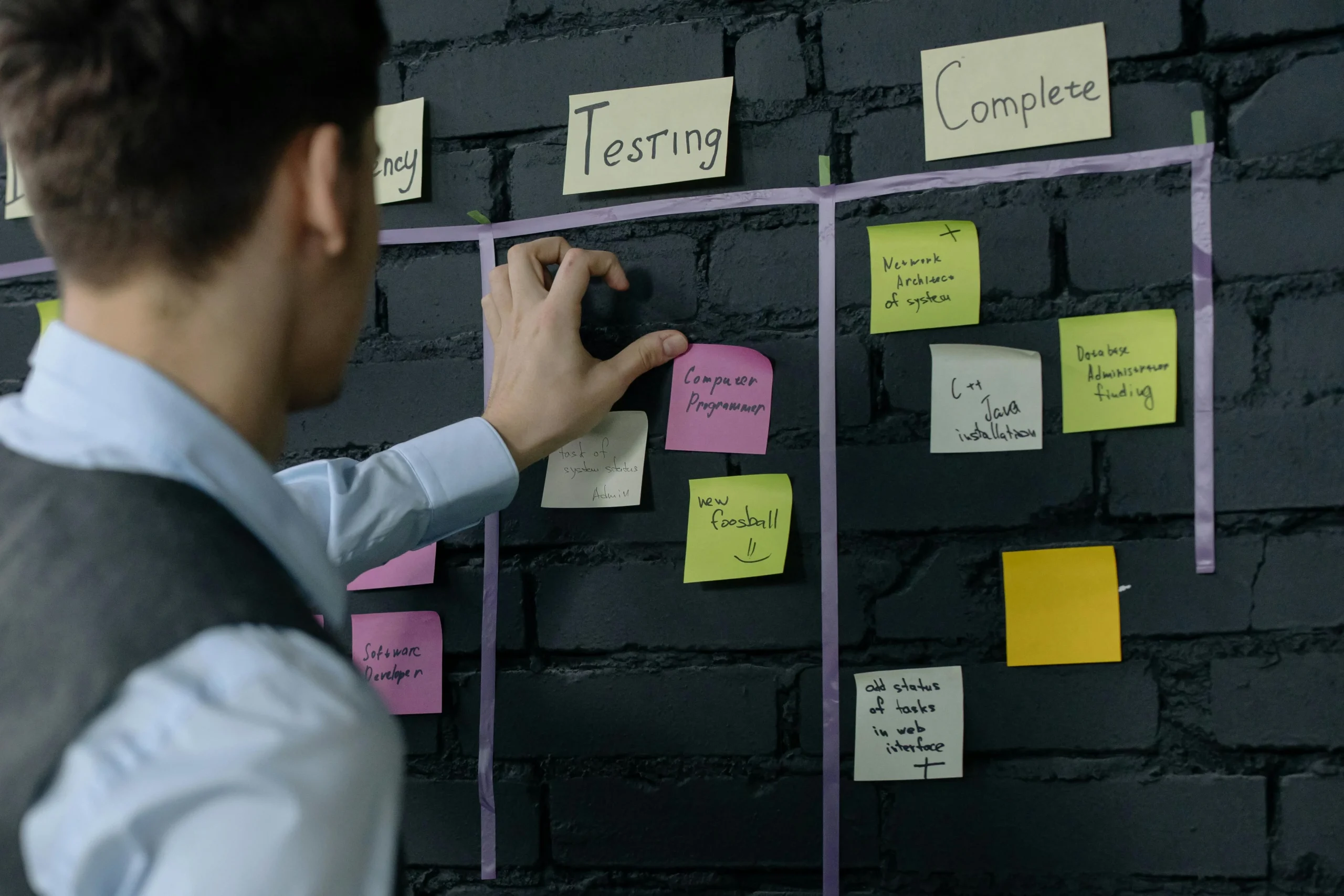
Trello is the gateway drug of project management. Nearly every WordPress developer starts there. You create a board, add a few lists like “To Do,” “In Progress,” and “Done,” throw in some cards for tasks, and you feel organized. For a while, it works.
Then reality catches up. You are juggling three client projects, a personal plugin, and a WooCommerce store rebuild. You need clients to see progress without giving them access to your internal workflow. You want voters to weigh in on which features matter most. You need boards that live inside WordPress, not on a third-party SaaS platform that charges per-seat pricing the moment your team grows past the free tier.
Trello was never designed for WordPress developers. It does not understand custom post types, WordPress user roles, or the REST API. It cannot embed natively in your client-facing site. Every integration requires Zapier or a custom webhook, and your project data lives on Atlassian’s servers, not yours.
The Product Roadmap plugin was built specifically for this gap. It brings kanban boards, voting, timelines, and status tracking directly into your WordPress dashboard. No external accounts. No per-seat fees. No context switching between browser tabs.
This post walks through how to replace Trello with a fully native WordPress roadmap for your development projects, including how Trello concepts map to the plugin, advanced features you gain, and the real cost comparison.
Mapping Trello Concepts to Product Roadmap
If you have spent any time in Trello, you already understand the mental model behind the Product Roadmap plugin. The terminology changes, but the logic carries over cleanly.
Lists Become Statuses
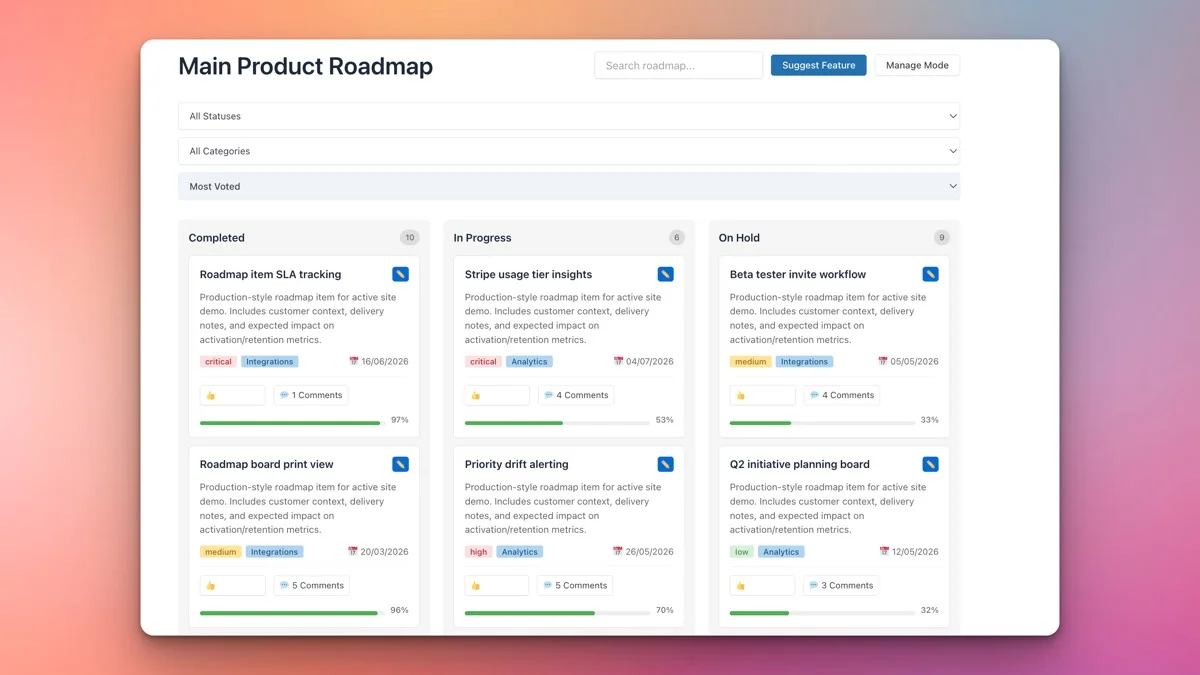
In Trello, you create lists to represent stages of work. “Backlog,” “In Development,” “Code Review,” “QA,” “Deployed”, each is a vertical column on your board. In the Product Roadmap plugin, these become custom statuses. You define as many as you need, assign colors to each, and items flow through them just like cards move across Trello lists.
The advantage here is that statuses are managed at the WordPress level. You can query them with WP_Query, display them conditionally in templates, and filter them in the admin. They are not locked inside a proprietary API that requires OAuth tokens to access.
Cards Become Roadmap Items
Trello cards are the atomic unit of work. In the Product Roadmap plugin, these are roadmap items, essentially a custom post type with rich metadata. Each item can have a title, description, status, category, target date, and vote count.
Unlike Trello cards, roadmap items support the full WordPress editor. You can embed code blocks, add images, include shortcodes, and format content with the block editor. If you need to document a technical specification or attach a detailed bug report, you are not limited to Trello’s markdown-lite formatting.
Labels Become Categories
Trello labels are color-coded tags you attach to cards for quick visual filtering. The Product Roadmap plugin uses WordPress categories for the same purpose. You can create categories like “Bug Fix,” “Feature Request,” “Performance,” and “Security,” then filter the board by category.
Because these are standard WordPress taxonomies, you can also use them in URLs, create archive pages, and build custom queries. Try doing that with Trello labels.
Boards Become Roadmaps
In Trello, each board is a separate workspace. The Product Roadmap plugin (Pro version) supports multiple boards, each with its own set of statuses, items, and display settings. You can have one board for your plugin development, another for client work, and a third for internal infrastructure. Each lives as a distinct entity inside WordPress, accessible from the same dashboard.
Voting: The Feature Trello Charges Extra For
Trello offers a Power-Up for voting, but it is limited. You get basic upvotes, and anything more requires a paid Power-Up or an external service like Canny or Productboard.
The Product Roadmap plugin includes voting as a core feature. Any logged-in WordPress user can upvote roadmap items. This means your team members, clients with subscriber accounts, or community members can all weigh in on what matters most.
How Voting Works in Practice
Each roadmap item displays a vote button on the frontend. Users click to upvote, and the count updates in real time. You can sort the board by vote count to surface the most requested features. This creates a natural prioritization mechanism that does not require you to manually reorder cards.
For development teams, this is powerful. Instead of guessing which features to build next, you let stakeholders vote. The data tells you where to focus. For agencies, you can let clients vote on a shared roadmap to determine sprint priorities.
Controlling Who Can Vote
Because voting is tied to WordPress user roles, you have granular control. You can restrict voting to logged-in users only, specific roles, or even specific boards. This prevents anonymous spam voting and ensures that the people influencing your roadmap actually have a stake in the project.
Multiple Boards with the Pro Version
The free version of the Product Roadmap plugin gives you a single board. For solo developers working on one project, that is often enough. But the moment you are managing multiple projects, the Pro version becomes essential.
Board-Level Isolation
Each Pro board operates independently. You can have different statuses on each board, different categories, and different display settings. Your “Plugin Development” board might use statuses like “Ideation,” “Spec Writing,” “Development,” “Beta Testing,” and “Released.” Your “Client Projects” board might use “Pending Approval,” “In Progress,” “Review,” and “Completed.”
This isolation matters because not every project follows the same workflow. Trello handles this with separate boards too, but you pay for the privilege of advanced views and Power-Ups on each one.
Shortcode-Based Embedding
Each board can be embedded anywhere on your WordPress site using shortcodes. You can place a client-facing roadmap on a password-protected page, an internal roadmap on a private page visible only to administrators, and a public feature request board on your plugin’s landing page. The same plugin powers all three, with different visibility settings for each.
Frontend Manage Mode: Edit Without the Dashboard
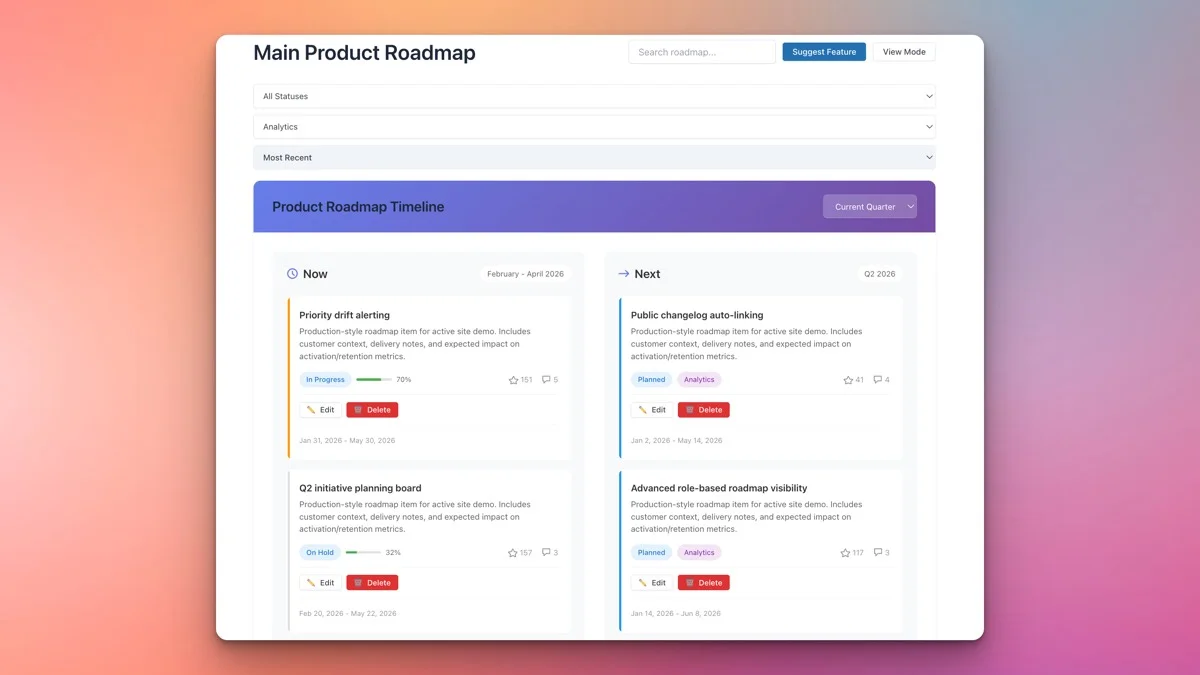
One of the most compelling features for development teams is the frontend manage mode. In Trello, all editing happens in Trello. With the Product Roadmap plugin, you can enable a frontend editing interface that lets authorized users create, edit, and move items without ever touching the WordPress admin.
Why This Matters for Teams
Not everyone on your team needs a WordPress admin account. A project manager might only need to update item statuses. A client might need to submit new feature requests. Frontend manage mode lets you expose exactly the editing capabilities you want, to exactly the users who need them, without granting admin-level access.
In Trello, every collaborator needs a Trello account. That means onboarding them into yet another tool, managing yet another set of credentials, and dealing with yet another notification stream. With frontend manage mode, your roadmap lives on your site, and users interact with it using their existing WordPress credentials.
Practical Use Cases
Consider a WordPress agency with five developers and three project managers. The developers work in the WordPress admin and use the backend roadmap interface. The project managers use the frontend manage mode to update statuses and add notes during client calls. Clients view a read-only version of the roadmap embedded on a dedicated project page. Everyone sees the same data, but the interface adapts to each role.
REST API: The Integration Layer Trello Cannot Match Inside WordPress
Trello has a REST API, and it is good. But it is Trello’s API, not yours. Every request goes through Trello’s servers, subject to their rate limits, their uptime, and their terms of service.
The Product Roadmap plugin (Pro) exposes a REST API that runs on your WordPress installation. This means you can build custom integrations, sync with external tools, and automate workflows without depending on a third-party service.
What You Can Do with the API
The REST API lets you programmatically create, read, update, and delete roadmap items. You can fetch items by status, category, or board. You can update vote counts from external systems. You can create items from CI/CD pipelines, GitHub webhooks, or custom admin scripts.
For example, you could set up a GitHub Action that automatically creates a roadmap item when a new issue is opened in your repository. Or you could build a Slack bot that creates roadmap items from slash commands. The API follows WordPress REST API conventions, so if you have built custom endpoints before, you already know the patterns.
Authentication and Security
API access uses standard WordPress authentication methods, application passwords, cookie authentication, or OAuth. This means you can leverage existing WordPress security infrastructure without setting up separate API keys or managing Trello-style tokens.
Cost Comparison: Product Roadmap vs. Trello
Let us talk money, because this is where the conversation gets uncomfortable for Trello advocates.
Trello Pricing (as of 2026)
Trello’s free tier gives you limited boards with basic automation. Trello Standard costs $6 per user per month (billed annually). Trello Premium costs $12.50 per user per month. Trello Enterprise starts at $17.50 per user per month.
For a team of 10, Trello Premium costs $125 per month or $1,500 per year. And that is just for the project management tool. You still need separate subscriptions for voting (Canny at $99/month), client portals, and API access.
Product Roadmap Plugin Pricing
The Product Roadmap plugin is a one-time purchase or annual license. There are no per-seat fees. Whether you have 2 users or 200, the cost is the same. The Pro version includes multiple boards, REST API access, frontend manage mode, and priority support.
Over a three-year period, a team of 10 would spend approximately $4,500 on Trello Premium alone. The Product Roadmap plugin costs a fraction of that, and you own the installation. No recurring per-seat charges eating into your margins.
Hidden Costs of Trello
Beyond the subscription, Trello imposes hidden costs that developers rarely account for. Context switching between WordPress and Trello wastes time. Syncing data between the two platforms requires middleware like Zapier (another subscription). Training clients to use Trello adds onboarding overhead. And when Trello changes its API or pricing (which Atlassian does regularly), you absorb the migration cost.
With a native WordPress solution, your project management tool lives where your projects live. No context switching. No middleware. No external dependencies.
Migration Path: Moving from Trello to Product Roadmap
Switching tools always involves some friction, but the migration from Trello to Product Roadmap is straightforward.
Step 1: Export Your Trello Data
Trello allows JSON exports of each board. Download the JSON file for every board you want to migrate. Each file contains all cards, lists, labels, and members associated with that board.
Step 2: Map Your Structure
Before importing, map your Trello structure to Product Roadmap equivalents. Create the statuses that correspond to your Trello lists. Create the categories that correspond to your Trello labels. Decide which boards to consolidate and which to keep separate.
Step 3: Create Items
Using the REST API or the WordPress admin, create roadmap items for each Trello card. If you have a large number of cards, write a quick PHP script or WP-CLI command that reads the Trello JSON and creates items programmatically. The REST API makes this a scriptable process.
Step 4: Redirect Your Team
Update your team’s bookmarks and communication channels to point to the new roadmap pages. Embed the kanban board on a prominent page and ensure everyone knows where to find it. The visual similarity to Trello means the learning curve is minimal.
Real-World Scenarios Where Product Roadmap Wins
Scenario 1: Plugin Development with Community Input
You maintain a popular WordPress plugin with 10,000 active installations. Feature requests flood your support channel. With Trello, you would need to manually create cards and somehow collect votes. With Product Roadmap, you embed a public board on your plugin’s website, users submit and vote on features directly, and the highest-voted items naturally rise to the top of your development queue.
Scenario 2: Agency Managing Multiple Client Projects
Your agency handles eight active client projects simultaneously. Each client wants visibility into their project’s progress. With Trello, you would need separate boards and separate guest accounts for each client, potentially pushing you into Premium pricing. With Product Roadmap Pro, you create per-client boards, embed each on a password-protected page, and clients log in with their WordPress accounts. One plugin, one installation, unlimited boards.
Scenario 3: Internal Product Team
Your product team of six developers uses agile sprints. You need a board for the current sprint, a backlog board, and a release planning board. With Trello, that is three boards at Premium pricing for six users: $900 per year. With Product Roadmap Pro, you pay once and get unlimited boards with no per-seat charges.
What Trello Still Does Better
Fairness matters. Trello has advantages in specific areas.
Trello’s mobile apps are polished and full-featured. If your team does significant project management from phones, Trello’s native iOS and Android apps provide a better mobile experience than a responsive WordPress page.
Trello’s ecosystem of Power-Ups is massive. If you need integrations with hundreds of SaaS tools out of the box, Trello’s marketplace offers more pre-built connectors.
Trello’s real-time collaboration is seamless. Multiple users can edit the same board simultaneously with instant updates. The Product Roadmap plugin handles concurrent access well, but it operates within WordPress’s standard request-response cycle rather than WebSocket-based real-time updates.
These are valid considerations. But for WordPress-centric teams, the benefits of a native solution typically outweigh these trade-offs.
Getting Started: Your First Board in Five Minutes
Here is the fastest path from zero to a working kanban board.
- Install the plugin, Upload and activate the Product Roadmap plugin from your WordPress admin.
- Define your statuses, Go to the roadmap settings and create statuses that match your workflow. Start with “Planned,” “In Progress,” “Testing,” and “Complete” if you are unsure.
- Create a few items, Add three or four roadmap items to populate the board. Assign each a status and category.
- Embed the board, Add the roadmap shortcode to any page or post. The kanban view renders automatically.
- Share the link, Send the page URL to your team. They can start voting and (if you enable manage mode) editing immediately.
The entire setup takes less time than configuring a new Trello workspace with Power-Ups.
Final Thoughts
Trello is a capable tool, but it was designed for general-purpose project management across any industry. The Product Roadmap plugin was designed for WordPress. It understands your ecosystem, runs on your server, respects your user roles, and costs a fraction of what Trello charges for a growing team.
If your development projects already live in WordPress, your project management should too. Stop paying per-seat taxes to Atlassian for a tool that requires middleware to talk to your own platform.
Get the Product Roadmap plugin and bring your project management home to WordPress.
Related Posts



Part of the Wbcom Designs family
The all-in-one WordPress community stack
- BuddyNext
- BuddyX
- Reign
- Jetonomy
- Eventonomy
- Learnomy
- Listora
- SnipShare
- WB Ad Manager
- WP Career Board
- WP Sell Services
- MediaVerse


Also ours: wbcomdesigns.com vapvarun.com brndle.com