Build a Feature Request Voting Board in WordPress

Why Your Product Needs a Feature Request Voting Board
Every product team has the same challenge: too many feature requests, not enough development time. Customers email ideas, post in forums, drop suggestions in support tickets, and message on social media. Without a central system, great ideas get buried and you end up building features nobody actually asked for.
SaaS tools like UserVoice, Canny, and ProductBoard solve this with dedicated feature voting platforms. But they come with serious trade-offs: recurring monthly costs that scale with your user base, data stored on third-party servers, limited customization options, and yet another login for your customers to manage.
What if you could build the same experience directly inside your WordPress site? A place where customers log in with their existing accounts, submit feature ideas, upvote the ones they care about, and watch as your team marks requests as planned, in progress, or shipped.
That is exactly what we are going to build in this guide. Using WordPress as the foundation and WB Polls as the voting engine, you will have a fully self-hosted feature request board running on your own infrastructure.
Why Self-Hosted Beats SaaS for Feature Voting
Before diving into the technical setup, it is worth understanding why a self-hosted approach makes sense for many teams.
Cost Control
SaaS voting tools typically charge $50 to $500 per month depending on the number of users and features. Over two years, that is $1,200 to $12,000 spent on what is essentially a poll system with a nice UI. A self-hosted WordPress solution costs you the price of a plugin and the hosting you are already paying for.
Data Ownership and Privacy
When you use a third-party platform, your customer data (names, emails, voting preferences, feature ideas) lives on someone else’s servers. With GDPR, CCPA, and growing privacy regulations, keeping customer feedback data on your own servers simplifies compliance significantly.
Full Customization
SaaS tools give you a configuration panel. Self-hosted gives you the source code. Want to weight votes by customer plan tier? Add a custom field. Want to auto-close requests after 90 days of inactivity? Write a cron job. Want to integrate with your existing project management tool? Build an API endpoint.
Single Sign-On by Default
Your customers already have WordPress accounts. They should not need to create separate accounts on an external platform just to tell you what features they want. A self-hosted solution uses the same login, the same profile, the same session.
Architecture Planning for Your Voting Board
Before writing any code, map out the components you need. A feature request board has several moving parts that need to work together.
Core Components
- Feature Request Post Type: A custom post type where each feature request is a post. This gives you titles, descriptions, comments, categories, and all the WordPress infrastructure for free.
- Voting Mechanism: Each feature request needs an upvote button and a visible vote count. WB Polls handles this with its polling and voting system, including duplicate vote prevention.
- Status Taxonomy: A custom taxonomy or meta field to track where each request stands: submitted, under review, planned, in progress, shipped, or declined.
- Sorting and Filtering: Users need to sort by most votes, newest, or status. Developers need to filter by category or status.
- User Dashboard: A page where customers can see their submitted ideas and what they have voted on.
Database Considerations
WordPress stores votes in the post meta table by default. For boards with thousands of requests and tens of thousands of votes, you may want to consider a custom table for vote records. This keeps queries fast and lets you run analytics without scanning the entire postmeta table.
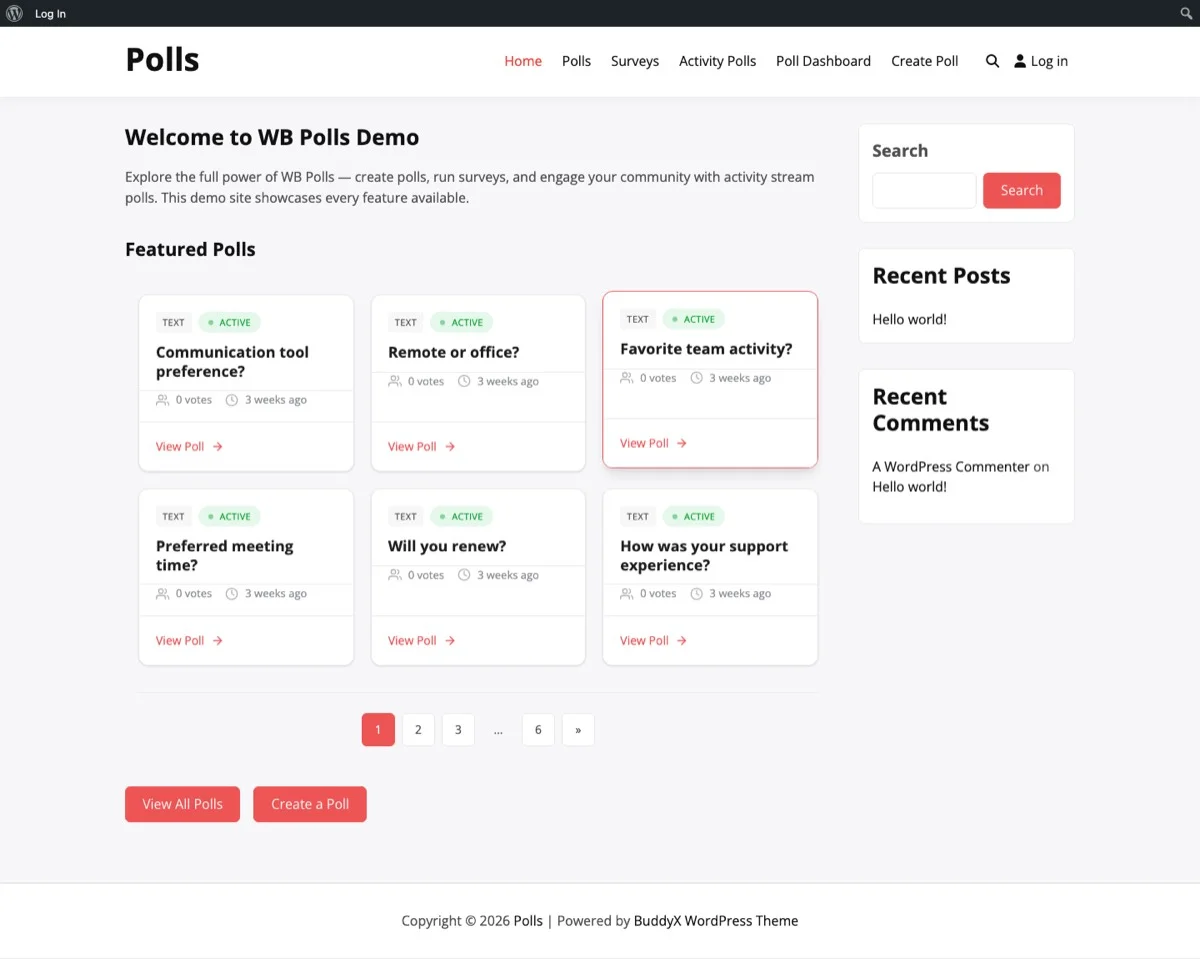
The WB Polls grid layout provides a clean, organized view for displaying feature requests with vote counts and status indicators.
Setting Up the Poll Board with WB Polls
WB Polls gives you the voting infrastructure out of the box. Rather than building a voting system from scratch (handling duplicate prevention, vote counting, AJAX updates), you get all of that ready to configure.
Step 1: Install and Configure WB Polls
Install the WB Polls plugin from your WordPress dashboard. Once activated, navigate to the settings panel and configure these key options:
- Voting restriction: Set to logged-in users only. You do not want anonymous votes on a feature board since each vote should be tied to a real customer account.
- Vote changing: Allow users to change their votes. Customers should be able to shift their priorities as your product evolves.
- Results display: Show vote counts publicly. Transparency builds trust. When customers see that 200 people want the same feature, they know you are aware of the demand.
Step 2: Create Feature Categories
Organize your board with categories that match your product areas. For example:
- UI/UX Improvements
- New Integrations
- Performance
- API and Developer Tools
- Mobile Experience
- Reporting and Analytics
Each category becomes a filterable section on your board, making it easy for customers to find relevant requests and for your team to triage by product area.
Step 3: Set Up the Submission Flow
Create a front-end submission form where logged-in customers can propose new features. The form should capture:
- Feature title (keep it short and descriptive)
- Detailed description (what problem does this solve)
- Category selection
- Optional: priority level from the customer’s perspective
When a customer submits a request, it should go into a moderation queue. This prevents duplicates and lets your team merge similar requests before they go public.
Integrating with Customer Accounts
The real power of a self-hosted voting board is the connection to your existing customer data. Here is how to make that connection work.
Tying Votes to Customer Profiles
Since WB Polls tracks which users voted on which polls, you can build a profile page that shows each customer their voting history. Add a custom tab to the BuddyPress or WordPress profile that lists:
- Features they submitted
- Features they upvoted
- Status updates on features they care about
Weighting Votes by Plan Tier
Not all votes are equal in a business context. A customer on your enterprise plan paying $500 per month probably deserves more weight than a free-tier user. You can implement vote weighting by storing the customer’s plan tier and multiplying their vote value accordingly.
For example, free users get 1x weight, pro users get 3x, and enterprise users get 5x. Display the weighted total alongside the raw vote count so your product team can prioritize based on revenue impact.
Single Sign-On Flow
If your product has its own authentication system outside WordPress, set up SSO so customers do not need to log in separately. WordPress supports OAuth and SAML through various plugins, making it straightforward to connect your app’s auth system to the voting board.
Displaying Vote Counts and Trending Requests
The front end of your voting board needs to communicate priority clearly. Here are the key display elements.
The Vote Counter
Each feature request should show a prominent vote count with an upvote button. WB Polls handles this with AJAX-powered voting that updates the count without a page reload. The interaction should feel instant: click the arrow, see the number increase, done.
Trending and Popular Views
Create multiple sorting options for your board:
- Most Voted (All Time): The overall leaderboard of feature requests.
- Trending (Last 30 Days): Features gaining the most votes recently. This helps surface new ideas that are gaining momentum.
- Newest: The latest submissions, regardless of vote count.
- Recently Updated: Features where the status has changed, so customers can see progress.
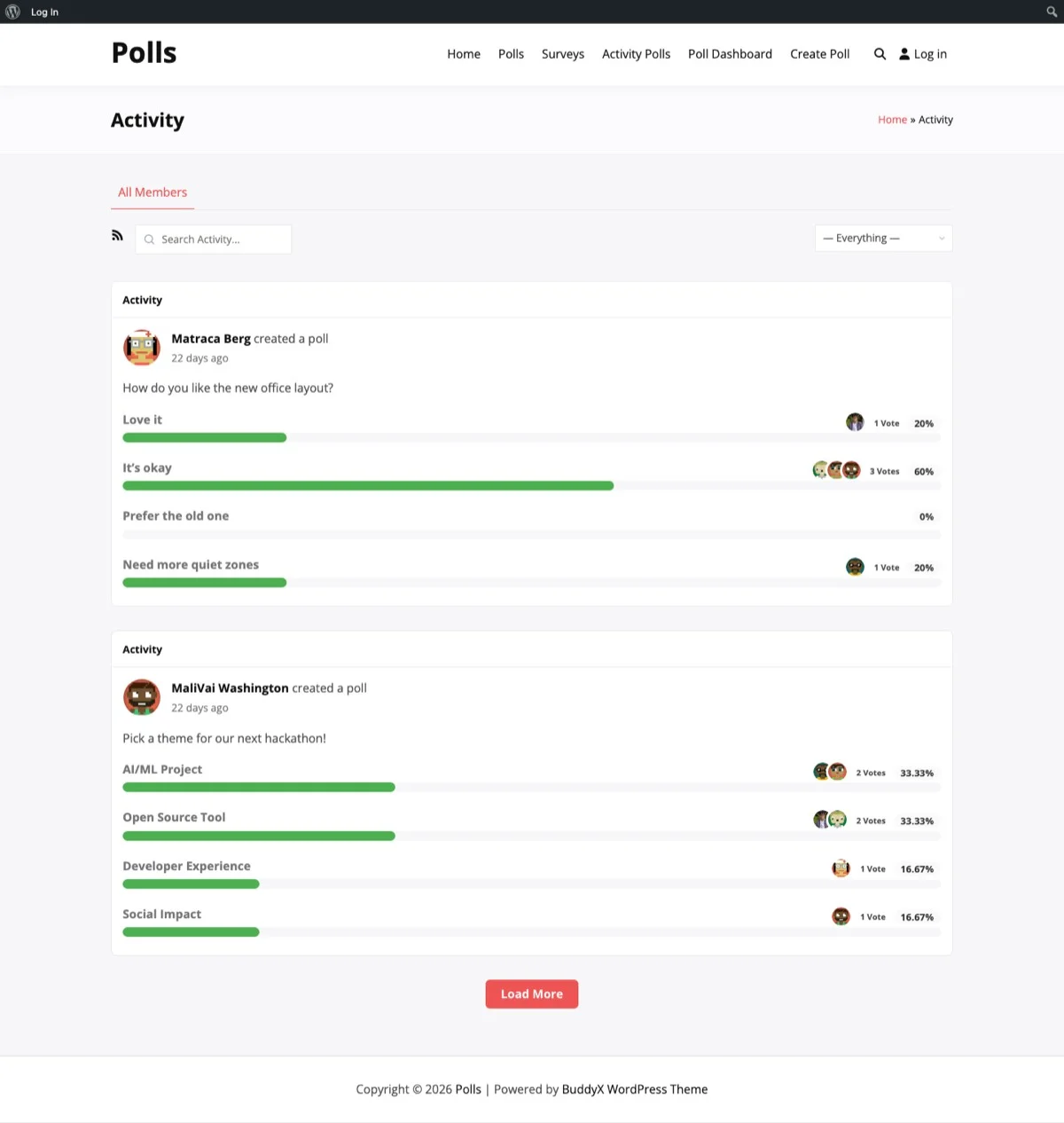
The activity feed shows real-time voting activity, keeping customers engaged with the latest feature request interactions on your board.
Visual Status Indicators
Use color-coded badges to show the status of each request at a glance:
- Blue: Under Review
- Purple: Planned
- Orange: In Progress
- Green: Shipped
- Gray: Declined (with explanation)
Marking Features as Shipped
The most satisfying moment for both your team and your customers is marking a heavily-requested feature as shipped. Here is how to make that moment count.
The Status Update Workflow
When a feature moves from one status to another, update the request post and trigger notifications. Here is a practical workflow:
- Developer completes the feature in your product.
- Product manager updates the feature request status from “In Progress” to “Shipped.”
- The system automatically sends an email to everyone who voted on that feature.
- The request moves to the “Shipped” section of the board with a release note link.
The Shipped Changelog
Create a dedicated “Shipped” page that acts as a public changelog driven by your voting board. Each shipped feature shows the original request, the vote count, and a link to the release notes. This builds credibility. Customers can see that their votes actually lead to results.
Automating the Transition
You can hook into the post status change to automate notifications. When a feature request’s status meta changes to “shipped,” fire off emails using WordPress’s built-in mail functions or a transactional email service like Postmark or SendGrid.
Customizing the UI to Match Your Brand
A voting board that looks like a generic plugin page will not inspire confidence. Here is how to make it feel native to your product.
Template Overrides
WB Polls supports template overrides, so you can copy the default templates into your theme and customize them. Focus on these elements:
- Vote button style: Match your product’s button design system.
- Card layout: Each feature request should be a card with the title, description preview, vote count, status badge, and category tag.
- Color scheme: Use your brand colors for status badges, buttons, and hover states.
- Typography: Match the fonts used in your product.
Responsive Design Considerations
Many customers will access the voting board on mobile devices. Ensure that:
- The vote button is large enough to tap easily (at least 44×44 pixels).
- The card layout stacks properly on narrow screens.
- Category filters use a dropdown on mobile instead of a horizontal list.
- The submission form works well with mobile keyboards.
Custom CSS for the Board Layout
The grid layout provided by WB Polls works well as a starting point. Add custom CSS to refine spacing, shadows, and hover effects. A subtle shadow on hover and a smooth transition on the vote button goes a long way toward making the board feel polished.
Automating Notifications and Keeping Users Engaged
A voting board is only useful if customers come back to it. Notifications are the key to sustained engagement.
Email Notifications to Set Up
- New submission confirmation: When a customer submits a feature request, send them a confirmation with the request URL.
- Status change alerts: When a request they voted on changes status, notify them. This is the most important notification because it shows that their vote mattered.
- Weekly digest: A summary of the most popular new requests that week. This encourages customers to come back and vote.
- Milestone notifications: When a request hits 50, 100, or 500 votes, notify the submitter. Social proof motivates continued engagement.
In-App Notifications
If your product has a notification system, push voting board updates through it. A small badge that says “3 features you voted on have been updated” drives traffic back to the board without requiring an email open.
Slack and Team Notifications
Set up a webhook that posts to your team’s Slack channel whenever a feature request crosses a vote threshold. This keeps your product team aware of rising demand without having to check the board manually.
Advanced Features: Taking Your Voting Board Further
Once the basics are running, here are some advanced features that can differentiate your board from generic alternatives.
Duplicate Detection
Before a new request is submitted, search existing requests for similar titles and descriptions. If a likely duplicate is found, suggest that the customer vote on the existing request instead. This keeps your board clean and prevents vote splitting across similar ideas.
Admin Merge Tool
Give your team the ability to merge two feature requests into one, combining their vote counts. When requests are merged, all voters from both requests should be notified and the merged request should include context from both original descriptions.
Roadmap Integration
Create a public roadmap page that pulls from your voting board. Group planned and in-progress features by quarter or release milestone. This turns your voting board into a living roadmap that updates automatically as you move features through the pipeline.
Analytics Dashboard
Build an admin dashboard that shows:
- Total votes cast this month
- Most active voters (your power users)
- Categories with the most demand
- Average time from submission to shipped
- Voter satisfaction scores (after a feature is shipped, ask: did this meet your expectations?)
Performance Considerations
A voting board can generate a lot of database queries, especially on the front-end listing page. Keep performance in mind as your board grows.
- Cache vote counts: Store the total vote count as post meta rather than counting votes on every page load. Update the cache when a vote is cast.
- Paginate results: Do not load all feature requests at once. Use infinite scroll or traditional pagination with 20 to 30 requests per page.
- Index custom fields: If you add custom meta for status, category, or vote weight, ensure those fields are indexed in the database.
- Use object caching: A persistent object cache (Redis or Memcached) dramatically reduces database load on pages with many vote counts and status queries.
Ready to Build Your Feature Voting Board?
A self-hosted feature request voting board gives you everything the expensive SaaS tools offer: organized submissions, democratic voting, status tracking, and customer engagement. But you get it on your own terms, with your own data, on your own servers, integrated with your existing WordPress ecosystem.
WB Polls provides the voting engine you need to get started without building polling logic from scratch. Combined with WordPress’s custom post types, user management, and notification capabilities, you have everything required to build a professional feature voting board.
Get WB Polls and start building a feature request system that puts your customers in the driver’s seat of your product roadmap.
Related Posts


Part of the Wbcom Designs family
The all-in-one WordPress community stack
- BuddyNext
- BuddyX
- Reign
- Jetonomy
- Eventonomy
- Learnomy
- Listora
- SnipShare
- WB Ad Manager
- WP Career Board
- WP Sell Services
- MediaVerse


Also ours: wbcomdesigns.com vapvarun.com brndle.com