Proven WooCommerce Caching Strategies for Dynamic Cart Data
Learn how to implement WooCommerce caching strategies that coexist with dynamic cart data — covering page cache with cart exclusions, Redis object cache, fragment caching, AJAX cart session handling, and surgical cache invalidation rules for production stores.

WooCommerce Performance & Scale - Article 3 of 6
How to Implement WooCommerce Caching Strategies That Actually Work with Dynamic Cart Data
Page cache makes WooCommerce fast. Dynamic cart data makes page cache complicated. Most tutorials give you one or the other - a pristine Nginx config that breaks your cart, or a “cache everything off” setting that sends your server to its knees. This guide closes that gap. You will walk away with five concrete, production-tested caching layers that coexist with session cookies, real-time stock, and AJAX cart updates without ever serving a customer someone else’s basket.
Why WooCommerce Caching Is Genuinely Hard
A static marketing site caches cleanly because every visitor sees the same HTML. WooCommerce breaks that assumption in at least four ways simultaneously.
- Session cookies. The moment a visitor adds one item to their cart, WordPress sets a
woocommerce_items_in_cartcookie. Any cache layer that does not check for this cookie will serve that visitor a stale, cart-less page. - Per-user prices. B2B stores, membership sites, and wholesale catalogues show different prices to different customers. Caching one user’s price and serving it to another is a business-critical error.
- Real-time stock. If twenty customers are on the same product page and you cached it two minutes ago, the stock level in that cached HTML is wrong. Overselling is worse than a slow page.
- Checkout state. The checkout page renders nonces, chosen shipping methods, and saved addresses. A cached checkout page breaks payment processing entirely.
The solution is not to turn off caching. It is to apply the right caching strategy at the right layer, with precise exclusion rules and fast invalidation paths. Let us build each layer from the ground up.
Layer 1 - Page Cache with Cart Exclusions
Full-page caching is the highest-impact performance lever available to a WooCommerce store. When Nginx (or LiteSpeed, Varnish, or WP Rocket) serves a cached response, PHP never boots, the WordPress bootstrap never runs, and the database receives zero queries. A typical WooCommerce page that takes 400–800 ms to generate can be served in 5–10 ms from cache.
The critical implementation detail is the exclusion set. You must tell your cache layer: “Cache everything, except these URLs and except requests carrying these cookies.” The Nginx FastCGI cache configuration below covers all standard WooCommerce exclusions.
The Cookie Detection Trap
The woocommerce_items_in_cart cookie is set by WooCommerce when the cart is non-empty and cleared on checkout. This is your primary signal. However, WooCommerce also sets a session cookie (wp_woocommerce_session_*) for every visitor - even those with empty carts - when a session is initialized. If you exclude all wp_woocommerce_session_* requests, you eliminate page cache benefits for most of your anonymous traffic.
The safer pattern: exclude on woocommerce_items_in_cart (cart is non-empty) and on woocommerce_cart_hash (a hash of the cart contents). Let anonymous visitors with empty sessions hit the cache freely. They have nothing user-specific in their rendered HTML.
Plugin-Based Page Cache
If you are using WP Rocket, LiteSpeed Cache, or W3 Total Cache instead of direct Nginx configuration, the exclusion logic is expressed in the plugin UI rather than in a server config file, but the underlying rules are identical. In WP Rocket, navigate to Cache > Never Cache URL(s) and add /cart/, /checkout/, /my-account/. Under Advanced Rules > Never Cache Cookies, add woocommerce_items_in_cart and woocommerce_cart_hash.
Cache Plugin | Cart Cookie Setting Location | URL Exclusion Setting |
|---|---|---|
WP Rocket | Advanced Rules > Never Cache Cookies | Cache > Never Cache URL(s) |
LiteSpeed Cache | Cache > Do Not Cache > Cookies | Cache > Do Not Cache > URI |
W3 Total Cache | Page Cache > Rejected Cookies | Page Cache > Never Cache Pages |
Nginx FastCGI | if ($http_cookie ~* “...”) directives | if ($request_uri ~* “...”) directives |
Layer 2 - Object Cache with Redis or Memcached
Page cache keeps PHP from running at all for cacheable pages. But WooCommerce pages that cannot be page-cached - cart, checkout, my-account, and any page personalized per user - still hit the database repeatedly for the same data. Object cache is the solution for those pages.
WordPress’s default object cache is in-memory only and scoped to a single request. Every page load starts with an empty cache, builds up data via DB queries, then discards everything. A persistent object cache like Redis or Memcached replaces this with a process-level store that survives across requests. The second visitor to hit the cart page reads term counts, product meta, and shipping zone data from Redis in microseconds rather than triggering new queries.
Configuring Redis for WooCommerce
The wp-redis plugin (Automattic) installs an object-cache.php drop-in that swaps WordPress’s in-memory store for Redis transparently. No code changes needed - WordPress’s own wp_cache_get(), wp_cache_set(), and wp_cache_delete() calls all route to Redis automatically once the drop-in is active.
What to Cache and What to Exclude
Not everything belongs in Redis. WooCommerce session data is a good example - it is inherently user-scoped and changes on every cart interaction. Caching session data in a shared Redis store can leak cart contents between users if the expiry logic is misconfigured. The WP_REDIS_IGNORED_GROUPS constant in the configuration above tells the drop-in to skip specific cache groups entirely and fall back to the in-memory store for them.
Redis is not a replacement for database indexes. Before adding an object cache, run
Common production mistake - optimize the query firstEXPLAINon your slowest WooCommerce queries. A missing index onwp_woocommerce_sessions.session_expirywill defeat any caching strategy.
Memcached vs Redis - Choosing for WooCommerce
Both backends work, but Redis has a practical advantage for WooCommerce: it supports selective group flushing and persistent connections natively. When a product stock level changes, you want to flush only the wc_products cache group, not the entire object cache. Redis supports this; Memcached requires a workaround (key versioning). If you are on a managed hosting stack that offers both, choose Redis.
Layer 3 - Fragment Caching for Expensive Partials
Page cache handles uncached, anonymous traffic. Object cache handles persistent data lookups. But there is a third category: expensive PHP computations that produce reusable HTML fragments - featured product loops, recently viewed sections, category navigation trees, and promotional banners. These fragments take 50–200 ms to generate, but they change rarely. Fragment caching stores the rendered HTML output in a transient so that the generating code runs once and the resulting HTML is reused for every visitor until the transient expires or is explicitly busted.
Choosing the Right Expiry
Expiry time is a trade-off between cache freshness and server load. For a featured products section that a store manager updates once a week, a 24-hour expiry is appropriate. For a “top sellers this week” section that recalculates from order data, a 1-hour expiry makes more sense. The event-based invalidation in the example - deleting the transient on save_post_product - gives you the best of both worlds: long expiry for stability, immediate bust on change.
Be careful with fragment cache keys. The key must encode every variable that affects the output. A featured products fragment that varies by currency, language (WPML), or user role needs those variables incorporated into the key: 'featured_products_' . $currency . '_' . $lang . '_' . $user_role. Missing a variable produces a cache key collision and wrong output for some visitors.
Layer 4 - Cart Session Handling and AJAX Cart Updates
The mini-cart widget and cart item count in your header are the most visibly dynamic elements on a cached WooCommerce page. Because the surrounding page is served from cache, these elements need a separate strategy: serve the cached HTML shell first, then update cart-specific markup via AJAX after the page loads.
WooCommerce ships a built-in mechanism for this: wc-cart-fragments. This JavaScript file, enqueued by default, fires an AJAX request to /?wc-ajax=get_refreshed_fragments on every page load and updates registered cart fragment selectors in the DOM. For most stores, this works out of the box. The implementation below shows how to register a custom cart fragment endpoint when you need more control - for example, when you have a custom header cart design or need to update multiple DOM areas simultaneously.
The wc-cart-fragments Performance Problem
WooCommerce’s default wc-cart-fragments script fires on every single page load - even on pages where the cart never changes, like a product category page where the visitor is just browsing. On a high-traffic store, this generates significant unnecessary AJAX overhead. Every page view becomes two HTTP requests: the page itself and the fragment refresh.
There are two practical solutions. First, conditionally dequeue the script on pages where cart mutations are impossible, such as blog posts and static content pages. Second, cache the fragment response itself with a short TTL (15–30 seconds) keyed to the session hash. If the cart hash has not changed since the last fragment request, return a cached response immediately without running WooCommerce’s cart calculation. This cuts fragment AJAX server time from 80–120 ms to under 5 ms for unchanged carts.
Session Storage: Database vs Redis
By default, WooCommerce stores session data in the wp_woocommerce_sessions database table. On a store with thousands of concurrent visitors, this table becomes a write bottleneck: every cart interaction writes a row, and the session expiry cleanup process runs a DELETE query across the entire table. Moving sessions to Redis eliminates this bottleneck entirely. The WP_REDIS_IGNORED_GROUPS configuration from Layer 2 intentionally excludes cart-specific groups from the shared Redis key namespace to avoid cross-session contamination, while still using Redis as the session storage backend via WooCommerce’s own session handler override.
Layer 5 - Cache Invalidation Rules That Do Not Destroy Performance
Cache invalidation is the hardest part of caching. The naive approach - flush everything whenever anything changes - defeats the purpose of caching. A store that flushes its entire page cache every time any product is updated will have effectively zero page cache hit rate during business hours when store managers are active. The correct approach is surgical invalidation: flush only the URLs and cache groups that contain data that actually changed.
Invalidation Triggers to Implement
Different WooCommerce events require invalidation at different scopes. Here is the full decision tree for the most common triggers.
Event | What to Invalidate | Hook |
|---|---|---|
Product stock changes | That product’s page only | woocommerce_product_set_stock |
Product published/unpublished | Product page + all category archive pages it belongs to | transition_post_status |
Price change | Product page + shop page (if showing prices) | woocommerce_product_object_updated_props |
New order placed | Session cache + My Account pages for that user | woocommerce_checkout_order_processed |
Coupon created/updated | Cart and checkout pages | save_post_shop_coupon |
Shipping zone changed | Checkout page + object cache group wc_shipping | woocommerce_shipping_zone_method_status_toggled |
CDN Cache Invalidation
If you are running a CDN in front of your WooCommerce store - Cloudflare, Fastly, or AWS CloudFront - cache invalidation becomes a two-step process: flush the origin (your Nginx/PHP cache) and flush the CDN edge nodes. Most enterprise CDNs provide an API for this. Cloudflare’s Cache Purge API, for example, accepts a list of URLs and invalidates them across all edge locations within seconds.
The practical approach is to extend each invalidation hook with an additional API call to your CDN’s purge endpoint. Pass the exact URLs being invalidated rather than issuing a zone-wide purge - zone-wide purges on large WooCommerce stores can take minutes to warm back up and cause a temporary traffic spike to your origin while the CDN refills.
Putting It All Together - The Layered Cache Architecture
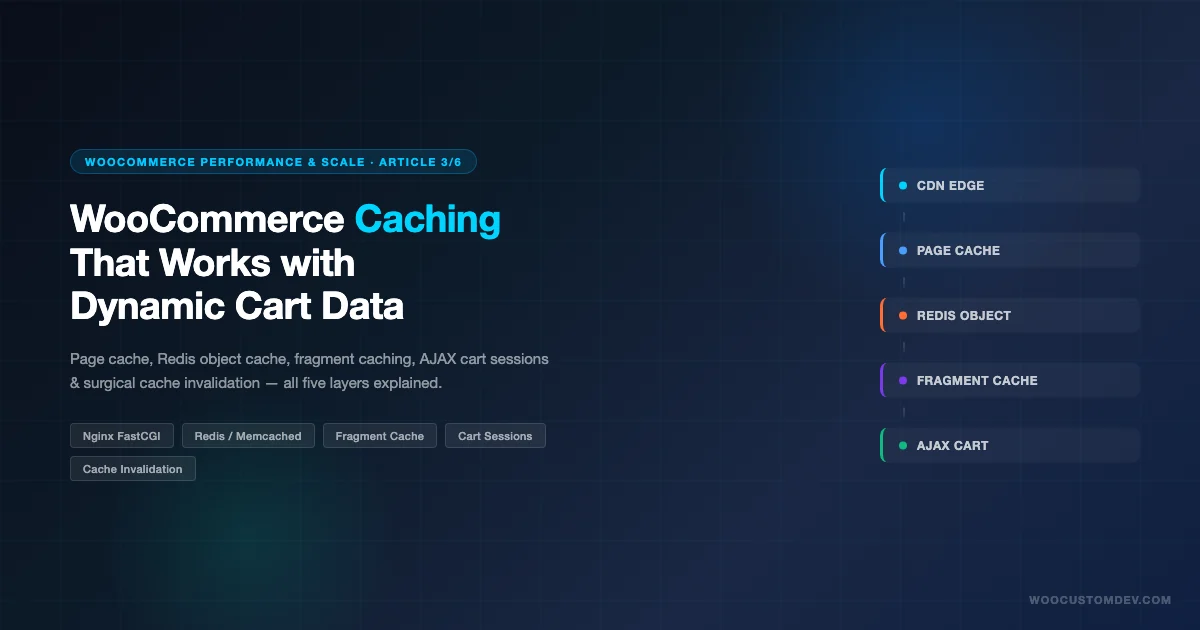
Each of the five layers above solves a different problem. The art is in combining them so that they reinforce rather than interfere with one another. Here is the complete picture of how a request flows through a properly layered WooCommerce cache stack.
- CDN edge node - handles static assets (JS, CSS, images) with long cache-control headers. Optionally caches HTML for anonymous, cookieless requests with a short TTL (60–120 seconds). Immediately bypasses to origin when WooCommerce session cookies are present.
- Nginx FastCGI / LiteSpeed / WP Rocket page cache - caches rendered HTML at the server for anonymous visitors without cart cookies. Bypasses for cart, checkout, my-account, and all requests carrying WooCommerce session cookies.
- PHP opcode cache (OPcache) - caches compiled PHP bytecode so that even cache-miss requests (those that must run PHP) do not pay the compilation cost on every request. Already active on most hosting environments; confirm with
phpinfo(). - Redis object cache - caches database query results and WP_Query objects across requests. Cart and checkout pages that bypass page cache still benefit because their repeated metadata lookups are served from Redis rather than MySQL.
- Fragment cache (transients) - stores rendered HTML partials for expensive product loops, navigation trees, and promotional sections. Works on both cached and non-cached pages.
- AJAX cart fragments - loads cart-specific markup asynchronously after the page loads. This is the layer that makes cart-carrying visitors invisible to the page cache while keeping their shopping experience accurate and fast.
Measuring Cache Effectiveness
Before and after implementing any caching change, measure two things: server response time and cache hit rate. The X-FastCGI-Cache header (from the Nginx config above) tells you whether a response was a HIT, MISS, BYPASS, or EXPIRED. A well-tuned WooCommerce store should see a cache HIT rate above 70% on product and category pages. If your hit rate is below 50%, the most common causes are overly broad cookie exclusion rules or a very short cache expiry. For a broader baseline, run through the WooCommerce Performance Checklist to identify other speed bottlenecks beyond caching.
For Redis, the redis-cli INFO stats command shows keyspace_hits and keyspace_misses. A hit ratio below 80% usually points to keys expiring too quickly or to a Redis memory limit that is evicting keys before they can be reused. The memory limit is set in redis.conf via maxmemory; for WooCommerce object cache, 512 MB is a reasonable starting point for a mid-sized store.
Common Mistakes and How to Avoid Them
Caching the Checkout Page
The checkout page contains WordPress nonces (one-time tokens used to validate form submissions). A nonce cached in a page cache response will be expired by the time the visitor submits the form, causing checkout to fail with a “Session expired” error. Always exclude /checkout/ and any URL containing checkout query parameters from page cache, unconditionally - no exceptions. If you have a customized checkout flow, review the guide to customizing the WooCommerce checkout flow for additional caching considerations specific to custom checkout fields and multi-step checkouts.
Forgetting REST API Endpoints
WooCommerce REST API endpoints at /wp-json/wc/v3/ should never be page-cached. They return user-specific and authentication-aware data by design. The Nginx exclusion pattern in the configuration above catches /wc-api/ but not /wp-json/. Add /wp-json/wc/ to your URL exclusion list explicitly.
Ignoring Scheduled Cache Warmup
After a cache flush - whether from deployment, bulk product updates, or a plugin update - your entire cache is cold. Every visitor for the next several minutes is hitting PHP and MySQL directly, potentially causing a traffic spike that overwhelms the server. Implement a cache warmup script that crawls your sitemap and pre-populates the cache before the flush happens (in a blue-green deployment model) or immediately after (in a rolling flush model). WP Rocket and LiteSpeed Cache both include built-in preload crawlers; for Nginx FastCGI cache, a simple bash loop over your XML sitemap does the job.
Not Testing with WooCommerce Session Active
Most developers test their caching configuration while logged in as admin. Admin sessions always bypass page cache (WordPress sets a logged-in cookie for all authenticated users). To test your cache exclusion rules accurately, open an incognito browser window, add an item to the cart, and then browse product and category pages. Confirm via the X-FastCGI-Cache: BYPASS response header that cart-carrying sessions are correctly excluded from the cache. Then clear the cart, browse again, and confirm you see X-FastCGI-Cache: HIT.
Performance Benchmarks - What to Expect
To set realistic expectations, here are typical before/after numbers observed after implementing the full five-layer caching stack on WooCommerce stores of different sizes. These are real-world ranges, not lab conditions.
Store Size | Page Type | Before (uncached) | After (full stack) | Primary Gain |
|---|---|---|---|---|
Small (500 SKUs) | Product page (anonymous) | 350–500 ms | 8–15 ms | FastCGI page cache |
Small | Cart page (logged in) | 280–400 ms | 90–140 ms | Redis object cache |
Medium (5,000 SKUs) | Category archive (anonymous) | 600–900 ms | 10–20 ms | FastCGI page cache |
Medium | Checkout page | 450–700 ms | 180–280 ms | Redis + OPcache |
Large (50,000+ SKUs) | Shop/search results (anonymous) | 1,200–2,000 ms | 15–30 ms | CDN + FastCGI |
Large | My Account (logged in) | 600–900 ms | 120–200 ms | Redis object cache |
The gains on logged-in and cart-carrying requests are more modest because page cache cannot be applied there. The improvement comes from Redis object cache eliminating repeated database queries and from OPcache keeping PHP compilation cost near zero. For large stores, this difference between 600 ms and 150 ms is the line between acceptable and excellent user experience for logged-in customers.
WooCommerce Caching with WPML and Multi-Currency
Multilingual and multi-currency stores add a significant complication: the same URL can produce different HTML depending on the visitor’s language and currency. A page cache that does not account for these variables will serve German content to French visitors or EUR prices to USD customers.
The correct approach is to vary the cache key by language and currency. Both WPML and WooCommerce Multilingual set cookies or query parameters to indicate the active language. In Nginx, extend the fastcgi_cache_key to include the language cookie value: fastcgi_cache_key "$scheme$request_method$host$request_uri$cookie_wpml_referer";. For currency, include the active currency cookie from WooCommerce’s currency switcher plugin: $cookie_wmc_current_currency (WooCommerce Multi-Currency) or $cookie_wc_current_currency (Currency Switcher for WooCommerce).
Fragment cache keys need the same treatment. Any fragment that contains translated text or currency-formatted prices must include the active language and currency in its transient key, or you risk serving mis-translated or mis-priced content to some visitors.
Conclusion
WooCommerce caching is not a toggle - it is a layered architecture. Page cache with precise cart exclusions handles anonymous traffic. Object cache with Redis reduces database load for authenticated and cart-carrying sessions. Fragment caching stores expensive computed partials. AJAX cart fragments keep dynamic data accurate without defeating the cache. And surgical invalidation rules ensure that data changes propagate without performance collapses.
Implement these layers incrementally. Start with the Nginx page cache exclusions and measure the hit rate. Add Redis object cache next and watch your logged-in response times drop. Then layer in fragment caching for the specific components you know are slow. Each layer compounds the benefit of the previous one, and together they create a WooCommerce store that is fast for every visitor - whether they are browsing anonymously or halfway through checkout.
Need Expert Help Configuring WooCommerce Caching?
Getting the cache layer stack right for a WooCommerce store - especially with custom themes, multi-currency, or high traffic - requires deep knowledge of both WordPress internals and server infrastructure. The WooCustomDev team specializes in performance-optimized WooCommerce builds and has implemented caching architectures for stores processing millions of dollars in transactions monthly.
Plugins we build and run
We maintain these ourselves, which is why we can support them on your site.
- BuddyNextThe self-hosted community engine for WordPress
- BuddyXFree community theme, Pro when you outgrow it
- ReignPremium community theme. Add pieces, build anything
- JetonomyCommunity forum and Q&A for WordPress
- EventonomyEvents and RSVPs for WordPress communities
- LearnomyCourses and learning communities on WordPress
- ListoraDirectories and listings your members can browse
- SnipShareCode sharing built for developer communities
- WB Ad ManagerAd placements that turn traffic into revenue
- WP Career BoardA job board your community actually uses
- WP Sell ServicesSell services with offers, orders, and payouts
- MediaVersePhotos, video, and media albums for members
- WB GamificationPoints, badges, and rewards that keep members active
- Product RoadmapPublic roadmaps with voting your users trust