
Managing ticket sales can be overwhelming, especially when juggling different event types, attendee lists, and payment methods. WooCommerce offers a powerful solution with dedicated ticketing plugins that make the entire process easier and more efficient. Whether you are organizing a concert, conference, webinar, workshop, charity event, or festival, these plugins let you sell tickets directly through your WooCommerce store with complete control.

From customizable ticket templates to automated check-ins using QR codes, WooCommerce ticket plugins help you simplify event management while giving your customers a smooth and professional booking experience. Below, we break down the five best WooCommerce ticket plugins to help you sell tickets effortlessly and manage attendees like a pro.
What Are WooCommerce Tickets Plugins?
WooCommerce tickets plugins are specialized tools that convert your WordPress website into a fully functional event ticketing system. They integrate seamlessly with WooCommerce, allowing you to create, manage, and sell tickets just like any other product in your store.
These plugins are widely used for a variety of events, including:
- Concerts
- Online workshops and webinars
- Conferences and seminars
- Sports events
- Festivals and exhibitions
- Training sessions
- Fundraisers and charity events
By automating key tasks like sending tickets, collecting attendee information, generating QR codes, and managing check-ins, WooCommerce ticket plugins save time, reduce manual work, and deliver a seamless experience to your buyers.
Key Features of WooCommerce Tickets Plugins
1. Seamless WooCommerce Integration
Tickets are created as WooCommerce products, meaning you can use all the payment gateways, checkout options, tax settings, shipping configurations, and analytics tools that WooCommerce already provides. This makes setup effortless and consistent.
2. Customizable Ticket Types
You can create multiple ticket categories such as Early Bird, VIP, Standard, Student Pass, Backstage Access, and more. Each ticket type can have unique pricing, stock limits, and features, giving customers flexible choices.
3. Attendee Information Collection
Collect attendee details during checkout using custom fields. This can include names, phone numbers, email addresses, meal preferences, seating choices, or any other required information for your event.
4. QR Code and Barcode Support
Most ticketing plugins automatically generate scannable QR codes or barcodes on each ticket. Event staff can quickly verify tickets using a mobile app or scanner, speeding up check-ins and preventing unauthorized entry.
5. PDF Ticket Generation
Customers receive their tickets as automatically generated PDF files, which they can download or print. This adds a professional touch and makes the check-in process smoother.
6. Event Management Tools
These plugins often include dashboard features that let you manage multiple events at once. You can track available seats, attendees, ticket types, and order details, all from a central interface.
Best WooCommerce Tickets Plugins
Below are the best WooCommerce ticketing plugins that help you sell event tickets, manage attendees, and streamline check-ins. These plugins are perfect for events, webinars, concerts, workshops, and more.
1. YITH Event Tickets for WooCommerce
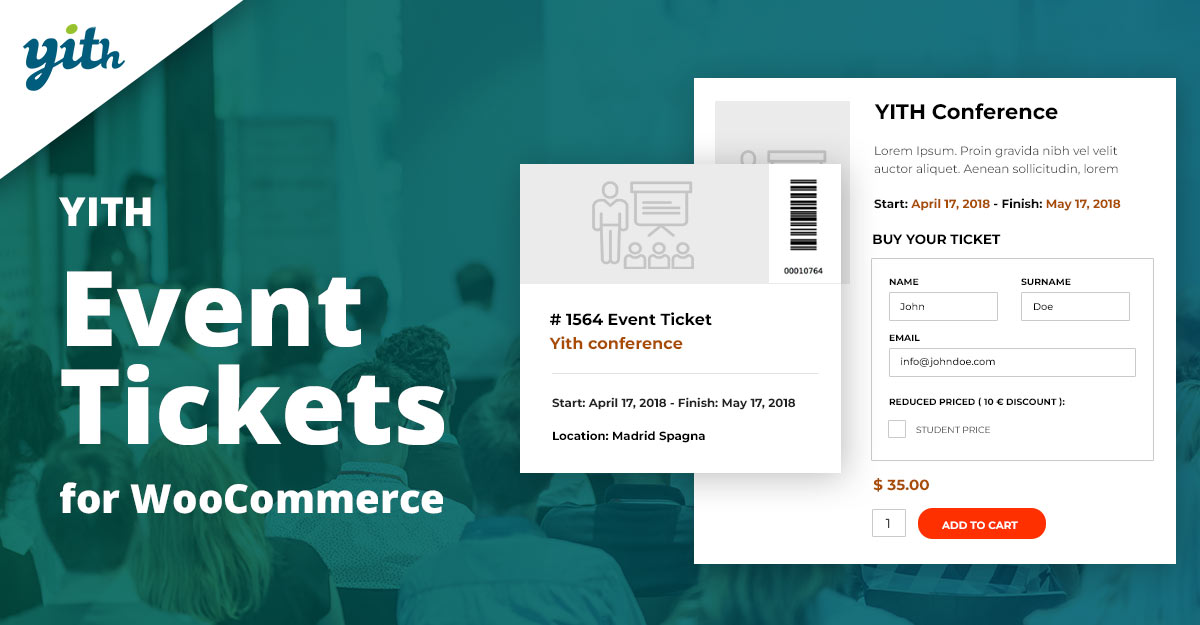
YITH Event Tickets is a beginner-friendly plugin that lets you create and sell tickets directly from your WooCommerce store. It is ideal for small to medium sized events.
Pros
- Very easy to set up
- Customizable ticket layouts
- Budget friendly pricing
Cons
- Lacks advanced event management features
- No built in check-in or scanning system
- Requires other YITH add-ons for extended functionality
Key Features
- Create tickets as WooCommerce products
- Add custom fields to collect attendee details
- Automated email delivery of tickets
2. WooCommerce Box Office

WooCommerce Box Office allows you to sell tickets from your store without third party platforms. It is great for workshops, concerts, in person events, and virtual events.
Pros
- Seamless WooCommerce integration
- Customizable ticket templates
- Simple attendee management
Cons
- No seat selection or mapping
- Advanced features require extra plugins
- Not ideal for very large events
Key Features
- Attendee information collection
- Ticket creation within WooCommerce
- Works with all WooCommerce payment gateways
3. WP Event Manager
WP Event Manager is a lightweight plugin that offers event listings, ticket sales, and attendee tracking. It is flexible and works well for multi event websites.
Pros
- Free base plugin
- Very lightweight and flexible
- Supports multiple ticket types
Cons
- Advanced features require paid add-ons
- Basic front end design
- Limited analytics and reports
Key Features
- Front end event submission
- WooCommerce powered ticket checkout
- Attendee data collection and tracking
Also Read: How to Sell Your Products Online and Grow Your Business
4. Event Tickets Plus
Event Tickets Plus is a premium level plugin suitable for organizers running multiple events. With QR scanning, RSVP tracking, and robust features, it is perfect for medium to large events.
Pros
- QR and barcode check-in
- Supports multiple events
- Deep integration with The Events Calendar
Cons
- Requires The Events Calendar plugin
- Expensive compared to alternatives
- More complex setup for beginners
Key Features
- Real time attendee tracking
- Custom registration fields
- Compatibility with major calendar tools
5. Tickera
Tickera is a powerful standalone ticketing system that also integrates with WooCommerce. It is designed for serious event organizers needing scanning apps and advanced ticket layouts.
Pros
- Mobile apps for scanning tickets
- No commission fees
- Highly customizable ticket templates
Cons
- Setup may require technical knowledge
- Pricing can be high for small setups
- Limited integration with third party tools
Key Features
- PDF tickets with unique barcodes
- Real time sales and attendee insights
- Multiple ticket variations and pricing options
6. FooEvents for WooCommerce
FooEvents is a feature-rich ticketing plugin that lets you create unlimited events and sell branded tickets without any monthly fees. It is ideal for concerts, workshops, and virtual events.
Pros
- No recurring subscription fees
- Supports unlimited events and tickets
- Includes check-in apps for iOS and Android
Cons
- Some advanced features require separate add-ons
- Interface can feel slightly outdated
- Limited customization in free version
Key Features
- Automated PDF ticket generation
- QR code scanning for fast entry
- Supports recurring events and Zoom integrations
Also Read: How WooCommerce Custom Shipping Extension Can Improve Your Store
7. Amelia Booking + WooCommerce Integration
Amelia is a modern booking and event management system that integrates with WooCommerce for ticket payments. It is perfect for workshops, classes, seminars, and corporate events.
Pros
- Beautiful modern UI
- Automates bookings, payments, and notifications
- Easy for beginners and non-tech users
Cons
- Not designed specifically for large concerts
- Limited ticket customization
- Requires Pro version for full WooCommerce support
Key Features
- Frontend event booking system
- SMS and email reminders for attendees
- WooCommerce checkout for ticket sales
8. EventON + EventON Tickets
EventON is known for its visually appealing event layouts. With its Tickets add-on, you can sell stylish, customizable tickets directly through WooCommerce.
Pros
- Beautiful event calendar design
- Lots of customization options
- Works well for creative and corporate events
Cons
- Requires multiple add-ons for advanced features
- Slight learning curve for initial setup
- No built-in mobile check-in app
Key Features
- Custom event calendar with ticket sales
- Ticket QR codes and attendee details
- Options for repeating and multi-day events
9. WooCommerce Event Manager
This lightweight plugin focuses on simple event creation and ticket sales. It is suitable for small businesses, local workshops, and meetup-style events.
Pros
- Very easy to set up
- Affordable pricing
- Great for small to medium events
Cons
- Limited design flexibility
- Fewer advanced check-in features
- Reporting tools are basic
Key Features
- Event-specific WooCommerce product types
- Custom ticket fields
- Supports multiple pricing tiers
10. Event Espresso + WooCommerce Add-on
Event Espresso is a powerful event management suite, and with its WooCommerce add-on, you can sell tickets using your WooCommerce payment gateways.
Pros
- Extremely feature-rich
- Perfect for large or multi-location events
- Advanced attendee management
Cons
- Expensive compared to others
- Setup takes time and technical knowledge
- Some features require additional add-ons
Key Features
- Barcode and QR code ticket scanning
- Detailed attendee reports
- Automated event reminders and confirmations
Also Read: 10 Best Hosting Companies to Gear Up Your Ecommerce Store in 2025
Benefits of Using WooCommerce Tickets Plugins
1. Streamlined Ticket Sales
With WooCommerce tickets plugins, you can sell and manage tickets directly from your store, eliminating the need for third-party ticketing platforms. This keeps all your event sales, reporting, and customer data in one place, making management simpler and more organized.
2. Customizable Ticket Options
Create multiple ticket types such as General Admission, VIP, Early Bird, or Backstage Pass with unique pricing, availability, and perks. This flexibility allows you to cater to different customer segments and maximize revenue for your events.
3. Integrated Payment Processing
WooCommerce’s robust payment gateway integrations allow you to offer secure, seamless, and diverse payment options—from credit cards to PayPal and other digital wallets—ensuring a smooth checkout experience for attendees.
4. Efficient Attendee Management
Collect attendee information during ticket purchase, including custom fields like name, email, phone number, seating preference, or dietary requirements. This simplifies check-ins, post-event communication, and ensures a complete record of your guests.
5. Improved Customer Experience
Enhance the buying experience with mobile-friendly ticket designs, instant confirmations, downloadable PDF tickets, and QR codes for fast entry. Happy customers are more likely to attend, return, and recommend your events.
6. Automated Processes
Automate routine tasks like generating tickets, sending confirmation emails, updating attendees on event changes, and generating sales reports. Automation saves time, reduces human error, and allows organizers to focus on other event logistics.

Final Thoughts on WooCommerce Tickets Plugins
Choosing the right WooCommerce tickets plugin can transform the way you manage and sell tickets for your events. From streamlining ticket sales to providing customizable ticket options, seamless payment processing, and real-time attendee management, these tools simplify the process for both organizers and attendees.
Whether you are hosting a small workshop, webinar, or a large conference, WooCommerce tickets plugins ensure a smooth, professional, and efficient ticketing experience. With benefits like automated workflows, improved customer satisfaction, and cost-effective management, these plugins are invaluable for any event organizer looking to optimize operations, boost ticket sales, and deliver a memorable experience for attendees.
Interesting Reads
Best WooCommerce Wishlist Plugins