
In 2026, website speed is no longer just a technical detail it’s a major factor that can make or break your online presence. Slow-loading pages frustrate visitors, increase bounce rates, and can prevent users from ever engaging with your content. A fast, responsive website not only keeps users happy but also strengthens your brand credibility and encourages repeat visits.

By using the best WordPress speed optimization plugins, you can significantly improve your site’s performance. These tools handle critical tasks such as caching pages, compressing images, minifying CSS and JavaScript, lazy-loading media, and cleaning up databases. The result is faster load times, smoother navigation, and a more enjoyable browsing experience for your visitors.
Start Your WordPress Project With Us Today!
What Are WordPress Plugins for Website Speed Optimization?
These plugins make your WordPress site faster and more efficient by:
- Reducing file sizes – compressing images and combining CSS/JS files
- Caching pages – storing static versions for faster delivery
- Lazy-loading assets – delaying images or videos until needed
- Database optimization – removing junk, spam, and unnecessary data
- CDN integration – serving your site from servers closer to your visitors
Some plugins specialize in one area, while others provide a complete performance suite. The goal is a fast, smooth site that passes Core Web Vitals and delivers excellent user experience on all devices.
What to Look for in a Speed Optimization Plugin
- Caching: page, browser, and object caching to reduce server load
- Image optimization: compress images without losing quality
- File minification: shrink CSS, JavaScript, and HTML
- Lazy loading: load media only when visible to the user
- Database cleanup: remove spam, revisions, and transient data
- CDN support: global content delivery for faster performance
- Compatibility: works seamlessly with your theme and other plugins
- Ease of use: clear, beginner-friendly setup and presets
Why Use Website Speed Optimization Plugins?
- Enhance user experience: faster pages reduce frustration and keep visitors engaged
- Increase conversions: smoother sites drive higher sales and sign-ups
- Boost SEO rankings: Google prioritizes sites that load quickly
- Save bandwidth: optimized files consume fewer server resources
- Manage performance easily: achieve professional results without coding
How to Use Speed Optimization Plugins
- Go to your WordPress dashboard
- Navigate to Plugins > Add New
- Search for your chosen plugin
- Click Install Now, then Activate
- Configure settings based on your site’s needs – most plugins offer beginner-friendly presets
Best WordPress Plugins for Website Speed Optimization
In 2026, website speed is critical for SEO, user experience, and conversions. Slow websites lose visitors, reduce engagement, and hurt rankings. WordPress offers a wide range of plugins to optimize speed, but some stand out for performance, ease of use, and advanced features. Here’s a list of the 15 best WordPress speed optimization plugins with key features.
1. WP Rocket
WP Rocket is widely recognized as one of the most beginner-friendly premium caching plugins available for WordPress. It stands out because it doesn’t require complex configuration users can enable powerful performance enhancements with just a few clicks. Beyond simple caching, WP Rocket offers a comprehensive suite of optimization tools, including file compression, lazy loading for images and videos, database cleanup, and seamless CDN integration. Its intuitive interface ensures even non-technical users can implement advanced speed improvements without touching code.
Key Features:
- Page caching & browser caching
- GZIP compression
- Lazy loading for images and videos
- Database cleanup (post revisions, spam, trash)
- Integration with CDN
- Minification and concatenation of CSS/JS
Best For: Beginners and non-technical users
Also Read: Top 10 PDF Invoice Plugins for WordPress & WooCommerce for 2026
2. LiteSpeed Cache

LiteSpeed Cache is a standout plugin, especially for websites hosted on LiteSpeed servers, because it delivers enterprise-level caching entirely for free. Unlike many optimization plugins that require premium versions for advanced features, LiteSpeed Cache provides powerful server-side caching combined with a comprehensive suite of performance tools. It offers image optimization, database cleanup, browser caching, and support for modern CDNs like QUIC.cloud, ensuring your site loads quickly and efficiently. Its deep integration with the server allows for faster response times and reduced server load, while features like CSS/JS minification and lazy loading enhance front-end performance.
Key Features:
- Server-level caching
- Image optimization with WebP support
- Database optimization
- Browser cache & QUIC.cloud CDN integration
- CSS/JS minification
Best For: Sites on LiteSpeed servers
3. W3 Total Cache
W3 Total Cache is ideal for developers and advanced WordPress users who want full control over every aspect of website performance. Unlike beginner-friendly plugins, it offers deep customization options for page caching, object caching, database caching, and browser caching. Users can fine-tune minification, compression, and CDN integration to match their specific server environment and site requirements. This level of control allows for highly optimized, lightning-fast websites, especially for large or complex sites with heavy traffic.
Key Features:
- Page, object, and database caching
- Browser caching
- CDN integration
- Minification & gzip compression
- Fragment caching for dynamic content
Best For: Advanced users and developers
4. WP Fastest Cache
WP Fastest Cache is designed for users who want a powerful caching solution without getting bogged down in technical settings. Its simple setup allows even beginners to enable essential caching features like page caching, browser caching, GZIP compression, and CSS/JS minification within minutes. At the same time, it delivers strong performance improvements, reducing page load times and server requests. For those who need more advanced options, the premium version adds features like image optimization, database cleanup, and cache timeout controls.
Key Features:
- Page caching & browser caching
- GZIP compression
- Minification of CSS/JS
- Cache timeout settings
- Premium version adds database cleanup & image optimization
Best For: Users wanting simplicity and performance
Also Read: The Best Multilingual Plugins for WooCommerce in 2026
5. Autoptimize
Autoptimize is an excellent choice for websites that need focused code optimization. It specializes in minifying and aggregating HTML, CSS, and JavaScript files, which reduces page size and improves load times. By handling scripts and styles efficiently, it eliminates unnecessary overhead that can slow down a site.
Autoptimize works seamlessly alongside caching plugins, allowing you to combine code optimization with robust caching for maximum performance gains. Its straightforward interface makes it easy to enable advanced features without touching code, making it suitable for both beginners and experienced users who want to enhance website speed and efficiency.
Key Features:
- Minifies HTML, CSS, and JS
- Aggregates scripts and styles
- Inline CSS/JS optimization
- Google Fonts optimization
Best For: Sites needing script handling and code optimization
6. WP-Optimize
WP-Optimize is a comprehensive all-in-one optimization plugin that tackles multiple performance issues at once. It cleans up your WordPress database by removing unnecessary post revisions, spam comments, and trashed items, which reduces bloat and improves efficiency. Additionally, it offers caching features to speed up page load times and image compression tools to reduce media file sizes without compromising quality.
With scheduled cleanups and an intuitive interface, WP-Optimize makes it easy for both beginners and advanced users to maintain a lean, fast, and high-performing website. Its versatility and automation make it a go-to plugin for anyone looking to optimize multiple aspects of their site in a single solution.
Key Features:
- Database optimization (post revisions, spam, trash)
- Image compression & lazy loading
- Page caching
- Scheduled cleanup automation
Best For: Users wanting a complete optimization toolkit
7. Smush
Smush is an essential plugin for websites with heavy image content, as it automates image optimization to improve load times and overall site performance. It compresses images as they are uploaded, ensuring your media library remains lightweight without sacrificing quality. Additionally, Smush supports bulk optimization, allowing you to compress existing images in your library with a single click. Features like lazy loading further enhance page speed by only loading images when they appear in the viewport.
Key Features:
- Automatic image compression
- Lazy loading for images
- Bulk optimization for media library
- WebP conversion
Best For: Image-heavy websites
Also Read: What is Lazy Loading Plugin and How Does It Work in 2026?
8. ShortPixel Image Optimizer
ShortPixel Image Optimizer is a powerful plugin for websites that want to reduce image file sizes without compromising visual quality. It supports both lossy and lossless compression, giving users control over the balance between performance and image fidelity. ShortPixel also converts images to modern formats like WebP and AVIF, which are optimized for faster loading in modern browsers. With bulk optimization options, it allows you to efficiently compress your entire media library, including thumbnails and PDFs.
Key Features:
- Lossy & lossless compression
- WebP and AVIF format conversion
- Bulk optimization
- Optimizes thumbnails and PDFs
Best For: High-quality image optimization
9. Asset CleanUp
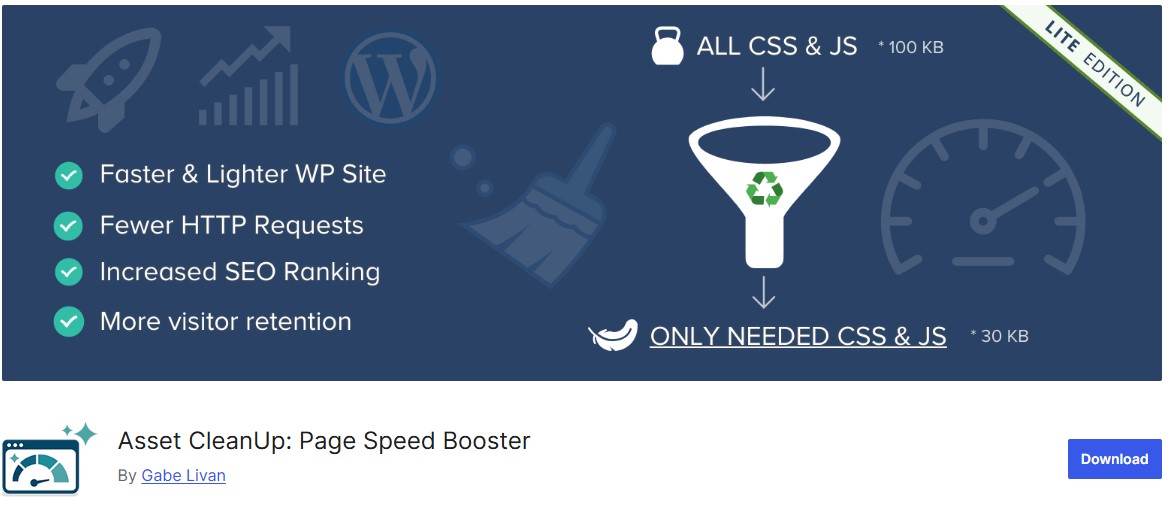
Asset CleanUp is a smart optimization plugin that targets one of the main causes of slow WordPress sites: unnecessary scripts and styles loading on pages where they aren’t needed. By selectively disabling CSS and JavaScript files per page or post, it reduces page bloat and improves load times. This is especially useful for sites using heavy plugins like WooCommerce or page builders, where assets often load globally instead of only where required. Asset CleanUp also supports conditional loading, helping you fine-tune performance without affecting functionality.
Key Features:
- Disable unused CSS/JS per page/post
- Plugin-specific asset management
- Supports WooCommerce & third-party plugins
- Conditional script loading
Best For: Developers and page-specific optimization
10. FlyingPress
FlyingPress is a modern premium plugin designed to deliver powerful speed optimizations in a streamlined, user-friendly package. It combines page caching, lazy loading for images and videos, and font optimization, ensuring that your site loads quickly and efficiently across all devices. The plugin also supports preloading and critical CSS generation, which further enhances perceived performance. Its intuitive dashboard makes advanced optimization accessible without technical expertise, while still offering features that satisfy developers looking for precise control.
Key Features:
- Page caching & browser caching
- Lazy load images & videos
- Font optimization
- Preloading & critical CSS generation
- CDN support
Best For: Premium users wanting ease of use
Also Read: 12 Best WordPress Plugins for SSL Encryption in 2026
11. Perfmatters
Perfmatters is a lightweight and highly efficient plugin focused on reducing WordPress bloat by disabling features that are often unnecessary for most websites. It allows you to turn off elements like emojis, embeds, REST API calls, and other functions that can slow down page load times. Additionally, Perfmatters lets you selectively disable plugins on specific pages, further trimming overhead and improving performance. By targeting only the features you don’t need, it fine-tunes your site for maximum speed without compromising functionality.
Key Features:
- Disable emojis, embeds, REST API, and more
- Selectively deactivate plugins per page
- DNS prefetch & script preloading
- Lightweight with minimal server load
Best For: Users wanting precise performance control
12. Hummingbird
Hummingbird is a comprehensive performance optimization plugin that offers a full suite of tools to improve website speed. It combines caching, file minification, asset optimization, and lazy loading to enhance both server-side and front-end performance. Additionally, Hummingbird provides detailed performance reports and actionable insights, allowing you to identify and fix bottlenecks quickly. Its seamless integration with Smush ensures that image optimization complements other speed improvements.
Key Features:
- Page caching & GZIP compression
- CSS/JS minification and combination
- Lazy loading images
- Performance reports & recommendations
- Integrates with Smush
Best For: Users wanting insights along with optimization
13. Nitropack
Nitropack is an advanced, all-in-one performance optimization plugin that automates nearly every aspect of website speed improvement. It combines full-page caching, image optimization, minification of HTML, CSS, and JavaScript, and generation of critical CSS to ensure your pages load instantly. The plugin also includes a built-in CDN and performance score tracking, allowing you to monitor improvements over time. Its automated approach makes it ideal for users who want top-tier optimization without manually configuring multiple plugins, while still offering advanced settings for developers who want fine-grained control.
Key Features:
- Full-page caching & CDN
- Image & font optimization
- Minification of HTML, CSS, JS
- Critical CSS and lazy loading automation
- Performance score tracking
Best For: Fully automated high-performance optimization
14. Cache Enabler
Cache Enabler is a lightweight and straightforward caching plugin designed for small to medium-sized WordPress websites. Its minimal setup allows users to quickly enable page caching, reducing server load and improving page load times without complicated configurations. The plugin also supports WebP images and HTML minification, helping to further decrease page size and enhance performance. Cache Enabler’s simplicity makes it ideal for beginners who want effective caching with minimal effort, while still providing enough flexibility for experienced users looking for a reliable, no-frills optimization solution.
Key Features:
- Simple page caching
- WebP image support
- Minification of HTML & inline JS
- Lightweight and beginner-friendly
Best For: Users needing minimal configuration
Also Read: 10 Top Print on Demand Plugins for WordPress in 2026
15. WP Super Minify
WP Super Minify is a lightweight plugin dedicated to reducing the size of your website’s CSS, JavaScript, and HTML files. By minifying these resources, it decreases page load times and improves overall site performance without altering your site’s functionality or design. Its simplicity and focused approach make it easy to set up, even for beginners, while providing an effective solution for users who want a minimal yet impactful performance boost. WP Super Minify is especially useful for sites that already use caching plugins but need additional optimization for code efficiency, making it a perfect companion in a comprehensive speed optimization strategy.
Key Features:
- Minifies HTML, CSS, and JavaScript
- Easy setup and lightweight
- Compatible with most themes and plugins
Best For: Lightweight code minification

Time to Boost Your WordPress Site Speed
Website speed is essential slow sites frustrate visitors, increase bounce rates, and hurt growth, while a fast site improves user experience, SEO rankings, and conversions. The 12 Best WordPress Plugins for Website Speed Optimization simplify performance improvements by addressing caching, image compression, and script optimization without technical expertise. To get started, identify what’s slowing your site: use Smush or ShortPixel for image compression, WP Rocket or LiteSpeed Cache for overall optimization, and Perfmatters or Asset CleanUp to remove unnecessary code. Test your site with Google PageSpeed Insights or GTmetrix to track progress, and focus on the plugins that address your biggest issues to make your site faster and more efficient.
Interesting Reads:
Finding the Best PPC Agency to Drive Results for Your Business

