WordPress continues to dominate the global website market thanks to its flexibility, scalability, and powerful plugin ecosystem. In 2026, WordPress plugins have evolved beyond basic functionality many now leverage AI, automation, enhanced security, and performance optimization to meet the demands of modern websites.
Whether you’re a blogger, business owner, eCommerce store manager, or developer, the right plugins can dramatically improve your site’s performance, visibility, security, and user experience. However, with over 60,000 plugins available, choosing the best ones can be overwhelming.
What Are WordPress Plugins?
A WordPress plugin is a piece of software that adds new features or extends the functionality of your WordPress website without requiring you to modify core files. Built primarily with PHP, plugins integrate seamlessly with WordPress, allowing you to customize your site to match your exact needs, whether that is improving performance, boosting security, or adding entirely new capabilities.
Think of plugins as apps for your website. Just as you install apps on your phone to add features, plugins let you enhance your WordPress site with just a few clicks.
How Do WordPress Plugins Work?
WordPress plugins hook into the WordPress core system and execute specific tasks when certain actions occur. You can install plugins directly from the WordPress Plugin Directory, upload them manually, or install premium plugins purchased from third-party providers.
Once activated, plugins can:
Add new features to your site
Modify existing WordPress behavior
Automate complex tasks
Improve performance and security
Most plugins work quietly in the background, while others provide dashboards, settings panels, or visual editors you can interact with.
Common Examples of What Plugins Can Do
Add Advanced Features
Plugins like WooCommerce transform a standard WordPress site into a complete ecommerce store with products, payments, and shipping options.
Boost Website Performance
Performance plugins such as WP Rocket improve load times using caching, file optimization, and lazy loading.
Enhance Security
Security plugins like Sucuri or Wordfence protect your site from malware, brute force attacks, and hacking attempts.
Improve SEO
SEO plugins like Yoast SEO or Rank Math help optimize content, manage metadata, generate sitemaps, and improve search engine rankings.
Types of WordPress Plugins
1. Free Plugins
Free plugins are available in the official WordPress Plugin Directory. They are ideal for beginners and small websites.
Pros:
No cost
Community support
Regular updates for popular plugins
Cons:
Limited features
No guaranteed support
2. Premium Plugins
Premium plugins are paid tools that offer advanced features, professional support, and frequent updates.
Pros:
More powerful functionality
Priority customer support
Better scalability for growing sites
Cons:
Recurring or one time cost
Best WordPress Plugins
1. Yoast SEO
Yoast SEO is one of the most widely trusted WordPress plugins for optimizing content for search engines. It is built to support everyone, from beginners publishing their first blog post to SEO professionals managing large websites. With tools like real-time keyword optimization, readability analysis, and automatic XML sitemap generation, Yoast makes on-page SEO easier, more structured, and more effective.
In 2026, Yoast SEO continues to evolve with improved schema markup, smarter internal linking suggestions, and enhanced compatibility with modern WordPress editors, helping websites stay aligned with changing search engine standards.
Key Features
Real-time SEO and readability analysis
Automatic XML sitemap generation
Social media preview for posts and pages
Keyword optimization and internal linking suggestions
Integration with Google Search Console
Pros
Clean and beginner-friendly interface
Free version offers strong core SEO features
Frequent updates aligned with Google algorithm changes
Excellent documentation and community support
Cons
Premium version can be expensive for small websites
Feature-rich interface may feel overwhelming for complete beginners
Elementor is one of the most popular visual drag-and-drop page builders for WordPress, designed to make web design accessible to everyone. Whether you are a beginner building your first website or a professional designer creating complex layouts, Elementor allows you to design stunning pages in real time without touching a single line of code.
By 2026, Elementor has continued to evolve with performance-focused updates, smarter responsive controls, and deeper integration with modern WordPress themes, making it a reliable choice for creating fully customized page layouts quickly and efficiently.
Key Features
Live drag-and-drop visual editor
300+ professionally designed templates and blocks
Mobile editing with advanced responsive design controls
Theme builder for custom headers, footers, archives, and dynamic content
Pros
Highly intuitive and beginner-friendly interface
Large template and widget library
Works seamlessly with almost any WordPress theme
Active community and frequent updates
Cons
Advanced widgets and features require the Pro version
Heavy or excessive use may impact site speed if not optimized
3. WooCommerce
For anyone running an ecommerce website, WooCommerce is the go-to solution for selling online with WordPress. It seamlessly transforms your WordPress site into a fully functional online store, allowing you to sell physical products, digital downloads, subscriptions, and more. From small startups to large-scale stores, WooCommerce offers the flexibility and scalability needed to grow an online business.
By 2026, WooCommerce has evolved with better performance optimization, improved checkout experiences, enhanced payment integrations, and deeper compatibility with modern WordPress themes, making it a powerful choice for serious ecommerce websites.
Key Features
Seamless integration with WordPress
Support for physical, digital, and subscription-based products
Fully customizable store design and layouts
Multiple payment gateway options, including cards, wallets, and local methods
Pros
Free core plugin with essential ecommerce functionality
Massive ecosystem of extensions and themes
Highly scalable for growing businesses
Strong community and developer support
Cons
Premium extensions can become expensive
Full setup and customization may require some technical knowledge
WPForms is a beginner-friendly drag-and-drop form builder for WordPress that makes creating contact forms, surveys, feedback forms, and lead generation forms incredibly simple. Designed with ease of use in mind, WPForms allows you to build professional-looking forms in minutes without writing any code.
In 2026, WPForms continues to stand out with performance-optimized forms, stronger spam protection, and seamless integrations with modern email marketing and CRM platforms, making it a reliable choice for both small websites and growing businesses.
Key Features
Drag-and-drop visual form builder
Pre-built form templates for quick setup
Smart conditional logic for dynamic forms
Built-in spam protection and CAPTCHA support
Pros
Extremely easy to use, even for beginners
Integrates with popular email marketing services
Fully mobile-responsive forms
Reliable performance and regular updates
Cons
Limited features in the free version
Advanced functionality requires a paid plan
5. Rank Math
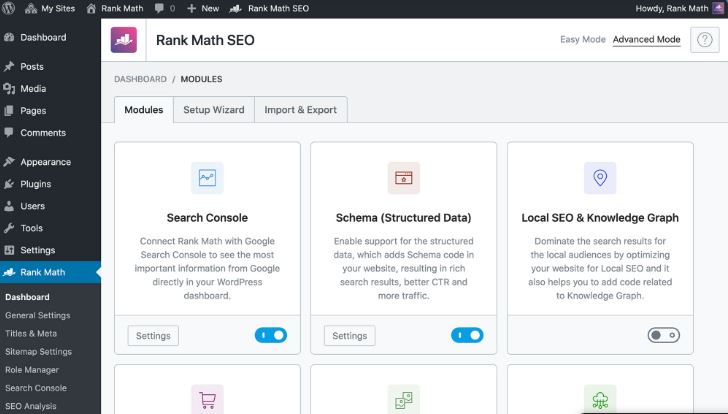
Rank Math is a powerful WordPress SEO plugin that has quickly become a strong alternative to Yoast SEO. It is designed for users who want advanced SEO features without heavy costs, offering tools like built-in schema markup, local SEO support, and in-depth optimization insights, all from a clean and modern dashboard.
By 2026, Rank Math continues to stand out with AI-powered content suggestions, performance-focused architecture, and deep integration with Google tools, making it an excellent choice for bloggers, businesses, and SEO professionals alike.
Key Features
Multiple keyword optimization per post or page
Google Search Console and Analytics integration
Built-in schema markup for rich snippets
Comprehensive SEO analysis and recommendations
Pros
Feature-rich free version with advanced SEO tools
User-friendly setup wizard
Lightweight and fast, with minimal performance impact
Ideal for scaling SEO strategies
Cons
Fewer third-party integrations compared to Yoast
Advanced feature set may feel overwhelming for beginners
UpdraftPlus is one of the most trusted and widely used WordPress backup plugins, designed to make website backups and restoration simple and reliable. It allows you to schedule automated backups and store them securely on popular cloud platforms, ensuring your site data is always protected in case of crashes, hacks, or accidental data loss.
By 2026, UpdraftPlus continues to stand out with improved incremental backups, stronger encryption, and seamless cloud integrations, making it suitable for both beginners and advanced users.
Key Features
Automated backups to cloud storage
Incremental backups to save storage space
One-click site restore
Database encryption for added security
Pros
Feature-rich free version
Supports multiple cloud storage services
Regular updates and strong community support
Cons
Premium version can be expensive
Advanced features may require a learning curve
7. WP Rocket
WP Rocket is a premium WordPress caching plugin built to dramatically improve website speed and performance with minimal setup. It implements essential optimization techniques such as caching, lazy loading, and file optimization automatically, making it a favorite among developers and non-technical users alike.
In 2026, WP Rocket remains a top choice due to its consistent performance improvements, compatibility with modern hosting environments, and excellent support.
Key Features
Page and browser caching
Lazy loading for images and videos
Database optimization tools
CDN integration support
Pros
Noticeable speed improvements
Quick and easy setup
Compatible with most themes and plugins
Cons
No free version available
Some features rely on third-party services
8. Sucuri Security
Sucuri Security is a powerful WordPress security plugin focused on protecting websites from malware, hacking attempts, and malicious traffic. It provides monitoring, scanning, and firewall tools to help website owners detect and prevent security threats before they cause damage.
By 2026, Sucuri continues to be trusted for its DNS-level firewall, proactive monitoring, and professional malware cleanup services.
Key Features
Malware scanning and threat detection
File integrity monitoring
Website firewall protection
Brute-force attack prevention
Pros
Strong free security features
Regular updates and threat intelligence
Reliable customer support
Cons
Advanced protection features require premium plans
Smush is a popular image optimization plugin that improves website performance by compressing images without sacrificing quality. It automatically optimizes images as they are uploaded, helping reduce page load times and improve SEO.
In 2026, Smush continues to be a reliable choice thanks to its automation, ease of use, and consistent performance improvements, especially for image-heavy websites.
Key Features
Lossless image compression
Bulk image optimization
Automatic image resizing
Lazy loading for images
Pros
Improves site speed and performance
Beginner-friendly and easy to use
Automatic optimization on upload
Cons
Bulk optimization may be slow on large libraries
Some advanced features are locked behind a paid plan
10. Akismet Anti-Spam
Akismet Anti-Spam is a widely trusted WordPress plugin that automatically filters and removes spam comments, keeping your website clean and saving you time. It is particularly useful for blogs, forums, and any site that allows user-generated content. By 2026, Akismet continues to be essential for preventing spam while maintaining performance and reliability.
Key Features
Automatic detection and filtering of spam comments
Comment history and status tracking
Detailed status history for each comment
Pros
Significantly reduces spam and improves site quality
Choosing the right WordPress plugins can make a dramatic difference in your website’s functionality, performance, and user experience. Essential tools like Yoast SEO help improve search engine rankings, Elementor enables flexible and visually stunning designs, and WP Rocket boosts site speed for a smoother visitor experience.
However, it’s important to be selective: only install plugins that are necessary to prevent bloating your site and maintain optimal performance. Regularly update your plugins to ensure compatibility, security, and access to the latest features.
Interesting ReadsBest Software to Write Up Data Analysis ReportCan Directory Indexing Be Turned Off on WordPress?Best AI Tools for Audio Repair in 2024
Learn how to configure percentage, flat-rate, tiered, per-vendor, and per-product WooCommerce commission systems using Dokan, WCFM Marketplace, and WC Vendors




 Elementor is one of the most popular visual drag-and-drop page builders for WordPress, designed to make web design accessible to everyone. Whether you are a beginner building your first website or a professional designer creating complex layouts, Elementor allows you to design stunning pages in real time without touching a single line of code.
By 2026, Elementor has continued to evolve with performance-focused updates, smarter responsive controls, and deeper integration with modern WordPress themes, making it a reliable choice for creating fully customized page layouts quickly and efficiently.
Elementor is one of the most popular visual drag-and-drop page builders for WordPress, designed to make web design accessible to everyone. Whether you are a beginner building your first website or a professional designer creating complex layouts, Elementor allows you to design stunning pages in real time without touching a single line of code.
By 2026, Elementor has continued to evolve with performance-focused updates, smarter responsive controls, and deeper integration with modern WordPress themes, making it a reliable choice for creating fully customized page layouts quickly and efficiently.
 For anyone running an ecommerce website, WooCommerce is the go-to solution for selling online with WordPress. It seamlessly transforms your WordPress site into a fully functional online store, allowing you to sell physical products, digital downloads, subscriptions, and more. From small startups to large-scale stores, WooCommerce offers the flexibility and scalability needed to grow an online business.
By 2026, WooCommerce has evolved with better performance optimization, improved checkout experiences, enhanced payment integrations, and deeper compatibility with modern WordPress themes, making it a powerful choice for serious ecommerce websites.
For anyone running an ecommerce website, WooCommerce is the go-to solution for selling online with WordPress. It seamlessly transforms your WordPress site into a fully functional online store, allowing you to sell physical products, digital downloads, subscriptions, and more. From small startups to large-scale stores, WooCommerce offers the flexibility and scalability needed to grow an online business.
By 2026, WooCommerce has evolved with better performance optimization, improved checkout experiences, enhanced payment integrations, and deeper compatibility with modern WordPress themes, making it a powerful choice for serious ecommerce websites.
 UpdraftPlus is one of the most trusted and widely used WordPress backup plugins, designed to make website backups and restoration simple and reliable. It allows you to schedule automated backups and store them securely on popular cloud platforms, ensuring your site data is always protected in case of crashes, hacks, or accidental data loss.
By 2026, UpdraftPlus continues to stand out with improved incremental backups, stronger encryption, and seamless cloud integrations, making it suitable for both beginners and advanced users.
UpdraftPlus is one of the most trusted and widely used WordPress backup plugins, designed to make website backups and restoration simple and reliable. It allows you to schedule automated backups and store them securely on popular cloud platforms, ensuring your site data is always protected in case of crashes, hacks, or accidental data loss.
By 2026, UpdraftPlus continues to stand out with improved incremental backups, stronger encryption, and seamless cloud integrations, making it suitable for both beginners and advanced users.
 WP Rocket is a premium WordPress caching plugin built to dramatically improve website speed and performance with minimal setup. It implements essential optimization techniques such as caching, lazy loading, and file optimization automatically, making it a favorite among developers and non-technical users alike.
In 2026, WP Rocket remains a top choice due to its consistent performance improvements, compatibility with modern hosting environments, and excellent support.
WP Rocket is a premium WordPress caching plugin built to dramatically improve website speed and performance with minimal setup. It implements essential optimization techniques such as caching, lazy loading, and file optimization automatically, making it a favorite among developers and non-technical users alike.
In 2026, WP Rocket remains a top choice due to its consistent performance improvements, compatibility with modern hosting environments, and excellent support.
 Sucuri Security is a powerful WordPress security plugin focused on protecting websites from malware, hacking attempts, and malicious traffic. It provides monitoring, scanning, and firewall tools to help website owners detect and prevent security threats before they cause damage.
By 2026, Sucuri continues to be trusted for its DNS-level firewall, proactive monitoring, and professional malware cleanup services.
Sucuri Security is a powerful WordPress security plugin focused on protecting websites from malware, hacking attempts, and malicious traffic. It provides monitoring, scanning, and firewall tools to help website owners detect and prevent security threats before they cause damage.
By 2026, Sucuri continues to be trusted for its DNS-level firewall, proactive monitoring, and professional malware cleanup services.